


 Organizations migrate SQL Server for many reasons: rising licensing costs, ageing infrastructure, cloud programs, or a wider move away from vendor lock-in. Whatever the driver, migrating a system the business depends on brings a different level of risk.
What a SQL Server database migration involves
 A SQL Server database migration is the process of moving one or more SQL Server databases from an existing environment to a new platform. It can be homogeneous, where SQL Server remains the database engine, or heterogeneous, where the database moves to a different engine such as PostgreSQL. The migration also has to account for the applications, integrations, database schema, and other dependencies that rely on those databases.
Homogeneous vs. heterogeneous migrations
A homogeneous migration keeps SQL Server as the target. Moving from an on-premises instance to a cloud-hosted one, or upgrading across major versions, falls into this category. The schema and procedural code come across largely intact, so the work concentrates on infrastructure, connectivity, and testing.
A heterogeneous migration changes the engine. Moving to PostgreSQL is one example. Here the schema needs converting, the procedural code needs rewriting, and the applications need remediating.
The planning discipline is largely the same across both, but the effort profile isn’t. Heterogeneous migrations generally require more conversion and application remediation because the source and target engines differ.
The phases of a migration program
Seven phases run in sequence, and each depends on the one before it.
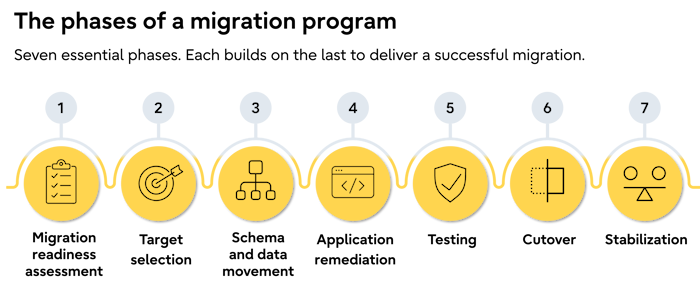
- Migration readiness assessment
Inventory, dependency mapping, and workload classification. - Target selection
Engine, deployment model, and support arrangement. - Schema and data movement
Conversion where required, then loading and reconciling. - Application remediation
Drivers, queries, integrations, and authentication. - Testing
Functional, performance, and operational validation at each wave. - Cutover
The controlled switch, with go or no-go criteria agreed in advance. - Stabilization
Monitoring, tuning, and support in the weeks that follow.
Skipping work in one phase usually creates more work later.
Assessment and discovery
 A migration readiness assessment establishes what needs to move, what depends on it, and how much disruption each workload can tolerate. Gaps here tend to surface much later, when fixing them is more expensive, and the options are narrower.
Dependencies are a particular challenge: Flexera's 2026 State of the Cloud Report found that 54% of enterprise organizations cited application dependency mapping as a hurdle when migrating workloads to the cloud.
A complete migration readiness assessment should cover three areas:
1 SQL Server estate inventory
Build an inventory of every SQL Server instance and database, including versions, editions, sizes, and hosting arrangements. SQL Server Management Studio (SSMS), PowerShell, dbatools, and Azure Migrate can help collect and assess this information across larger estates.
2 Application and integration dependencies
The dependencies missing from the formal inventory are often the ones that delay a migration once work is underway. Map everything that consumes or interacts with each database, including:

- Applications
Including applications that connect directly to the database rather than through a documented service. - Integrations
Including undocumented file transfers, scripts, APIs, and interfaces between systems. - Business processes
Reports, spreadsheet extracts, operational queries, and other processes that may exist outside formal application documentation. - SQL Server components
Linked servers, SSIS packages, SQL Agent jobs, and reporting tools that will need to move, change, or be replaced.
3 Workload classification
Classify each workload by business criticality, downtime tolerance, dependencies, and named owner. This provides the basis for RTO and RPO, migration approach, and sequencing.
Setting RTO and RPO before choosing an approach
A migration readiness assessment should establish recovery time objective (RTO) and recovery point objective (RPO) for each workload before a migration approach is chosen. These define how long the business can operate without a workload and how much data it can afford to lose.
RTO and RPO: what they mean
 Two measures define those limits:
- Recovery time objective (RTO)
The maximum time a workload can be unavailable before the disruption becomes unacceptable. - Recovery point objective (RPO)
The maximum amount of data the business can afford to lose, usually expressed as a period of time.
Set both for individual workloads rather than the SQL Server estate as a whole. A reporting database and a payment system may have very different requirements.
Start with business impact
RTO and RPO should reflect what an outage or data loss would actually mean for the organization. Consider lost or delayed revenue, interrupted operations, customer impact, contractual penalties, regulatory obligations, and the cost of recovery.
Turn business requirements into technical requirements
Once the acceptable business impact is clear, translate it into technical requirements for the migration. An RTO measured in minutes may rule out an approach that requires a full offline data load. Tighter RPO requirements may call for technologies such as log shipping, while near-zero requirements can require continuous replication or Always On availability groups, depending on the migration architecture and target.
These requirements narrow the migration approaches available. Rather than promising “no downtime”, define the acceptable outage window, how data will remain protected, and what happens if the migration exceeds either limit.
Choosing a migration approach
Three approaches cover most mission-critical SQL Server migrations. The right choice depends primarily on RTO and RPO, alongside data volume and migration complexity.
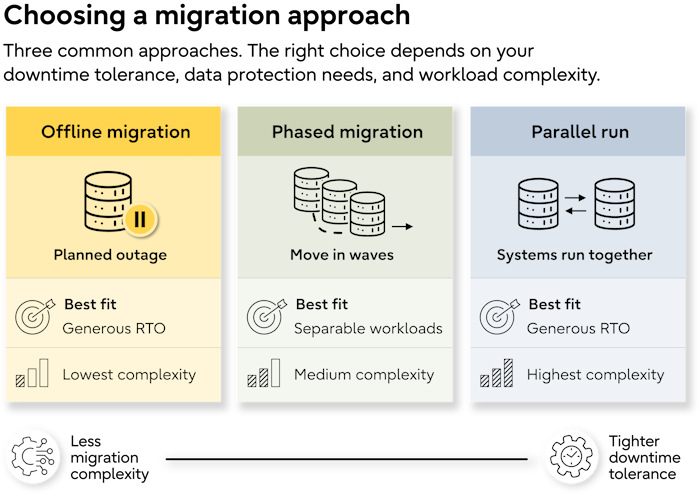
Offline migration with a planned outage
The system is taken offline, data is moved, applications are repointed, and the target is validated before users return. Tools such as BCP or the SQL Server Import and Export Wizard can support data movement where appropriate.
This is the simplest approach to test and roll back, but requires an outage long enough to complete the migration and validation. It therefore suits workloads with a generous RTO.
Phased migration by workload
Workloads move in waves, lowest risk first. Each wave has its own testing and cutover, reducing the impact of a single failure and allowing teams to refine the process before critical workloads move.
The trade-off is a longer program, with integrations potentially spanning both environments. It works best where workloads can be separated into clear migration groups.
Parallel run and cutover
 Both systems run concurrently, with change data capture or replication keeping the target current while testing continues. This supports tighter RTO and RPO requirements, but adds replication, monitoring, and cutover complexity.
For migrations to Azure SQL Managed Instance, Azure Database Migration Service can support minimal-downtime migration. For Azure SQL Database, Microsoft provides an offline DMS migration path. Where PostgreSQL is the target, logical replication can keep the target current after the initial load, while pg_createsubscriber can convert a physical replica into a logical replica and pg_basebackup can support the initial physical copy.
A parallel run still requires a cutover: applications need to be redirected and the target validated before users return.
A structured migration readiness assessment provides the workload classification, RTO and RPO requirements, and dependency mapping needed to choose between these approaches. Fujitsu offers this assessment as part of its professional services for organizations considering Fujitsu Enterprise Postgres.
Sequencing, testing, and rollback
Once the migration approach is agreed, define the order of migration waves, the validation required at each stage, and the conditions for rollback.
Sequence workloads by risk
Move lower-risk workloads first: non-production environments, internal or low-criticality workloads, then production workloads with manageable outage windows.
Move the most critical systems after the process has been tested and refined.
Validate every migration wave
Set acceptance criteria before each wave and test against them after migration:
- Functional validation

Confirm applications, queries, T-SQL code, and integrations behave as expected. - Data reconciliation
Compare row counts, aggregates, and sampled records between source and target. - Performance testing
Test production-like workloads and realistic data volumes. Tools such as Database Experimentation Assistant can help compare SQL Server workload performance where applicable. - Operational testing
Verify backups, monitoring, high availability, and failover on the target platform.
Rehearse rollback
A rollback plan nobody has executed is not a rollback plan. Rehearse it with the team responsible for cutover and confirm the rollback steps, expected duration, potential data loss, decision owner, and latest point at which rollback remains viable.
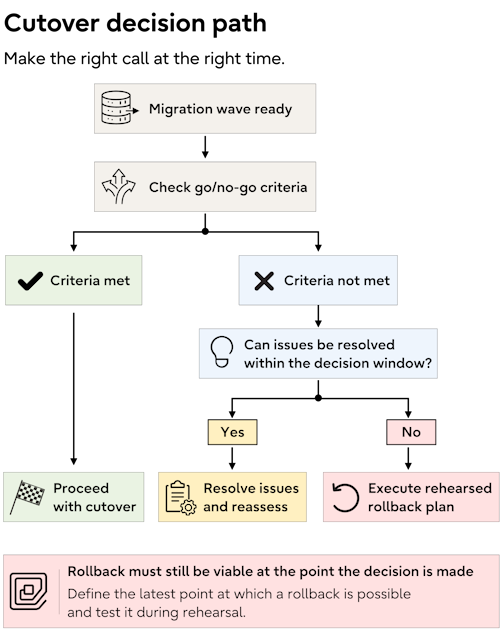
These criteria should be documented before the migration wave begins, not decided during cutover.
Cutover and the first weeks after
Cutover requires formal change management as well as a technical plan. For mission-critical systems, define the change controls, cutover sequence, decision points, and stabilization period before the migration window opens.
Before cutover
Complete the formal change process before cutover, including:
- Change approval

An approved change record, implementation plan, timings, and documented backout procedure. - Freeze window
Agreed restrictions on application, code, and database schema changes. - Go or no-go criteria
Measurable conditions that determine whether the migration proceeds or rolls back. - Decision ownership
A named person with authority to make the final go or no-go decision. - Support coverage
Support arrangements in place and active before the migration begins.
During cutover
Follow the rehearsed sequence rather than making decisions within the window: complete the final data sync, redirect application connections and routing, validate the target, and confirm that the agreed acceptance criteria have been met before reopening access.
For a homogeneous migration, this may include validating the new SQL Server instance through SQL Server Management Studio (SSMS) alongside application and operational checks.
Stabilization after migration
Performance characteristics can change on the new platform, so establish a monitoring baseline immediately and allow time for tuning during the first weeks after cutover.
Where PostgreSQL is the target, monitoring PostgreSQL activity differs from the SQL Server equivalent. Teams new to the platform should understand the practical differences before troubleshooting production issues and plan for a period of performance tuning.
Where migrations most often slip

- Incomplete discovery
Undocumented applications, integrations, or business processes surface after migration work has begun. - Underestimated application remediation
Database migration is scoped without accounting for the applications, queries, and integrations that also need to change. - Late stakeholder sign-off
Business owners are involved too late to agree to downtime, testing, or the cutover window. - Unclear decision ownership
Nobody has authority to make the final go or no-go decision when issues arise.
These are expertise gaps rather than tooling gaps. Kyndryl's 2025 State of Mainframe Modernization report found that 70% of organizations struggle to find the skills needed for modernization.
Teams without this experience internally can close the gap through a migration partner or professional services. Fujitsu professional services can support migration planning and execution through to cutover.
How Fujitsu Enterprise Postgres supports mission-critical migrations
For organizations moving to PostgreSQL, Fujitsu Enterprise Postgres combines migration services with the support and platform capabilities needed to maintain operational continuity through cutover and beyond.
This includes:
- Plan around business-critical workloads

Migration readiness assessments and architecture reviews identify dependencies, classify workloads, and define sequencing before migration begins. - Maintain continuity during migration
Professional services support execution through testing and cutover, while high availability and replication can keep the target current during parallel-run migrations. Replication reduces the final synchronization window rather than eliminating downtime, and failover slots for logical replication help maintain replication if a failure occurs. - Have support ready at cutover
24/7 global support with defined SLAs can be in place before the migration window opens and continue through stabilization. - Reduce disruption after migration
Long version support lifecycles reduce the pressure for another major upgrade soon after migration, while replication clusters can be upgraded with minimal disruption. - Keep PostgreSQL skills and tooling portable
100% PostgreSQL compatibility avoids tying migrated workloads to proprietary extensions, while proactive support helps identify issues before they become incidents.
A global capital markets operator used this structured approach to modernize from MS SQL Server to Fujitsu Enterprise Postgres, classifying and sequencing workloads before executing the migration in waves.
The first step is understanding what needs to move and in what order. Talk to the Fujitsu team about a migration readiness assessment before committing to a cutover date.
Frequently asked questions about SQL Server database migration
How long does a SQL Server database migration take?
A SQL Server database migration can take from weeks to many months. Key factors include the number of databases and applications, schema or code conversion, integration dependencies, testing, and permitted downtime. Heterogeneous migrations generally take longer because they require more remediation.
How much downtime does a SQL Server migration require?
Downtime depends on the migration approach and the workload's RTO and RPO. An offline migration requires time for data movement, validation, and cutover. Replication or change data capture can reduce the final synchronization window, but applications still need to be redirected and validated before users return.
What is the difference between a homogeneous and heterogeneous migration?
A homogeneous migration keeps the same database engine, while a heterogeneous migration moves to a different engine. Moving an MS SQL Server database to another SQL Server instance is homogeneous; moving it to PostgreSQL or MySQL is heterogeneous. The latter typically requires database schema conversion, code changes, and application remediation.
How do you validate that a SQL Server migration succeeded?
Validate the migration against acceptance criteria agreed before cutover. Check row counts and sampled data, test application functionality and integrations, compare performance under production-like loads, and verify operational processes such as backups, monitoring, high availability, and failover. All critical checks should pass before the migration is considered complete.
What should a SQL Server migration rollback plan include?
A rollback plan should define exactly how and when the migration will be reversed if cutover fails. Document the rollback steps, expected duration, potential data loss, decision owner, and latest safe rollback point. Rehearse the procedure before cutover so its timings and assumptions have been tested.
What is the biggest risk in a SQL Server database migration?
Undiscovered dependencies are one of the biggest risks in a SQL Server database migration. Undocumented applications, integrations, scheduled processes, or business workflows may fail when the source database moves. A migration readiness assessment should identify these dependencies before the migration approach, sequencing, and cutover plan are finalized.
What should be included in a SQL Server migration assessment?
A SQL Server migration readiness assessment should cover the database estate, dependencies, business requirements, and migration complexity. Inventory each SQL Server instance and database, map applications and integrations, assess schema and code changes, classify workloads by criticality and ownership, and agree RTO and RPO requirements with business stakeholders.


 PostgreSQL Insider

