


 Every enterprise buyer hears the same line about PostgreSQL — that it's free to license. That's true, but anyone responsible for an enterprise database knows that doesn't mean it's free to run.
Why enterprise data backup needs a strategy, not a schedule
An effective enterprise data backup strategy defines acceptable data loss, recovery times, and validation requirements. A completed backup job doesn't prove that files and archive logs are recoverable within the required timeframe.
Two objectives guide the choice of backup and recovery solution:
- Recovery point objective: The maximum amount of data loss the business can tolerate, expressed as a period of time.
- Recovery time objective: The maximum tolerable downtime before a system or service must be restored.
RPO and RTO depend on workload criticality, scalability, and infrastructure, including virtual machines (VMs), data center deployments, and cloud environments. A reporting database may tolerate overnight recovery, while a payments ledger may require minimal transaction loss.
Database backup supports disaster recovery and business continuity alongside high availability. Connection pooling, load balancing, and automated failover with Pgpool-II or an active-active reference architecture can help maintain availability.
However, replication may reproduce human error, corruption, or ransomware damage. PostgreSQL backup and recovery provides a separate recovery mechanism for different RPO and RTO requirements.
What is PostgreSQL backup/recovery?
PostgreSQL backup and recovery involves creating copies of database data and restoring them after data loss, corruption, or system failure. PostgreSQL database backup methods include logical backup and physical backup.
- Logical backup: Extracts database data into SQL scripts or archive files, offering flexibility for migration between PostgreSQL versions or systems. Longer restore times may make it less suitable for large databases with strict RTO requirements.
- Physical backup: Copies database files directly, supporting efficient whole-cluster recovery after hardware failure. Combined with continuous WAL archiving, it enables point-in-time recovery.
Logical backup
[[[DIAGRAM]]]
Alt text: PostgreSQL logical backup exports database data from Server A for migration to Server B
Physical backup
[[[DIAGRAM]]]
Alt text: PostgreSQL physical backup copies the database cluster to a backup area for recovery
Logical backup
A logical backup extracts the database data to a file while the PostgreSQL database is running. The following commands are available to perform a logical backup.
- pg_dumpall command
Backs up the contents of the entire database cluster in SQL format. You can then run the psql command to restore the database cluster using the latest backup.
- pg_dump command
Backs up the contents of the specified database in SQL script or archive format. SQL scripts can be restored using psql, while archive-format backups can be restored using pg_restore.
- SQL command COPY
Exports the data in the specified table in text, binary, or CSV format. The COPY command can also import this data to restore the table's contents from the exported file. It does not back up the table's schema, indexes, or dependencies.
Physical backup
Physical backup copies database files while the database is stopped (offline) or running (online).
Offline backup
The entire database cluster is backed up by copying all database files using the commands provided with the OS while the PostgreSQL database is stopped. The acquired backup data can be used to restore the cluster to the backup point by running the command provided with the OS and then starting the PostgreSQL database.
Online backup
Online backup is acquired with the PostgreSQL database still running.
Online recovery uses a base backup and write-ahead log (WAL) records, which capture database changes during and after the backup. The base backup and required WAL archives enable recovery after failure.
The following shows the flow from acquiring an online backup to recovering to the latest status after a problem occurs.
Online backup flow
[[[DIAGRAM]]]
Alt text: PostgreSQL online backup uses a base backup, archived WAL, and transaction logs to recover after failure
Using archived WAL records, it is possible to recover to the backup point, the latest point, or any time between them, provided the required WAL records are available.
The online backup features of PostgreSQL are as follows.
- Online backup with continuous archiving
You initiate a base backup using PostgreSQL's supported backup tools or backup API, copy the required database files, and complete the backup procedure. The acquired backup data will be recovered using point-in-time recovery. For the restore point, you can set the backup point, any specific time, or any point covered by the available WAL archives.
In addition to the features of PostgreSQL, Fujitsu Enterprise Postgres also provides the following online backup features.
- pgx_dmpall command
A command provided by Fujitsu Enterprise Postgres to perform an online backup by a continuous archive with one touch. The acquired backup data can be recovered using the pgx_rcvall command or WebAdmin. For the restore point, you can set the backup point, any specific time, or any point.
- WebAdmin
A GUI provided by Fujitsu Enterprise Postgres to perform a one-touch online backup with a continuous archive. You can recover to the point when the backup was acquired or the latest time.
Both methods back up the entire database cluster.
How to decide the backup method
As you can see, there are various ways to back up a PostgreSQL database, so how should you choose a method that suits your business?
The selection criteria must consider factors such as:
- To what point in time should the data be recovered
- Whether the service running can be stopped for a backup
- What types of failure the backup must protect against
The following lists some sample requirements with the optimal backup method.
- To recover only one table after its data was lost due to incorrect operation
Logical backup using the pg_dump command, which supports granular recovery without restoring the entire database cluster.
- To build a new system on another server, migrate all the data from the old system, and continue operation
Logical backup using the pg_dumpall command, because the entire system will be migrated.
- To recover data to the latest point just before a disk hardware failure
Physical backup via online backup by continuous archiving, WebAdmin, or the pgx_dmpall command.
- To recover to a point before the data was logically corrupted
Physical backup via online backup by continuous archiving or the pgx_dmpall command.
Restore testing should demonstrate that the chosen backup method meets the recovery time objective (RTO), rather than relying on estimates.
An enterprise backup solution must balance operational overhead and storage efficiency. A full backup captures the complete dataset; incremental backups and differential backup methods reduce subsequent data transfers. Backup software may also offer compression and deduplication, but third-party tools introduce integration and maintenance requirements.
Fujitsu Enterprise Postgres provides native tools, including pgx_dmpall and WebAdmin, reducing reliance on separate utilities.
The following shows the flow of selecting a backup method that addresses these requirements. The Fujitsu Enterprise Postgres features are indicated with red boxes.
Examples of selecting a backup method
[[[DIAGRAM]]]
Alt text: Flowchart compares PostgreSQL backup methods for table errors, data migration, hardware failure, and corruption
Testing and validating recovery, not just backup jobs
A successful backup job does not prove that recovery works. Restore testing checks data integrity and verifies recovery against the RTO through three practices:
- Scheduled restore drills.
Restore backups to a separate environment on a defined schedule, based on business criticality and recovery requirements. Include the relevant WAL archives and verify that the restored database is accessible, consistent, and functioning correctly with its applications. - Measured recovery times.
Record the time required to retrieve backup data, restore the base backup, and replay WAL. Compare the total recovery time against the agreed RTO to identify bottlenecks and determine whether the disaster recovery plan is achievable. - Documented recovery procedures.
Maintain a version-controlled recovery runbook covering restore steps, required credentials, dependencies, and validation checks. Update it when systems or configurations change so recovery doesn't depend on individual knowledge.
Restore drills can also reveal problems that routine backup monitoring misses, including expired storage credentials, missing WAL archives, and backup retention gaps. Identifying these issues before an incident helps reduce the risk of extended downtime and supports business continuity.
Securing backup data: encryption, access control, and audit logging
Backup files and WAL archives require the same data protection controls as production databases. Even when enterprise backups cover servers, endpoints, and other systems, database recovery has specific requirements.
Ransomware attacks and other cyberattacks can target backup repositories. Encryption, access control, audit logging, and isolated or immutable copies strengthen ransomware protection and cyber resilience.
| Control | What it covers | Purpose |
| Encryption at rest | Base backups, WAL archives, and stored backup files | Protects sensitive data from unauthorized disclosure if storage is compromised, provided encryption keys remain secure |
| Access control | Permissions to read, modify, or delete backup data | Restricts unauthorized activity and helps protect data integrity |
| Audit logging | Access and administrative activity across backup systems | Supports security investigations, accountability, and GDPR compliance obligations |
Apply production database governance controls to backup storage and recovery environments. Threat detection and monitoring can help identify unauthorized access or attempts to modify or delete backups.
In Fujitsu Enterprise Postgres, Transparent Data Encryption extends automatically to backup data, WAL, and archive logs at the same tablespace-level encryption strength as the live database, without separate encryption configuration. The platform's dedicated audit logging capability also supports tracking access to sensitive database information.
These capabilities complement broader PostgreSQL security best practices, including those for regulated environments and the enterprise database features regulated industries should prioritize.
Summary of PostgreSQL backup and recovery
The table below summarizes the types of backup and recovery available with PostgreSQL and Fujitsu Enterprise Postgres features.
| Type | Overview | Backup method | Backup target | Restore point |
| Logical backup | Data is retrieved and saved while the database is running. It is also possible to back up in units of definition and data. | pg_dumpall command | Database cluster | Backup point |
| Logical backup | As above | pg_dump command | Database | Backup point |
| Logical backup | As above | SQL command COPY | Table | Backup point |
| Physical backup (offline) | Physically copy the database files while the database is stopped. | OS command | Database cluster | Backup point |
| Physical backup (online) | Physically copy the database files while the database is running. WAL is also used. | Online backup with continuous archiving | Database cluster | Backup point, latest, or any point |
| Physical backup (online) | As above | WebAdmin | Database cluster | Backup point or latest |
| Physical backup (online) | As above | pgx_dmpall command | Database cluster | Backup point, latest, or any point |
Choose enterprise data backup methods against RPO, RTO, and operational requirements, then validate recovery through regular testing.
Backup and recovery backed by enterprise PostgreSQL support
With more than 15 years of PostgreSQL engineering experience, Fujitsu Enterprise Postgres combines PostgreSQL compatibility with enterprise data backup and recovery capabilities.
Key capabilities include:
- One-touch backup and recovery
The pgx_dmpall command and WebAdmin provide one-touch online backup and recovery, reducing manual administration. - High-speed recovery
Supports TB-scale backup and recovery operations against selected tablespaces, helping organizations manage large enterprise databases. - WAL duplication
Provides additional protection against WAL storage failure, reducing a potential single point of failure. - Encryption and auditing
Transparent Data Encryption and Dedicated Audit Log support data security, traceability, and governance across database operations and backups. - 24/7 global enterprise support
Provides access to specialist PostgreSQL engineers for troubleshooting, recovery issues, and ongoing database operations.
These capabilities support the operational requirements of mission-critical PostgreSQL environments, including database modernization in manufacturing, where service availability and recovery performance are essential.
Evaluate Fujitsu Enterprise Postgres backup, encryption, and recovery capabilities in your own environment with a free trial.
Frequently asked questions about enterprise PostgreSQL backup and recovery
What is the difference between RPO and RTO in a backup strategy?
The recovery point objective (RPO) defines the maximum tolerable data loss, while the recovery time objective (RTO) defines the maximum acceptable downtime following an incident. RPO determines how far back an organization may need to restore data, influencing backup frequency and WAL archiving requirements. RTO determines how quickly database services must be restored, influencing the choice of backup method, recovery infrastructure, and disaster recovery procedures. Both should be defined according to business continuity requirements and verified through recovery testing.
How often should PostgreSQL restore tests be performed?
PostgreSQL restore tests should follow a defined schedule based on database criticality, recovery objectives, and the organization's disaster recovery plan. Mission-critical databases generally require more frequent testing than lower-priority systems, with additional tests following significant infrastructure or configuration changes. Each test should restore backup data to a separate environment, verify data integrity and application functionality, and measure actual recovery time against the agreed RTO. Documenting the results helps identify recovery failures before a real incident.
Can PostgreSQL backup data be encrypted?
Yes, PostgreSQL backup data can be encrypted using appropriate backup software, storage-level encryption, or database platform capabilities. In Fujitsu Enterprise Postgres, Transparent Data Encryption extends automatically to backup data, WAL, and archive logs associated with encrypted tablespaces, without separate encryption configuration. Encryption helps protect sensitive information from unauthorized disclosure, but should be combined with access control, secure key management, and audit logging as part of a wider enterprise data protection strategy.
Is pg_dump or physical backup better for a large production database?
Physical backup is generally better suited to large production PostgreSQL databases where recovery speed and point-in-time recovery are priorities. It copies database files directly and, when combined with continuous WAL archiving, supports recovery to a specific point before data loss or corruption. The pg_dump command provides greater flexibility for granular recovery, individual database backups, and migrations between PostgreSQL versions. The best approach depends on database size, RPO, RTO, and operational requirements.
qqqq
What is PostgreSQL backup/recovery?
First, we will explain the basics of backup. PostgreSQL database backup methods include logical backup and physical backup.
- Logical backup
Extracts the data stored in the database to a file. Obtaining the data in the form of SQL takes a long time, but the flexibility is superior because it allows migration to other versions or other systems.
- Physical backup
Physically copies the database files. The time required to copy files is shorter, so this method is useful for recovery from hardware failures.
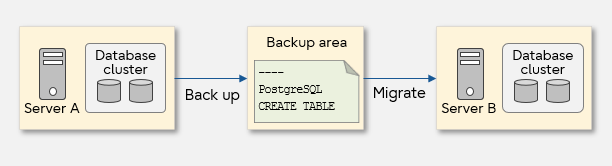

Next, we will explain each backup method in detail.
Logical backup
The logical backup extracts the database data to a file while the PostgreSQL database is running. The following commands are available to perform logical backup.
- pg_dumpall command
Backs up the contents of the entire database cluster in SQL format. You can then run the psql command to restore the database cluster using the latest backup.
- pg_dump command
Backs up the contents of the specified database in SQL format. When using the backup in archive file format, run the pg_restore command to restore the database.
- SQL command COPY
Backs up the data in the specified table in its own text format, binary format, or CSV format. This command also recovers the data to the latest backup point.
Physical backup
Physical backup is a physical copy of the database files as they are. Depending on the timing of the operation, it can be either an offline backup, if it is acquired while the database is stopped, or an online backup, if it is acquired while the database is still running.
Offline backup
The entire database cluster is backed up by copying all database files using the commands provided with the OS while the PostgreSQL database is stopped. The acquired backup data can be used for restoring the cluster to the backup point by running the command provided with the OS and then starting the PostgreSQL database.
Online backup
Online backup is acquired with the PostgreSQL database still running.
First, take a base backup as a starting point. The data is updated even while the base backup is being acquired, so the update process is saved as a transaction log, or write-ahead log (hereinafter abbreviated as WAL). WAL is archived as needed and stored as an archive log. In case of some failure such as database destruction, use the base backup, archive log, and WAL to recover.
The following shows the flow from acquiring an online backup to recovering to the latest status after a problem occurs.
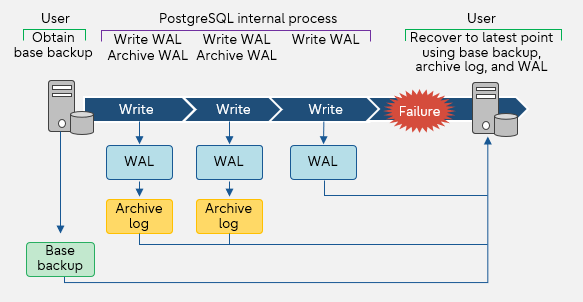
With the recovery using archive log and WAL, it is possible to recover to the backup point, the latest point, or any time.
The online backup features of PostgreSQL are as follows.
- Online backup with continuous archiving
You set the database in backup mode, copy the files using the OS feature, etc., and then end backup mode after the copy is complete. The acquired backup data will be recovered using point-in-time recovery. For the restore point, you can set the backup point, any specific time, or any point.
In addition to the features of PostgreSQL, Enterprise Postgres also provides the following online backup features.
- pgx_dmpall command
A command provided by Enterprise Postgres to perform an online backup by a continuous archive with one touch. The acquired backup data can be recovered using the pgx_rcvall command or WebAdmin. For the restore point, you can set the backup point, any specific time, or any point.
- WebAdmin
A GUI provided by Enterprise Postgres to perform a one-touch online backup with a continuous archive. You can recover to the point when the backup was acquired or the latest time.
Both methods back up the entire database cluster.

How to decide the backup method
As you can see, there are various ways to back up a PostgreSQL database, so how should you choose a method that suits your business?
The selection criteria must consider factors such as: to what point in time should the data be recovered, whether the service running can be stopped for a backup, and what kind of event is predicted. The following lists some sample requirements with the optimal backup method.
- To recover only one table after its data was lost due to incorrect operation
- Logical backup using the pg_dump command.
- To build a new system on another server, migrate all the data from the old system, and continue operation
- Logical backup using the pg_dumpall command, because the entire system will be migrated.
- To recover data to the latest point just before a disk hardware failure
- Physical backup via online backup by continuous archiving, WebAdmin, or the pgx_dmpall command.
- To recover to the point in time when the data was logically destroyed after detecting that the database is not working properly
- Physical backup via online backup by continuous archiving or the pgx_dmpall command.
The following shows the flow of selecting a backup method that addresses these requirements. The Fujitsu Enterprise Postgres features are indicated with red boxes.
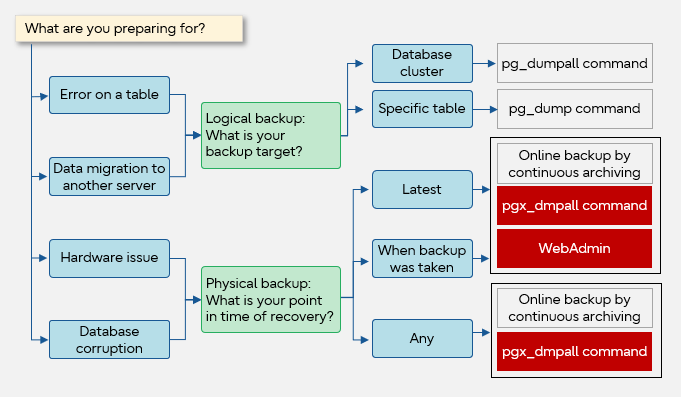
Summary of PostgreSQL backup and recovery
The table below sumarizes the types of backup and recovery available with PostgreSQL and Fujitsu Enterprise Postgres features.
| Type | Overview | Backup method | Backup target | Restore point of recovery | |||
| Backup | Latest | Any | |||||
| Logical backup | Data is retrieved and saved while the database is running. It is also possible to back up in units of definition and data. | pg_dumpall command | Database cluster |  |
 |
|
|
| pg_dump command | Database | |
|
|
|||
| SQL command COPY | Table | |
|
|
|||
| Physical backup | Offline backup | Physically copy the database files while the database is stopped. | OS command | Database cluster | |
|
|
| Online backup | Physically copy the database files while the database is running. WAL is also used. | Online backup with continuous archiving | Database cluster | |
|
|
|
| WebAdmin | Database cluster | |
|
|
|||
| pgx_dmpall command | Database cluster | |
|
|
Select the optimal database backup method that meets the system operation management requirements, and perform maintenance operation of the business data.


 PostgreSQL Insider

