


 Every database migration tool looks capable in a feature comparison. The differences emerge when it meets the real workload, like stored procedures that cannot be converted, a database schema that depends on engine-specific behavior, or a cutover window the chosen approach cannot meet.
What database migration tools do and where they stop
Database migration tools automate the mechanical parts of moving a database from one platform to another. That means database schema conversion, data movement, and in some cases keeping a target synchronized with a source while the migration runs.
A migration tool is not a migration strategy. No single tool performs the entire migration. The distinction matters because budgets and timelines are routinely built on the assumption that it does.
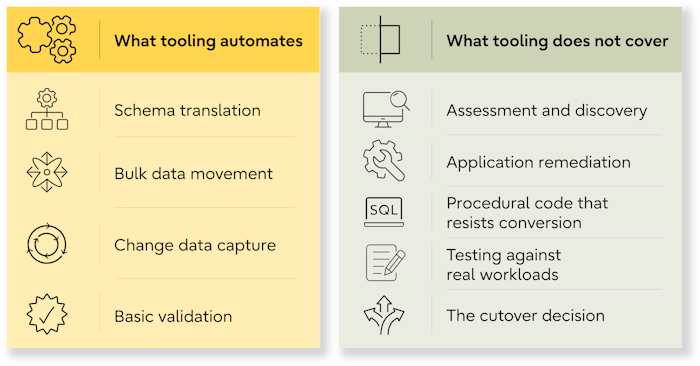
What tooling automates
Tooling can automate these parts of a migration:
- Schema translation
Table definitions, data types, constraints, and indexes converted between engines, with a report on what could not be handled. - Bulk data movement
Extract, transfer, and load, usually with parallelism and restart capability. - Change data capture
Streaming ongoing changes from source to target so the two stay aligned during a phased cutover. - Basic validation
Row counts and checksums, though the depth varies enormously between products.
What tooling does not cover
These parts still require human expertise:
- Assessment and discovery
Tooling can identify technical dependencies, but not the undocumented business processes and ownership decisions around them. - Application remediation
Drivers, embedded queries, ORM behavior, and authentication all need human work. - Procedural code that resists conversion
Dynamic SQL, engine-specific constructs, and anything relying on proprietary behavior. - Testing against real workloads
Confirming behavior matches, not just that the data arrived. - The cutover decision
Someone accountable, applying criteria agreed in advance.
Teams that assume the tool covers the project underestimate the application layer, which is where migrations usually slip. Migration tooling supports the strategy, but it does not define it.
How to evaluate a migration tool
| Evaluate | What to check |
| Source and target coverage | Support for your database engines, versions, deployment models, and heterogeneous migrations. |
| Schema conversion | How the database schema, stored procedures, functions, custom types, partitions, sequences, and triggers are handled. |
| Change data capture | Data synchronization, replication lag, interruption recovery, and schema changes during migration. |
| Data validation | Row counts, checksums, aggregate comparisons, and record-level reconciliation. |
| Rollback | A documented, tested path back if the cutover fails. |
| Observability | Real-time monitoring of migration progress, errors, throughput, and replication lag. |
| Support | Coverage hours, escalation paths, response times, and responsibility during the migration. |
Schema conversion depth
 Every tool claims schema conversion. The differences appear at the edges.
Test a representative subset of your real database schema and establish what is converted, flagged for manual work, or potentially changed in behavior. Vendor sample databases convert cleanly by construction.
Change data capture and cutover windows
 If the approach requires the source to stay live during the move, change data capture becomes the determining capability. Test data synchronization under production-like write volumes, including replication lag and recovery from interruption.
For PostgreSQL targets, logical replication can keep data synchronized natively between PostgreSQL systems, and the PostgreSQL documentation on logical replication sets out the constraints. Heterogeneous capture, from a different engine into PostgreSQL, usually means a third-party pipeline.
Validation, reconciliation, and rollback
 Data validation should prove that the target is complete and correct, while reconciliation should produce evidence a business owner can review. Rollback should be a documented and tested path, not an assumption. Ask what happens if you need to reverse the migration four hours after cutover.
Vendor support and escalation
 The support model behind the tool is a genuine selection criterion, and it is usually discovered during an incident instead of during evaluation.
Establish who supports the migration, when they are available, how critical incidents are escalated, and what they are accountable for. This matters whether you choose commercial software or open-source database migration tools: the key question is who takes the call when something fails during the cutover window.
The 5 categories of database migration tooling
Most database migration tools fall into five categories. The right one depends on whether you need to convert, move, transform, synchronize, or manage changes to the database.
| Category | Best fit | Main limitation |
| Cloud provider migration services | Moving into that provider's managed database | Assumes the provider's platform as the destination |
| Open-source conversion utilities | Well-understood moves with in-house expertise | Support and procedural conversion vary |
| ETL and data integration platforms | Migrations involving transformation or consolidation | Built for ongoing pipelines rather than one-time cutover |
| Change data capture and replication | Short outage windows and parallel running | Operationally complex, needs its own testing |
| Schema version control and deployment management | Controlling change during and after the migration | Manages schema changes rather than moving data |
1 Cloud provider migration services
 Cloud migration services combine data movement, schema conversion, and often change data capture for moves into a provider's own environment. They can support common sources such as MySQL, SQL Server, and PostgreSQL, with targets including Amazon RDS and Azure SQL.
They work best when the cloud destination is already decided. The trade-off is portability: the service is optimized for its provider's platform, which can become a constraint for hybrid or changing deployment strategies.
2 Open-source schema and data conversion utilities
 Community tooling covers a lot of ground, particularly for PostgreSQL targets. Alongside schema conversion and bulk-loading utilities, PostgreSQL provides tools for building and synchronizing replicas. pg_basebackup options support physical backup and replica creation, while pg_createsubscriber can convert an existing physical standby into a logical replica without copying the data again. Recent additions to pg_createsubscriber have expanded its replication options.
These open-source data migration tools are a strong fit when the source is well understood and the team has the expertise to handle gaps. Procedural code conversion and data validation may require additional work, while support depends on the utility and support model chosen.
3 ETL and data integration platforms
 These platforms move and transform data between systems. ETL and data integration tools such as Fivetran and Apache NiFi are particularly useful when the migration also requires data transformation, consolidation, or changes to data models.
The trade-off is additional complexity. They are designed primarily for ongoing data pipelines rather than one-time database migrations, and database schema conversion may still require separate tooling or manual work.
4 Change data capture and replication tools
 These keep a target synchronized with a live source, which is what makes short outage windows possible. Change data capture (CDC) continuously transfers source changes after the initial load, reducing the amount of data that must move during the final cutover. PostgreSQL logical replication can provide this for PostgreSQL-to-PostgreSQL migrations.
CDC is best suited to short outage windows, but it adds another live component that needs real-time monitoring, recovery testing, and data validation before cutover. Heterogeneous migrations may also require third-party replication tooling.
5 Schema version control and deployment management
 Tools such as Flyway and Liquibase put database schema changes under version control and automate their deployment across environments, often through CI/CD pipelines. They do not move data, but they help prevent source, test, and target schemas from drifting during a migration.
They complement rather than replace data migration tools and are most useful when application development and schema management continue throughout the migration.
Matching tooling to the migration you are actually running
Tool selection starts with three questions:
- How much downtime can the workload tolerate?
- Is the database engine staying the same or changing?
- Does application remediation need to happen in parallel?
That upfront assessment matters. Flexera's 2026 State of the Cloud Report found that understanding application dependencies and assessing technical feasibility were the top two cloud migration challenges.
Once those constraints are clear, you can match the migration approach to the tooling it requires.
| Migration approach | What it requires | Tooling to consider |
| Same engine, planned outage | Bulk data movement and validation | Provider service or open-source data migration tools |
| Different engines | Database schema and data type conversion, plus manual remediation | Schema and data conversion tools |
| Short or fixed cutover window | Source and target kept synchronized until cutover | Change data capture or replication |
| Data models change during migration | Data transformation as part of the move | ETL or data integration platform |
| Application remediation runs in parallel | Controlled database schema changes across environments | Add schema version control and deployment management |
Homogeneous vs. heterogeneous moves
A homogeneous move keeps the engine, so schema and procedural code generally require less conversion, leaving more of the residual work in infrastructure and testing. For PostgreSQL-to-PostgreSQL moves across versions, upgrading replication clusters is a well-trodden path.
A heterogeneous move changes the engine, making conversion depth more important. Conversion handles table definitions, straightforward constraints, and most indexes well. What remains manual is procedural code, proprietary data types with no direct equivalent, and anything depending on engine-specific transaction or locking behavior.
Homogeneous vs. heterogeneous moves
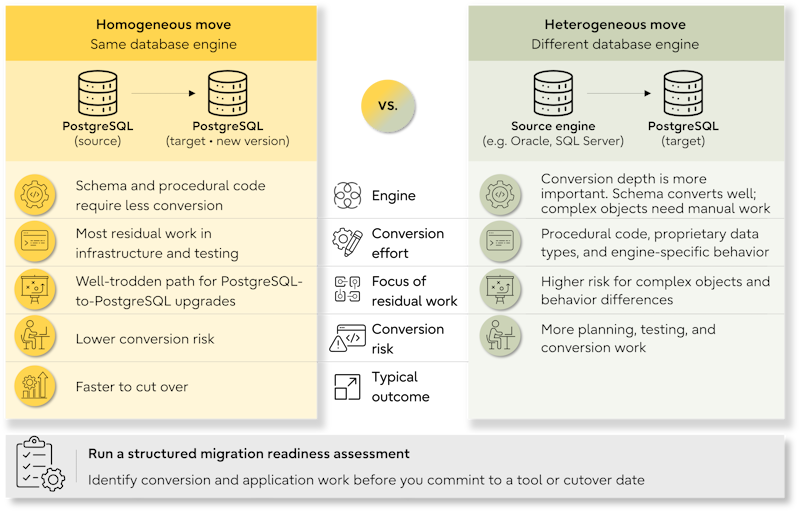
For teams moving to PostgreSQL, migration planning should also account for differences from the source database and time to establish day-to-day management tooling.
A structured migration readiness assessment can identify both the conversion and application work before you commit to a tool or cutover date.
When the cutover window is fixed
A fixed window inverts the evaluation. Instead of asking which tool converts best, ask which arrangement gets the final sync inside the window with a tested fallback.
That usually means change data capture or replication running beforehand, a rehearsed cutover, and data validation that completes inside the window. The tool also needs a tested recovery path if synchronization is interrupted.
Where tool selection goes wrong
Tool selection mistakes often surface when switching products already means reworking a partially completed migration:

- Choosing on source and target support alone
Compatibility tells you a tool can support the database pair, not how much manual work it leaves behind. - Selecting on licensing cost alone
Compare total cost, including manual conversion, engineering time, support, and the work the tool cannot automate. - Treating a successful test load as evidence of readiness
A sample load does not prove performance at production scale, procedural code correctness, or data synchronization under live changes. - Lacking a reconciliation plan
Define what successful data validation looks like before cutover, including the evidence required for a go/no-go decision. - Lacking a rollback path
Design and test how the migration will be reversed before you need to use it. - Ignoring the support model
Know who responds, how issues escalate, and what support covers before a problem occurs during cutover.
Operational assurance is the part that outlasts the project. Support for the migration and support for the platform afterward are different questions, and both need answering before cutover. That includes proactive PostgreSQL support and ongoing maintenance such as reclaiming bloat with pg_repack, which sit outside the migration toolchain.
How Fujitsu Enterprise Postgres supports enterprise migrations
Tooling covers the mechanical middle of a migration. Fujitsu Enterprise Postgres supports the work around it, from assessing the migration approach to operating the database after go-live:
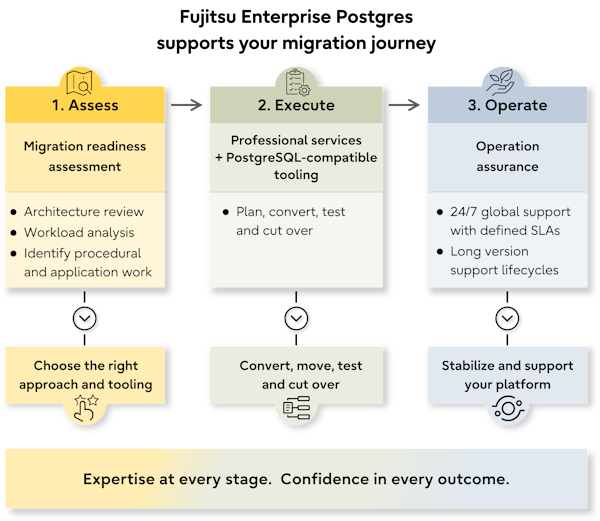
 Execute the migration
Professional services support planning and execution, including work that migration tools cannot automate. Fujitsu Enterprise Postgres is 100% compatible with community PostgreSQL, so standard PostgreSQL migration tools, logical replication, ecosystem utilities, and existing skills carry over without a proprietary layer.- Operate with assurance
24/7 global support with defined SLAs provides an escalation path after go-live, while long version support lifecycles reduce the pressure to undertake another major upgrade soon after migration.
One global superannuation platform moved off Oracle over a single weekend after its workloads had been assessed and the cutover sequenced in advance. While that timeline is not typical or guaranteed, the approach was defined before execution began.
A workload assessment narrows the tool selection by establishing which capabilities the migration actually requires. Talk to the Fujitsu team to learn more.
Frequently asked questions about database migration tools
What are database migration tools used for?
They automate the mechanical parts of moving a database between platforms. That means converting the database schema, moving bulk data, and in some cases using change data capture to keep a target synchronized with a live source. They do not replace migration planning, application remediation, workload testing, or the cutover decision.
Can a migration tool move a database without downtime?
No tool eliminates the outage entirely. Change data capture and replication can reduce the cutover window by keeping the target synchronized while the source remains live. Time is still required for the final sync, application cutover, and data validation before users return.
What is the difference between a migration tool and an ETL tool?
A migration tool is built to move a database from one platform to another and may support schema conversion, data movement, synchronization, and cutover. An ETL tool extracts, transforms, and loads data between systems. ETL and data integration platforms are particularly useful when a migration also requires data transformation or changes to data models.
Do you need a commercial tool to migrate to PostgreSQL?
Not necessarily. Open-source utilities can support database schema conversion, bulk data movement, and PostgreSQL replication. Commercial data migration tools may provide additional conversion, data validation, monitoring, or vendor support. Choose based on the migration approach, workload complexity, in-house expertise, and support requirements rather than licensing cost alone.
How do you validate that a database migration succeeded?
Data validation should confirm that the data is complete, applications behave correctly, performance holds under production-like loads, and operational processes work on the target. Compare row counts, aggregates, and sampled records, then test application behavior, performance, backups, monitoring, and failover. Define the pass criteria before cutover.
What is the most important factor when selecting a database migration tool?
How well it fits the migration approach you have already chosen. Downtime tolerance, whether you are running a homogeneous or heterogeneous migration, and when application remediation happens determine the capabilities you need. Then evaluate database migration tools for conversion depth, validation, rollback, observability, and vendor support.
Do migration tools convert application code?
Generally not. Migration tools convert database objects, including the database schema and, to varying degrees, stored procedures and functions. Application code usually requires separate remediation, including drivers, embedded SQL, ORM configuration, connection handling, and authentication. This is particularly important to scope in heterogeneous migrations between engines such as SQL Server and PostgreSQL.


 PostgreSQL Insider

