




How does your migration path affect which SQL Server migration tools you need?
 SQL Server data migration tools fall into three groups based on your source and target databases:
- Moving SQL Server into a cloud SQL target
- Converting other databases into SQL Server
- Moving data out of SQL Server
Identify your migration path before comparing tools. A tool built for one path may not support another.
| Direction | What it means | Tool families that serve it |
| Into a cloud SQL target | SQL Server to Azure SQL Database, Azure SQL Managed Instance, or SQL Server on Azure VMs | Azure Migrate for assessment, with Azure Database Migration Service or supported Azure migration workflows for the move |
| Into SQL Server | Another database engine is converted into SQL Server | SQL Server Migration Assistant (SSMA) |
| Out of SQL Server | SQL Server to PostgreSQL, or to an analytics platform such as Snowflake or Redshift | Schema conversion tools, where needed, alongside data movement or change data capture (CDC) tools |
The three migration directions for SQL Server, what each involves, and which tool families serve them
Which Microsoft tools can you use for SQL Server migration?
 Microsoft's SQL Server migration tools cover assessment, migration into Azure, and conversion from other database engines.
- Azure Migrate
Use this to discover SQL Server instances, assess their readiness for Azure, identify dependencies, and estimate target sizing and costs. It's particularly useful when planning cloud migrations across multiple servers. It can also support moving entire servers to Azure VMs, but it doesn't perform the database-level conversion needed for a move to PostgreSQL.
- Azure Database Migration Service
Use this to move SQL Server databases into supported Azure SQL targets, including Azure SQL Database and Azure SQL Managed Instance. It supports online migration for certain targets, helping reduce downtime, while Azure SQL Database migrations through this service use an offline approach.
- SQL Server Migration Assistant (SSMA)
Use this when moving from another database engine into SQL Server or Azure SQL. It helps assess compatibility, convert schemas, and migrate data from Microsoft Access, Db2, MySQL, Oracle, SAP ASE, and other supported sources.
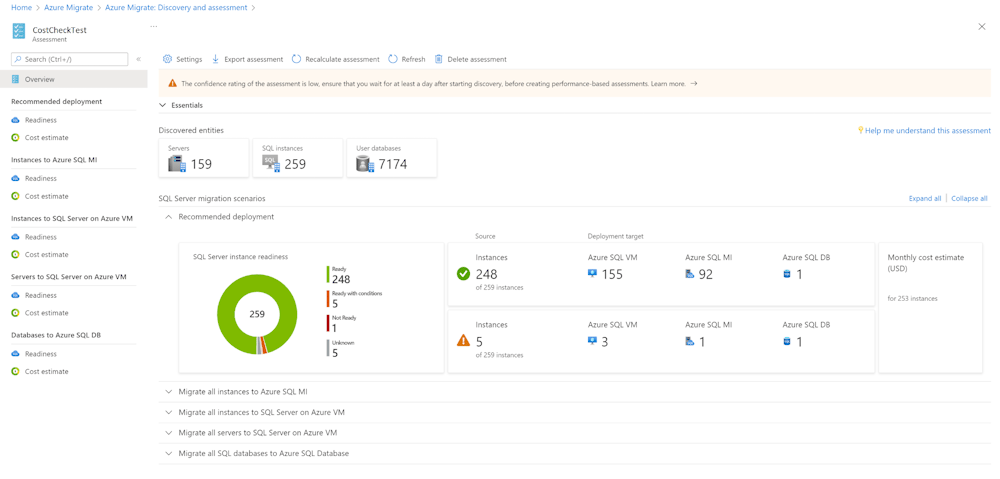
It's also worth checking that you're following current Microsoft guidance. Azure Data Studio retired in February 2026, and DMS (classic) for SQL Server scenarios retired in March 2026. Current options include the Azure portal and SQL Server Management Studio 22. Check Microsoft's migration tool comparison for supported paths and downtime requirements.
When should you use ETL or ELT tools for SQL Server migration?
 ETL (extract, transform, load) and ELT (extract, load, transform) tools move and transform data, but don't necessarily handle complete SQL Server database migrations.
Options include:
Two things separate the categories. ETL tools transform data before it lands in the target, which suits controlled, one-time transfers where the data has to change shape on the way across. ELT platforms load first and transform inside the target, and are built for continuous replication into cloud data warehouses rather than one-off platform moves.
Enterprise data integration suites sit between the two. They handle more complex transformation logic, and they ask for more pipeline engineering and ongoing maintenance in return.
Choose based on how long the data movement needs to continue:
| Requirement | What you need |
| Move data once | A migration or ETL workflow that transfers and validates the data before cutover. |
| Keep systems synchronized during migration | Change data capture (CDC) or another supported replication method to capture changes until cutover. |
| Maintain ongoing synchronization | A managed or custom ELT pipeline with monitoring, maintenance, and recurring costs. |
Choosing between one-time data migration, temporary synchronization, and ongoing data pipelines
Getting that wrong costs in both directions:
- Teams that pick an ELT service for a one-time platform migration may inherit an ongoing operational commitment they did not plan for, including a connector to maintain and a bill that does not stop at cutover.
- Teams that pick a one-shot migration tool for what is genuinely a sync requirement may need to rebuild the workflow later.
Change data capture (CDC) supports both scenarios by capturing changes made to the source database and applying them to the target. It can help minimize downtime during migration or maintain ongoing replication, depending on how the pipeline is configured.
What makes migrating from SQL Server to PostgreSQL challenging?
Moving SQL Server to PostgreSQL is a heterogeneous database migration. This means you're moving between different database engines. While data migration tools can transfer tables and records, converting database logic is often more complex.
The biggest challenges typically involve:
- Schema conversion
- T-SQL stored procedures and functions
- The application code that assumes SQL Server behavior
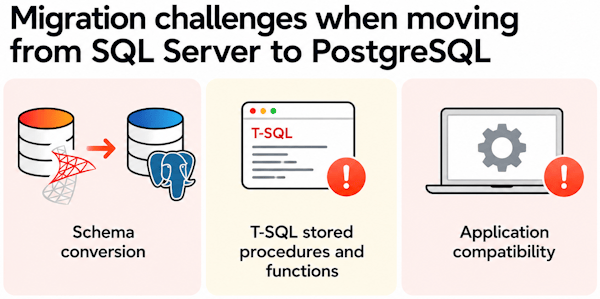
ETL tools can move and transform data, but typically don't convert procedural code. Automated schema conversion handles some objects, while unsupported logic still needs manual rework and testing.
Migrating to analytics platforms such as Snowflake or Redshift also requires adapting data structures and queries to the target architecture. These compatibility issues should be addressed during SQL Server migration planning.
Which SQL Server features commonly need modification for PostgreSQL?
SQL Server features that behave differently in PostgreSQL can require additional conversion and testing.
Check these during your migration assessment:
| Feature | Why it requires work |
| T-SQL stored procedures, functions, triggers | May need rewriting in PL/pgSQL or another supported language, particularly where SQL Server-specific logic is involved. |
| IDENTITY columns | PostgreSQL uses sequences or identity columns with different defaults and behavior |
| MERGE statements | Both platforms support MERGE, but differences in syntax and behavior may require modification. |
| Temp tables and table variables | Scope and lifetime rules differ from PostgreSQL temporary tables |
| Collation and case sensitivity | SQL Server commonly uses case-insensitive collations, while PostgreSQL's behavior depends on the configured collation and comparison method. |
| CLR assemblies | SQL Server CLR code has no direct PostgreSQL equivalent and may require rewriting or relocation. |
| Linked servers and SQL Agent jobs | May require PostgreSQL foreign data wrappers, external schedulers, or other integration tools. |
| Datetime types | Precision and range differ, so mapping decisions should be made before transfer |
SQL Server features that commonly require modification when migrating to PostgreSQL, and the compatibility issues involved
How to evaluate a tool against your project
 Evaluate SQL Server data migration tools against your source and target databases, conversion requirements, downtime limits, data integrity checks, costs, and recovery options.
- Direction coverage
Does it serve your migration path, with your specific source and target versions? - Schema and procedural code handling
What does it convert, what does it flag, and what does it ignore? - Downtime profile
Does it support online migration, and what window does the offline path require? - Data integrity validation
What does it verify after moving data, and what do you have to verify yourself? - Observability during the run
Can you see progress and errors while it executes, or only afterward? - Cost model
Is pricing based on a one-time fee, compute time, or data volume? Are there ongoing charges after cutover? - Failure position
If it fails halfway, what state is the target in, and does the tool give you a usable rollback point?
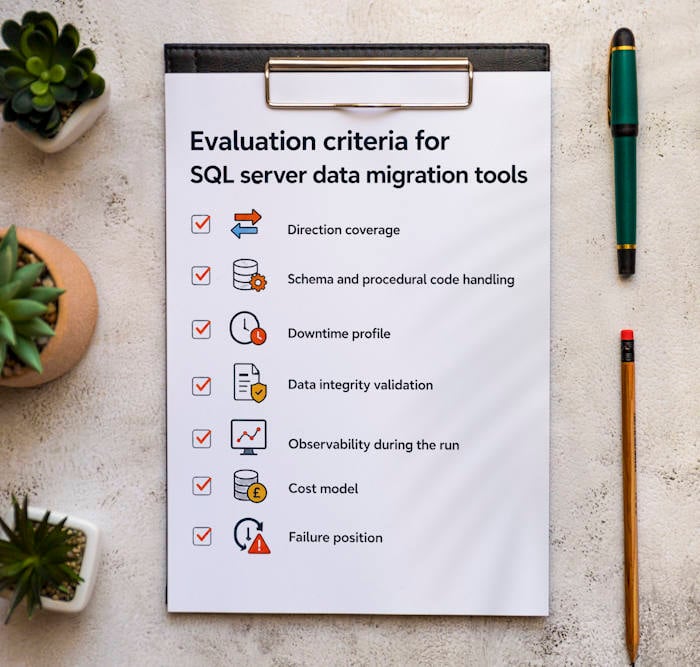
Test what happens if the migration fails midway, including whether you can resume safely or restore the previous state.
What no migration tool covers
Even capable database migration tools leave work for your team. Before cutover, account for:
 Undocumented dependencies
Tools can't reliably identify every application, integration, or downstream system that depends on the database, particularly when those connections aren't documented.- Data ownership
A migration tool can't decide who is responsible for a dataset, which records should move, or how conflicting business requirements should be resolved. - Application code
Moving the database doesn't automatically fix application queries, integrations, or business logic that rely on SQL Server-specific behavior. - Data integrity validation
A successful transfer doesn't guarantee that the data is correct. Row counts may match even when fields are truncated, timestamps are rounded, or character encoding changes. - Cutover and recovery decisions
Tools can support migration and recovery, but teams must decide when to switch systems, whether to proceed after errors, and when to roll back.
Reconcile critical records, calculated values, and business rules before cutover. Row counts alone won't catch every error, so minimizing database migration risk also requires validation beyond the initial transfer.
Where Fujitsu Enterprise Postgres fits
Fujitsu's database modernization services support Microsoft SQL Server migrations to PostgreSQL and Fujitsu Enterprise Postgres, covering three areas beyond the data transfer itself:
- Migration Assessment
Analyzes the source database, identifies SQL statements and T-SQL logic that require modification, and helps establish the scope of conversion work before migration. - Data Migration services
Support the transfer from SQL Server to PostgreSQL or Fujitsu Enterprise Postgres, including conversion and validation activities. The completion report documents what existed in the source database, what was transferred, and what is present in the target. - Health Check and Operations Review
Assess the target environment and its operational readiness, helping teams identify configuration, performance, and maintenance considerations.
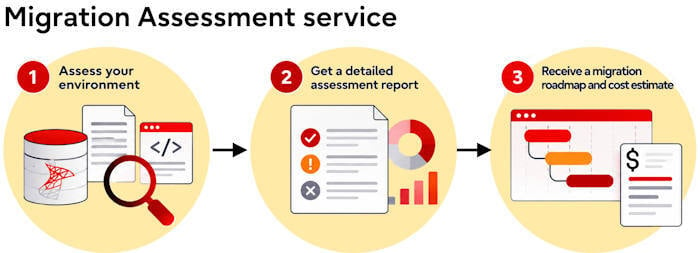
For organizations choosing Fujitsu Enterprise Postgres, the wider service offering includes:
- PostgreSQL compatibility
Support for the PostgreSQL ecosystem and standard database utilities, although SQL Server-specific code still requires assessment and potentially conversion. - Enterprise security capabilities
Security features and controls that support organizations managing sensitive data and meeting regulated industry requirements. - 24/7 global support
Access to technical expertise for organizations running business-critical PostgreSQL workloads.
Talk to Fujitsu about a migration assessment to identify which parts of your SQL Server estate can be converted with tooling and which need manual rework.
Frequently asked questions about SQL Server data migration tools
What is the difference between SSMA and Azure Database Migration Service?
The main difference between SSMA and Azure Database Migration Service is the migration path they support. SSMA converts other database engines into SQL Server or Azure SQL. Azure Database Migration Service moves existing SQL Server databases into supported Azure SQL targets. Neither helps a team migrating away from SQL Server to PostgreSQL.
Can SQL Server migration tools convert stored procedures?
SQL Server migration tools can convert some stored procedures, but complex T-SQL often requires manual rework. Automated conversion tools translate supported code and flag unsupported elements, including SQL Server-specific logic and error handling.
What tools migrate SQL Server to PostgreSQL?
Migrating SQL Server to PostgreSQL typically requires schema conversion tools alongside data movement or change data capture (CDC) tools. Neither SSMA nor Azure Database Migration Service supports this path. Procedural code and application compatibility often require the most rework.
Can SQL Server applications run unchanged on PostgreSQL?
Most SQL Server applications require at least some modification to run on PostgreSQL. An application using only standard SQL through an abstraction layer may need relatively minor changes, but anything using T-SQL, SQL Server-specific functions, or platform behavior requires rework and testing.
How do you migrate SQL Server with minimal downtime?
To migrate SQL Server with minimal downtime, use an online migration method or change data capture to keep the target synchronized while the source remains operational. Once the target is validated and replication lag is within the agreed threshold, you can pause writes and complete cutover. The achievable window depends on your database, application dependencies, and migration approach.
How do you verify data integrity after a migration?
To verify data integrity after a SQL Server migration, compare checksums or row-level samples on critical tables and reconcile aggregates and derived values against business rules. Row counts alone aren't sufficient, since a matching count can still hide truncated fields, rounded values, or encoding errors.


 PostgreSQL Insider


