




This guide covers what a PostgreSQL disaster recovery plan needs to include, from backups and point-in-time recovery to failover and recovery testing.
What disaster recovery means for PostgreSQL
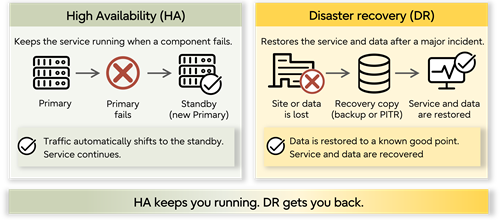
PostgreSQL disaster recovery restores database service and data after an event a high availability cluster cannot absorb. It protects business continuity when high availability alone cannot keep the database operational or recover the data you need.
- High availability keeps the service running through component failure.
- Disaster recovery restores it after loss.
They share mechanisms, particularly replication, but they cover different failures.
PostgreSQL disaster recovery is designed for events such as:
- Data corruption that replicates to every node in seconds
- An accidental DELETE without a WHERE clause, committed and propagated
- Ransomware encrypting the storage layer
- Loss of an entire site
This is why a standby replica is not a backup. A replica is an accurate copy of the primary database, including a mistake someone just made, and replication latency can be measured in milliseconds. A backup is a point in the past you can return to, which is what makes it a different control.
Setting recovery objectives you can actually meet
- A recovery time objective (RTO) defines how long the workload can be unavailable.
- A recovery point objective (RPO) defines how much data the business can afford to lose.
Set them per workload rather than per estate. A payment system, for example, may need an RTO measured in minutes and an RPO close to zero, while an analytics workload may tolerate a much longer recovery window.
| Workload | Typical RTO | Typical RPO | What that demands |
| Payments or order capture | Minutes | Near zero | Synchronous replication, warm standby, rehearsed failover |
| Core line-of-business system | 1–4 hours | Minutes | Streaming replication plus WAL archiving and PITR |
| Internal operational systems | 8–24 hours | 1 hour | Regular base backups with WAL archiving |
| Reporting and analytics | 24–72 hours | 24 hours | Nightly backup, rebuild from source if needed |
| Archive and historical data | Days | 24 hours | Backup only, restore rehearsed annually |
These figures are illustrative; set targets for your own workloads.
Be honest about what determines recovery time. It's dominated by data volume, storage throughput, and WAL replay speed, not by the tool you chose. A team that has never timed a restore does not know its RTO — it has a number someone wrote in a document. Run one, measure it, and validate the objective from the measurement.
How PostgreSQL backup and recovery works
PostgreSQL backup and recovery combines logical or physical backups with WAL archiving to restore data after a failure or loss.
Logical vs. physical backups
A logical backup from pg_dump exports the database as SQL or an archive format. It is generally portable to newer PostgreSQL versions and across architectures, and supports selective restore. But it captures one consistent moment rather than allowing recovery between backups.
A physical backup copies the data files. pg_basebackup is the standard tool, and recent options materially affect how long it takes on large clusters. Physical backups restore faster at scale and are the foundation for point-in-time recovery, at the cost of being tied to their version and platform.
WAL archiving and continuous protection
PostgreSQL writes every change to a write-ahead log before applying it to the data files. That log is what makes the database crash-safe, and archiving it continuously is what turns a periodic backup into continuous protection and enables PITR.
With a base backup plus the required WAL segments, you can recover to a point within the available archive. Without WAL archiving, you can only return to a backup. The PostgreSQL documentation on continuous archiving covers the configuration.
Two operational points matter. Archiving has to be monitored, because a failed archive_command can leave WAL accumulating in pg_wal. If pg_wal fills its filesystem, PostgreSQL can no longer continue writing WAL, so what to do when pg_wal is full belongs in the runbook rather than being discovered live.
Full, differential, and incremental strategies
A full backup copies everything, restores most simply, and costs the most in window and storage. Incremental approaches copy only changed blocks, shrinking both, at the cost of a restore that applies a chain. The differential sits between them.
PostgreSQL 17 added incremental backup support to pg_basebackup, with pg_combinebackup used to reconstruct a full backup from the backup chain.
The trade-off is always the backup window, storage cost, and restore time. Optimizing the first two at the expense of the third is common, because the first two are visible every day and the third only matters during recovery.
Point-in-time recovery
Point-in-time recovery (PITR) restores a PostgreSQL database to a specific moment using a base backup and archived write-ahead log (WAL) files. It’s what separates a real DR posture from a nightly dump, letting you recover to a chosen moment rather than whenever the last backup ran.
PITR exists for the events where the database was working perfectly and doing the wrong thing: a deployment that dropped a column, a batch job that updated every row, or a delete run against production instead of staging. Recovering to 14:32:07, immediately before the migration script started, is a different capability from restoring last night's backup.
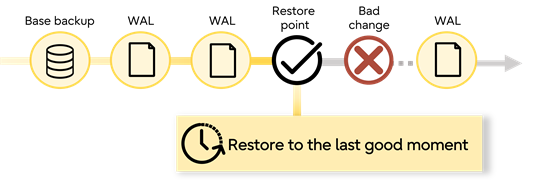
Two constraints limit how far back you can reach. Archive retention sets the outer boundary, so seven-day retention means a seven-day window. And you need the base backup preceding your target, so retention for base backups and WAL has to be planned together.
Targets can be specified by time, transaction ID, named restore point, or log sequence number. Named restore points are worth creating before any risky change, since they give you a labeled moment rather than a timestamp someone reconstructs afterward.
Designing the DR site
Where the recovery copy lives is an architectural decision with cost, latency, and regulatory consequences. You also need to decide how quickly that environment can take over, how it stays current, and how well it's isolated from production.
Warm standby vs. cold backup
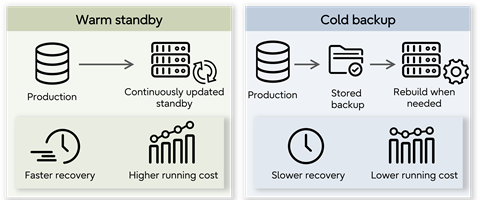
A warm standby is a running instance kept current by streaming or logical replication, ready to take over in minutes, at the cost of a full second environment.
A cold copy is backup storage with no running instance. It costs far less but can take longer to recover because infrastructure has to be provisioned first.
Greater distance can protect against regional failure but adds latency to synchronous replication, so site placement influences replication design.
Residency constraints on DR site placement
In regulated industries this is a design input rather than an afterthought, and it frequently eliminates otherwise sensible architectures. Before choosing a DR site, answer four questions:
- Can replicas cross national boundaries?
- Can backups leave the country of origin?
- Can support personnel access systems remotely, and from where?
- Do regulations govern where recovery services themselves operate?
Data sovereignty considerations apply to every copy, which includes the DR site, the backup target, and anywhere the backup provider replicates onward.
Immutable and isolated backup copies
Ransomware that reaches the backup target makes everything upstream irrelevant. Assume the attacker has the same credentials your backup process does, and design so that assumption is survivable.
That means immutability, through object lock or write-once storage that cannot be deleted before its retention expires, and isolation, so the backup target is not reachable with production credentials from a production network path. At least one copy should be genuinely offline or logically air-gapped.
CISA ransomware guidance recommends maintaining offline backups and ensuring backup data is encrypted and immutable so it cannot be altered or deleted.
Broader security practices apply to the backup estate as much as to the database.
How to detect data corruption and verify your backups
A backup that has never been restored is unverified. Data corruption can propagate silently, and it can sit in every copy you hold before anyone notices.
- Start with checksums. Enable data checksums so PostgreSQL can detect page-level corruption when data pages are read.
- Monitor the recovery chain. Monitor archiving status so failed archive_command attempts do not leave gaps in recoverable WAL.
- Test the restore. Restore periodically into an isolated environment and measure the result against your RTO.
The recovery runbook
Under pressure, at three in the morning, with people watching, the plan has to function without improvisation. A PostgreSQL disaster recovery runbook turns that plan into a sequence your team can actually follow.
Your recovery runbook should define:
- Who declares a disaster and the criteria for doing so, so the decision is not made by consensus while the clock runs.
- The restore and failover sequence, including dependencies, since applications and downstream systems come back in a particular order.
- Internal and external communication paths, so everyone knows who needs to be informed and when.
- How the team validates recovery is complete, because the database is up is not the same as the data is right.
Rehearse critical workloads regularly and the full plan at least annually, updating the runbook and measuring RTO after every test.
Recovery you can prove rather than assume
Most of the above is standard PostgreSQL practice and works on any distribution. What changes at the platform level is the support, security, and deployment options available when you need to recover.
During a real recovery, Fujitsu Enterprise Postgres combines backup and recovery capabilities with 24/7 global enterprise support if a restore behaves unexpectedly or the runbook runs out of steps.
Fujitsu Enterprise Postgres also supports your disaster recovery strategy with:
- Transparent data encryption: protects backup copies at rest wherever they are held.
- Flexible deployment: supports on-premises, hybrid, and multi-cloud DR site placement under residency constraints.
- Long version support lifecycles: help keep recovery procedures valid rather than invalidated by a forced upgrade.
- Dedicated audit logging: records what was accessed and changed, supporting post-incident review.
- 100% PostgreSQL compatibility: supports familiar PostgreSQL backup tooling and processes.
The number you actually need is how long a restore takes on your data, and the only way to get it's to run one. Try Fujitsu Enterprise Postgres and time a recovery in your own environment.
Frequently asked questions about PostgreSQL disaster recovery
What is disaster recovery in PostgreSQL?
PostgreSQL disaster recovery is the set of processes and infrastructure that restore database service and data after an event a high availability cluster cannot absorb, such as data corruption, accidental deletion, ransomware, or site loss. It relies on backups, WAL archiving, and point-in-time recovery.
Is a standby replica the same as a backup?
No. A standby replica mirrors the primary database, so logical errors can propagate to it. A backup preserves an earlier state you can recover to. Replicas primarily support availability and failover; backups protect your ability to recover earlier data.
What is point-in-time recovery and when do you need it?
Point-in-time recovery (PITR) restores the database to a chosen moment using a base backup plus archived WAL files. You need it when the disaster is logical rather than physical: a bad deployment, a batch job that updates every row, or a delete run against the wrong environment.
How often should you test a PostgreSQL restore?
Test PostgreSQL restores quarterly for critical workloads and at least annually for everything else. Test into an isolated environment, time the restore, and validate the data rather than just confirming the service starts. Each test should update the runbook and your recorded RTO.
How do you protect PostgreSQL backups against ransomware?
Protect PostgreSQL backups against ransomware with immutable, isolated copies that production credentials cannot modify. Use object lock or other write-once storage so copies cannot be deleted early, and keep at least one copy offline or air-gapped. Test restores from the immutable copy specifically.
How often should a disaster recovery plan be tested?
Test the full disaster recovery plan at least annually, and more often for critical workloads. The rehearsal should include the runbook, recovery process, and people responsible for carrying it out. A tabletop walkthrough is not sufficient alone, since the failures that matter are the ones nobody anticipated.
Can PostgreSQL recover from ransomware?
Yes, if the backups survived. Point-in-time recovery can restore the database to a moment before encryption began, provided the base backup and WAL archive were held in storage the attacker could not modify. Backups reachable with compromised production credentials may be encrypted alongside everything else.


 PostgreSQL Insider

