



 Three workstreams make up a migration plan, and migrations tend to fail when one of them gets planned as an afterthought. Schema migration covers the structure the data lives in. Data migration covers moving the data itself. Application code migration covers everything above the database that has to change to work correctly against the new environment. The first two get most of the attention, because they're the parts migration tooling handles. The third is where teams get surprised.
The move might be a version upgrade, a shift to the cloud, a switch from another database platform, or a step up to an enterprise distribution. In each case, planning around dependencies, security, performance, and operational readiness is what reduces risk. This guide walks through that planning end to end, from the migration types enterprises encounter through architecture, assessment, strategy selection, and the first 90 days after cutover.
The main types of PostgreSQL migrations
Not every PostgreSQL migration starts from the same place, and treating them all the same is where planning often goes wrong. A team preparing a routine version upgrade doesn't face the same risks as one moving off Oracle, but both get planned the same way if nobody stops to ask which kind of migration this actually is.
How much a migration actually costs to plan for depends heavily on which kind it is. Four categories cover most of what enterprises run into, and the effort profile differs sharply between them:

- Version upgrades
Moving between major PostgreSQL versions, such as 16 to 18, to stay on a supported release and pick up new capabilities.
- Infrastructure migrations
Moving the same PostgreSQL environment onto new infrastructure, whether that's on-premises to cloud, cloud to cloud, or a data center relocation.
- Platform migrations
Changing which PostgreSQL platform runs the workload, whether that's community PostgreSQL, an enterprise distribution such as Fujitsu Enterprise Postgres on IBM Power, or a managed service.
- Database modernization
Moving from a different database engine, such as Oracle, SQL Server, or IBM Db2, onto PostgreSQL.
The last category is the heaviest lift, since schema, code, and data all need translation rather than just relocation. Data types, primary keys, foreign keys, and DDL statements like CREATE TABLE and ALTER TABLE rarely map one-to-one between engines. Stored procedures written in a source engine's procedural language need to be rewritten in PL/pgSQL rather than simply copied over. Teams that have lived through it tend to describe the same pattern. The database itself was never the hard part. What broke, or nearly broke, were the things connected to it.
Architecture decisions before migration
It's tempting to treat architecture as something that gets sorted out after the data lands on the new platform. That's usually the moment teams discover the new environment doesn't support the high-availability pattern they were counting on, or that a maintenance window nobody approved is now the only time upgrades can happen.
Architecture decisions made before migration determine what needs testing, what needs replicating, and what the target environment has to be capable of, and they're far cheaper to get right on paper than to unwind after cutover.
A few decisions are worth settling early:

- Extension compatibility
Confirm every PostgreSQL extension in active use, such as PostGIS or pg_partman, is available and supported on the target platform.
- High-availability architecture
Decide whether the target needs synchronous replication, a standby cluster, or a different HA pattern than the source environment.
- Replication topology
Map primary-replica relationships, read replicas, and any multi-region requirements before migration, not after.
- Backup strategy
Confirm backup tooling, retention policy, and restore testing on the target platform before cutover, not as a post-migration afterthought.
- Maintenance windows
Establish what maintenance windows the target environment allows and whether they match operational expectations.
- Recovery objectives
Set explicit recovery point and recovery time objectives (RPO/RTO) for the migrated environment; these numbers should drive the HA and backup decisions above them, not follow from whatever the tooling happens to support.
None of these decisions are difficult to make. They're just easy to skip when the pressure is on to start moving data. This is why they belong at the front of the plan instead of the back.
What to assess before any PostgreSQL migration
 With architecture decided, the assessment phase turns intentions into numbers. It starts with the obvious, covering current PostgreSQL version and feature usage, a full extension inventory, and performance baselines to compare against after the move. The part that actually prevents failures is less obvious. It's the dependency catalog, and it needs to cover every application, ORM, ETL job, reporting tool, authentication path, and downstream consumer that touches the database, mapped out before anyone assumes they already know what's connected to what.
That assumption is usually wrong in some small way, and it's rarely the database itself that surfaces the problem. More often it's the report nobody remembered depended on a database-specific function, or the authentication service that quietly assumed a connection string that no longer exists.
Establishing performance baselines
Capture query performance, throughput, and resource utilization on the source environment before migration starts. Skip this, and there's no way to tell, once the new environment is live, whether a slower query is a genuine regression or simply a different, equally acceptable profile on the new platform. Teams without a baseline end up debating anecdotes instead of comparing numbers.
Mapping application and integration dependencies
Migration tools operate on the database layer, moving schema and data. They have no visibility into a hard-coded connection string buried in an application, or a query that quietly relies on database-specific behavior. Those gaps become someone else's problem to find, ideally during testing, and much less pleasantly in production if the assessment missed them. The dependency map should include every application, ORM, ETL job, reporting tool, and authentication path that touches the database, along with who owns each one, so there's a name attached to every gap before it becomes an incident.
Common PostgreSQL migration risks
Most PostgreSQL migrations don't fail all at once. They accumulate small, avoidable problems that compound by the time anyone notices. That can include things like:
 Underestimated application coupling.
Dependencies that weren't fully mapped during assessment surface during testing, or worse, after cutover, usually as a support ticket nobody can immediately explain.- Performance regressions without a baseline to compare against.
Without documented baselines, a slower query becomes a debate instead of a diagnosis. - Extension or feature gaps.
A capability in active use on the source platform isn't available, or behaves differently, on the target, and nobody checked until it broke something. - Underestimated operational readiness.
The migration itself succeeds, but the team isn't staffed or trained to run PostgreSQL day to day once it's in production, so the real cost shows up in the weeks after go-live rather than during the project. - Skipping the rollback plan.
Teams that treat rollback planning as a sign of doubt, rather than standard practice, have no clean path back if cutover doesn't go as planned, and find that out at the worst possible time.
None of these risks are unique to PostgreSQL. They're standard database migration risks, and they share a common root. Something that should have been checked before migration began usually wasn't, and the gap didn't surface until it was expensive to fix.
Choosing a migration strategy: batch vs. continuous replication
The tool a team reaches for shouldn't be the first decision. Database size, write volume, and downtime tolerance should decide the strategy, and the tool follows from that, not the other way around.
 Batch migration (dump and restore)
pg_dump and pg_restore, simple and reliable, suit databases under roughly 100 GB but require a downtime window while the transfer runs.- Logical replication or CDC-based migration
Continuous sync between source and target, enabling a minimal-downtime cutover. Suited to production systems with steady write traffic that can't tolerate an extended outage. - Physical replication
Byte-level replication of an entire database cluster, typically used for PostgreSQL-to-PostgreSQL infrastructure moves rather than heterogeneous conversions, since it replicates the storage format directly instead of transforming schema or data.
A team migrating a modest internal reporting database over a weekend has a very different tolerance than one moving a payments platform that can't go dark for more than a few minutes. Matching the strategy to that reality, rather than to whichever tool a previous project happened to use, is most of the decision. Whichever approach fits, plan for a documented downtime estimate, a defined switchover scenario, and explicit rollback criteria before committing to a cutover date.
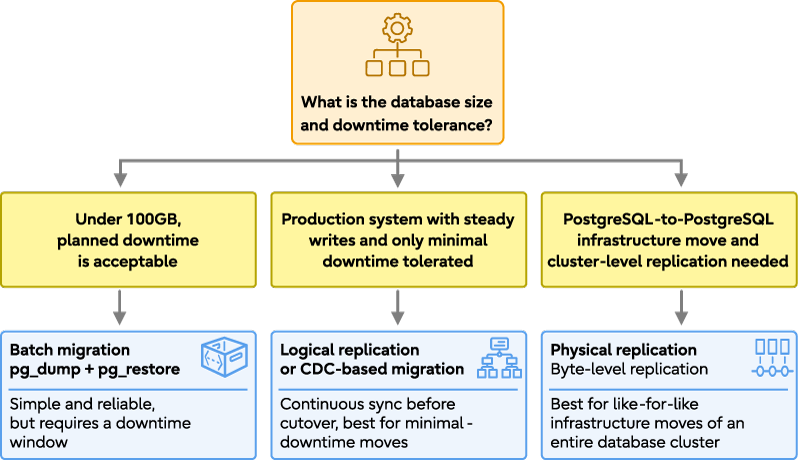
Choosing a PostgreSQL migration strategy
Planning for security, compliance, and operational continuity
 Migration has a way of exposing security gaps that steady-state operations never would. Data that's normally encrypted at rest and governed by tight access controls spends time in a staging environment during migration, and if that environment doesn't get the same scrutiny as production, it becomes the weakest link precisely when the most data is moving through it. Encryption in transit and at rest needs to cover staging environments too, access controls on those staging environments need the same rigor as production, and audit continuity for regulated workloads can't have a gap during the migration window itself.
The target platform decision affects all of this. Community PostgreSQL, managed cloud services, and enterprise distributions carry different built-in controls and support models for exactly these concerns. Enterprise distributions such as Fujitsu Enterprise Postgres build in transparent data encryption, data masking, and dedicated audit logging as target-platform capabilities, rather than something the migration team has to assemble from scratch under deadline pressure.
Validation, cutover, and the first 90 days
Cutover isn't the finish line. It's the point where the real test starts, since a migration that looked clean in staging can still surface problems the moment production traffic hits it. Post-migration validation covers row counts and integrity checks, a performance comparison against the baselines established during assessment, and a parallel-run period before the source environment gets decommissioned, precisely so there's still a way back if something looks wrong.
Once cutover is confirmed, the operational handover begins, and it extends well past the first week:
 Monitoring — establishing alerting and dashboards for the new environment
- Tuning — adjusting configuration and query performance based on real production load
- Index maintenance and vacuum strategy — PostgreSQL-specific housekeeping that differs from the source platform's equivalent
- Backup and disaster recovery testing — confirming backups actually restore, not just that they run
- Capacity monitoring — tracking growth against the resources provisioned at migration time
- Upgrade planning — setting the cadence for the next version upgrade before this one is even finished
Teams that treat this list as day-90 work, rather than day-one work, are usually the ones improvising when something breaks. The difference between a supported platform and an unsupported one is most visible in exactly that moment, at 2 a.m., when someone has to already know what to do rather than figure it out live.
Knowing when to bring in enterprise support for a PostgreSQL migration
 Not every PostgreSQL migration needs outside help, and pretending otherwise wastes budget on expertise a team already has. Internal teams handle these confidently in most cases, including straightforward version upgrades, small environments, and teams with experienced PostgreSQL DBAs already on staff.
The calculus changes once the migration involves heterogeneous conversion from another database engine, compliance requirements that raise the cost of getting something wrong, high-availability architecture that needs validating under load, multiple interdependent applications, or workloads where downtime carries real financial or operational cost. That's usually the point where a team's confidence and its actual experience with this specific kind of migration start to diverge, and that gap is exactly where outside expertise earns its cost.
Fujitsu's Migration Assessment and Data Migration services are built for that gap, covering community PostgreSQL migrations as well as moves onto Fujitsu Enterprise Postgres. Combined with 24/7 support once the migration is live, the value is the same either way.
If your migration touches mission-critical workloads, talk to Fujitsu's PostgreSQL specialists about an assessment that turns your dependency map and downtime tolerance into a concrete migration plan.
Frequently asked questions about PostgreSQL migration
How do I migrate a PostgreSQL database to a new server?
The method depends on downtime tolerance and database size. Smaller databases typically use pg_dump and pg_restore for a straightforward dump-and-restore migration, while larger or write-heavy production databases use logical replication or change data capture to sync continuously and cut over with minimal downtime. Either way, the migration should follow an assessment phase that maps dependencies and establishes performance baselines first.
How long does a PostgreSQL migration take?
Timelines vary widely by migration type and database complexity, but assessment and planning typically take longer than the data transfer itself. A straightforward version upgrade on a small environment can take days, while a heterogeneous migration from another database engine, with schema conversion and extensive testing, often takes weeks to months depending on application coupling and compliance requirements.
Can a PostgreSQL migration be done without downtime?
Near-zero downtime is achievable using logical replication or change data capture, which keep the source and target in sync until cutover. It isn't the same as zero risk. Minimal-downtime approaches still require careful validation, a defined switchover window, and rollback criteria, since the complexity moves from the outage window into the synchronization and validation process instead.
What is the safest PostgreSQL migration method?
There isn't one universally safest method. The safer choice is whichever strategy matches the workload's downtime tolerance and complexity, backed by a documented rollback plan and a validation process that checks data integrity and performance against a pre-migration baseline. Skipping assessment and rollback planning is a more common source of migration risk than the choice of tooling itself.
Do PostgreSQL extensions migrate automatically?
Not automatically. Extensions need to be confirmed available and compatible on the target platform before migration, then reinstalled or reconfigured there, since migration tools generally move schema and data rather than extension binaries. Checking the full extension inventory during assessment avoids discovering a missing or incompatible extension after cutover.
How do I validate a PostgreSQL migration?
Validation covers row counts and checksums to confirm data arrived intact, a performance comparison against the baseline captured before migration, and a parallel-run period where both environments operate side by side before the source is decommissioned. Application-level testing, not just database-level checks, confirms that dependent systems behave correctly against the new environment.
What's the difference between pg_upgrade and pg_dump?
pg_upgrade upgrades a PostgreSQL installation in place between major versions, reusing existing data files for a faster in-place upgrade. pg_dump and pg_restore export the entire database to a portable format and rebuild it on a new target, which works across different servers, versions, or platforms but takes longer since data is fully rewritten rather than reused.
Should I migrate to community or enterprise PostgreSQL?
It depends on how much support, security, and lifecycle management the organization needs the platform itself to carry. Teams with strong in-house PostgreSQL expertise and lower compliance requirements often run community PostgreSQL successfully. Regulated, mission-critical, or resource-constrained environments tend to benefit from an enterprise distribution's built-in support SLAs, security features, and longer version support windows.


 PostgreSQL Insider

