



Why database migration challenges cluster at specific points in a project
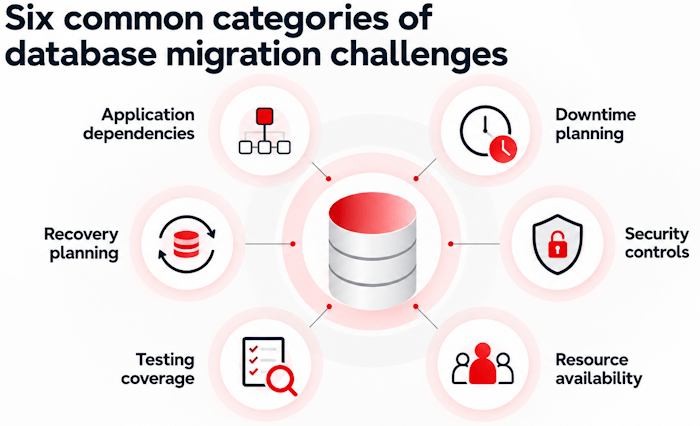
 Most database migration challenges fall into six common categories, each tending to surface at a predictable stage of the project:
- Application dependencies
Undocumented integrations, legacy systems, and business logic that may break when the database moves. - Downtime planning
Migration windows that exceed what the business can tolerate. - Security controls
Access permissions, encryption, and compliance requirements that must be maintained in the target environment. - Resource availability
Gaps in technical expertise, stakeholder alignment, and project ownership. - Testing coverage
Data integrity issues, application failures, and performance problems missed during testing. - Recovery planning
Untested rollback procedures and gaps in disaster recovery readiness.
These challenges emerge at different points in a database migration project.
- Before migration, teams uncover dependencies and gaps in planning.
- During execution, downtime, data integrity, and security risks become more immediate.
- After cutover, validation, performance, and operational ownership determine whether the new environment is ready for business use.
And the impact on timelines can be significant. In Caylent's 2025 Database Migration survey, only 6% of IT leaders said their organization's most difficult database migration finished on time.
Challenges that surface before any data moves
During discovery and assessment, data migration challenges such as undocumented dependencies, complex business logic, poor data quality, and resource gaps can affect your project's scope, cost, and timeline. Identifying them early gives you time to resolve them before data moves.
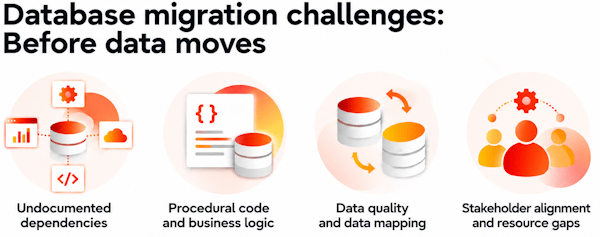
Undocumented dependencies
 Undocumented dependencies can cause a database migration to succeed technically while disrupting business operations. Other applications and systems often rely on the database you're migrating, including some you may not know about.
Think of a nightly batch job running on an old server, a reporting tool updating a finance spreadsheet, or an API connecting directly to the database. These dependencies are easy to miss, especially in legacy systems where documentation is outdated or missing. When the database moves, those connections can break.
Procedural code and business logic
Much of the complexity in database migration comes from the business logic built into the existing system. Stored procedures, functions, and triggers can contain years of business rules that nobody has documented, especially in legacy systems.
Before migration, assess how much procedural code you have and how difficult it will be to convert. For example, 1,000 simple stored procedures may be easier to migrate than 200 complex ones. Automated tools can convert some of this code, but more complex or incompatible logic may need manual changes and testing. Understanding the complexities of migrating from a proprietary legacy database early will help you build a realistic timeline.
Data quality and data mapping
In Drexel LeBow and Precisely’s 2025 Outlook: Data Integrity Trends and Insights, 64% of respondents said data quality is their top data integrity challenge.
If your source database contains duplicate records, missing values, or outdated information, those problems will follow you into the target system. Data profiling helps you spot these issues early so you can clean up the data before moving it.
You also need to check how data maps between the two systems. For example, a date field or numeric value might be stored differently in the new database. Incorrectly mapping precision, encoding, or null values can lead to data loss or corruption. Test your data mapping and transformation rules early to catch problems before migration.
Stakeholder alignment and resource gaps
Your team might have plenty of experience managing databases but limited experience migrating them, especially when legacy systems are involved. You'll need to make sure the right people have enough time and expertise to support the project, including any specialist skills needed for database modernization.
Data migration projects also involve people outside IT, including application owners, security, compliance, and business teams. For instance, a finance team may need to approve changes to reporting, while security needs to check access controls.
Agree on responsibilities, timelines, and who makes the final decisions early. That includes who can approve cutover or stop the migration if something goes wrong.
Challenges that surface during the migration
Once data migration begins, the focus shifts to keeping systems available, protecting data integrity, and maintaining security. Problems at this stage can cause downtime, data loss, or compliance risks, so teams need to know how they'll detect and respond to issues during the move.
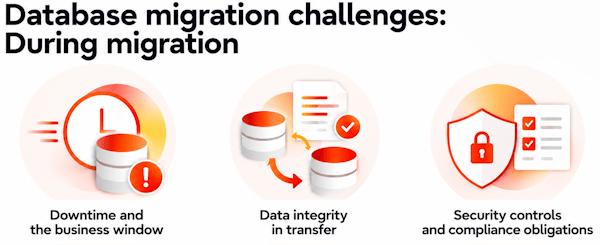
Downtime and the business window
 To protect business continuity, your migration needs to fit within the downtime your business can tolerate. But the time you've been given may be shorter than the migration actually requires.
For example, a migration that takes two hours with a small test dataset could take much longer with production-sized data.
In reality, Caylent’s 2025 survey found that 46% of respondents reported five or more hours of downtime during their toughest database migration.
Rehearse the migration and cutover using realistic data volumes and workloads to estimate downtime and identify where you can reduce it.
Data integrity in transfer
Data migration errors aren't always obvious. A field might get cut off, a timestamp rounded, or a character converted incorrectly. An interrupted transfer could also leave records missing from the target system.
These problems can go unnoticed because the database still appears to be working. Check data integrity throughout the transfer, comparing record counts, data types, and critical values against the source. You should also know what happens if a transfer fails halfway through and whether you can safely restart it.
Security controls and compliance obligations
Security settings don't always transfer directly between databases. Access controls, role-based permissions, encryption, and audit trails may need to be configured again in the target system. If they're overlooked, you could introduce security vulnerabilities or give users more access than they need.
Compare the source and target security settings before cutover, particularly if you're migrating sensitive data in a regulated environment. Follow PostgreSQL security best practices to help maintain appropriate access controls, encryption, and auditing.
Compliance requirements also apply throughout the migration. For instance, GDPR Article 32 requires appropriate security measures for processing personal data, while HIPAA imposes safeguards for electronic protected health information (PHI) in covered environments. Even data copied into a test environment needs appropriate protection.
Involve your compliance team early to review potential risks and confirm which enterprise database security features you'll need in the new environment.
Challenges that surface after cutover
After cutover, you still need to check data quality, performance, and recovery readiness under real operating conditions.
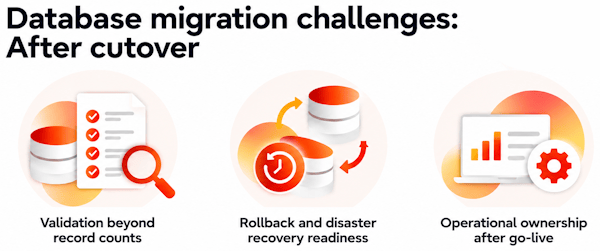
Validation beyond record counts
 Matching record counts doesn't guarantee a successful migration. Two databases can contain the same number of rows but have different or incorrect data.
Validate the migration at several levels:
- Record counts
Identify unexpected differences in the number of records. - Checksums and row comparisons
Identify unexpected differences or data corruption. - Aggregate reconciliation
Compare totals, averages, and balances to catch conversion errors. - Business-rule checks
Confirm calculations, derived values, and reports are accurate. - Application testing
Check that applications work correctly with the migrated data.
Set acceptance criteria for each check before cutover and agree on who makes the final go/no-go decision.
Rollback and disaster recovery readiness
A rollback plan is only useful if you've tested it. Run through the recovery process, measure how long it takes, and confirm how you'll handle changes made after cutover. Rolling back becomes more complicated once the new database starts accepting writes.
Define your recovery point objective (RPO) and recovery time objective (RTO) to establish acceptable data loss and recovery time if something goes wrong.
Operational ownership after go-live
Before cutover, agree on who will manage the new database. That includes monitoring, backups, recovery testing, performance tuning, and incident response.
Performance can also change under real production workloads, even if testing went well. Make sure your team has the skills and enterprise PostgreSQL support needed to identify and resolve issues after go-live.
What migration tooling does and does not solve
Depending on the tool, database migration software can automate schema conversion, data transfer, and synchronization. This can reduce manual work, speed up migration, and help minimize errors.
However, no tool addresses every technical or operational challenge.
| What migration tools can handle | What still needs your team |
| Schema conversion Convert supported tables, data types, and database objects. |
Complex business logic Rewrite incompatible stored procedures, functions, and triggers. |
| Data transfer Move data between source and target systems. |
Undocumented dependencies Find reporting tools, batch jobs, and applications that rely on the database. |
| Data validation Automate record counts and supported consistency checks. |
Business-rule validation Confirm calculations, reports, and application behavior remain correct. |
| Data pipelines Automate data movement and synchronization. |
Cutover decisions Approve downtime, manage risks, and decide when to roll back. |
Comparison of what database migration tools can automate and which tasks require manual intervention
Developers may also need to update and test applications that rely on the old database, even when migration tools can convert the procedural code.
When comparing database migration tools, check which tasks they can automate and where you'll still need manual work.
How to assess your database migration risks
 Before starting a database migration, assess your environment across six areas to identify potential risks, resource gaps, and technical challenges.
- Environment discovery
Have you documented your databases, data volumes, legacy systems, and infrastructure? Identifying these gaps early helps minimize database migration risks. - Application dependencies
Do you know which applications, integrations, and stored procedures depend on the source database? - Infrastructure readiness
Can the target system support your workloads, performance requirements, and data infrastructure? - Security and compliance
Are access controls, encryption, and audit trails ready for the new environment? - Operational readiness
Who will manage monitoring, backups, disaster recovery, and ongoing support after cutover? - Migration planning
Have you tested data integrity, confirmed acceptable downtime, and agreed on a rollback plan? These are essential steps in preparing for a successful data migration.
If you can't answer some of these questions confidently, address those gaps before migration begins.
For more complex projects, Fujitsu's professional database services include a Migration Assessment to identify what can be converted automatically, which database objects need modification, and the resources required.
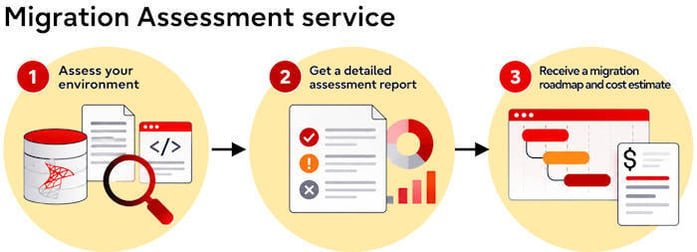
Talk to a Fujitsu PostgreSQL specialist about a migration assessment to identify potential challenges while there's still time to address them.
Frequently asked questions about database migration challenges
What is the biggest challenge in database migration?
One of the biggest database migration challenges is identifying undocumented application dependencies and complex procedural code. Missing these during discovery can lead to delays, unexpected costs, and application failures.
Why do database migrations fail?
Database migrations can fail because of poor planning, overlooked dependencies, data quality issues, or inadequate testing. Untested rollback plans and unclear ownership can also cause problems during and after cutover.
How do you minimize downtime during a database migration?
To minimize downtime during database migration, use replication or change data capture where supported to keep the target database synchronized with the source. Rehearse cutover with production-sized data to estimate the required downtime.
How do you prevent data loss during migration?
To prevent data loss during migration, validate transferred data, maintain reliable backups, and test your rollback plan. Account for any new writes to the target before attempting a rollback.
How do you validate data integrity after a migration?
To validate data integrity after migration, compare record counts, checksums, and critical data values between the source and target systems. Test business rules and application functionality to confirm the data works as expected.
How long does a database migration take?
A database migration can take anywhere from a few weeks to over a year, depending on data volumes, system complexity, application dependencies, and testing requirements. A migration assessment can help establish a realistic timeline.


 PostgreSQL Insider


