



Typically, when using PostgreSQL Logical Replication (Publish/Subscribe), all data changes from published tables will be replicated to subscribers. But what if you need to replicate only specific columns for security? Or filter rows to reduce bandwidth? Or handle partitioned tables differently?
The CREATE PUBLICATION command offers powerful options for tailoring exactly what data gets replicated. This comprehensive guide explores every syntax variation, helping you optimize replication for performance, security, and your specific use case.
CREATE PUBLICATION name
  [ FOR ALL TABLES | FOR publication_object [, ... ] ]
  [ WITH ( publication_parameter# [= value] [, ... ] ) ]

where publication_object is one of:
    TABLE table_and_columns [, ... ]
    TABLES IN SCHEMA { schema_name | CURRENT_SCHEMA } [, ... ]

and table_and_columns is:
    [ ONLY ] table_name [ * ] [ ( column_name [, ... ] ) ] [ WHERE ( expression ) ]
Command syntax from PostgreSQL documentation
# publication_parameter: publish, publish_generated_columns, publish_via_partition_root
One look at the syntax in the PostgreSQL documentation shows there are many ways to specify what data will be published.
In this blog post, we will explore in detail all those different parts of the PostgreSQL CREATE PUBLICATION syntax that allow users to tailor exactly what table data they want to be logically replicated.
This blog post builds upon and expands the material I presented at PGDU 2025, with the accompanying slides available here.
System catalogs, views, and psql describe commands
Internally, there are 3 main System Catalogs that tie everything together:

- pg_publication
- pg_publication_namespace
- pg_publication_rel
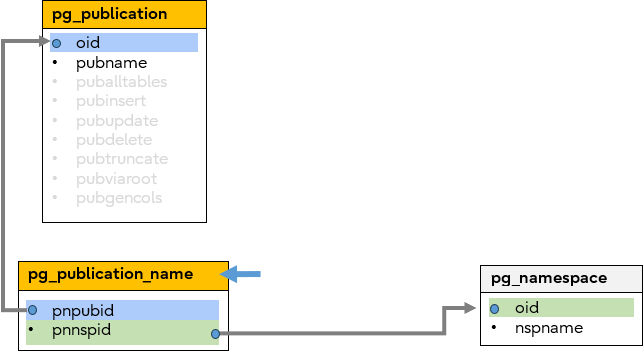
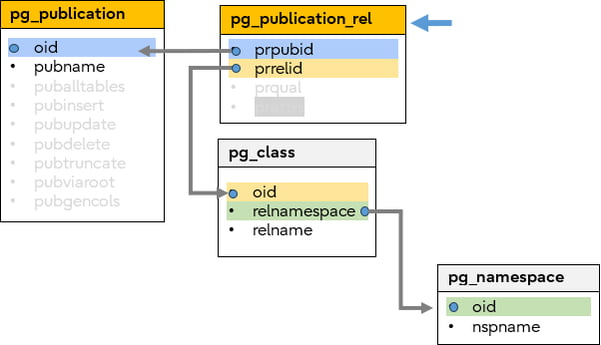
These are linked together as shown in the following diagram. Every kind of Publication can be represented by these catalogs, but note that not all catalogs are required for all CREATE PUBLICATION commands – e.g., the pg_publication_namespace is only used to describe a FOR TABLES IN SCHEMA publication.
Please take time to familiarize yourself with this system catalog diagram because we’ll be returning to this later in the blog each time when describing how the various Publication clauses are internally represented.
System Catalogs are linked together using the oid members as highlighted by the colour-coding below.
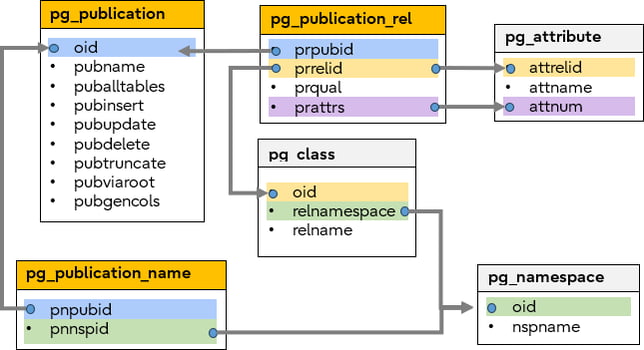
System catalogs
For a more human-readable summary of Publication information there is a System View:

- pg_publication_tables
There are also two psql describe commands:
# \dRp+ my_pub
Displays the publication information of my_pub including what tables are members.
# \d my_tab
Displays the table information of my_tab including what publications (if any) are publishing it
The evolving functionality – History and future
The CREATE PUBLICATION command has evolved with more functionalities being added with each new PostgreSQL version.
Here are some of the major milestones, and some future features currently under development.
| Version | Feature | Example |
| PostgreSQL 13 | Empty Publication |
CREATE PUBLICATION mypub13; |
| Specified Tables |
CREATE PUBLICATION mypub13 FOR TABLE t1,t2,t3;
|
|
| All Tables |
CREATE PUBLICATION mypub13 FOR ALL TABLES;
|
|
| Descendant Tables |
CREATE PUBLICATION mypub13 FOR ONLY TABLE parent;
|
|
| Partition Tables |
CREATE PUBLICATION mypub13 … WITH (publish_via_partition_root);
|
|
| DML Filtering |
CREATE PUBLICATION mypub13 … WITH (publish=’insert,update,delete,truncate’);
|
|
| PostgreSQL 15 | Row Filters |
CREATE PUBLICATION mypub15 … WHERE (X=99);
|
| Column Lists |
CREATE PUBLICATION mypub15 FOR TABLE t1(c1,c2,c3);
|
|
| Specified Schemas |
CREATE PUBLICATION mypub15 FOR TABLES IN SCHEMA s1;
|
|
| PostgreSQL 18 | Generated Columns |
CREATE PUBLICATION mypub18 … WITH (publish_generated_columns=stored);
|
| PostgreSQL 19 Still In development |
All Sequences |
CREATE PUBLICATION mypub19 FOR ALL SEQUENCES;
|
| Exclude Tables |
CREATE PUBLICATION mypub19 FOR ALL TABLES EXCEPT (t98,t99);
|
|
| Exclude Columns |
CREATE PUBLICATION mypub19 FOR TABLE t1 EXCEPT (c98,c99);
|
Table showing the Evolution of CREATE PUBLICATION command functionality
A note about table shapes
 Although it is typical for the Subscriber-side table to have the same schema as the Published table, in fact the only requirement is that the published column names must exist in the subscriber table.
This means different shape tables are possible at each side of the replication. For example, valid subscriber table variations include:
- Different column order
- Additional columns not in the publication
- Subset of publisher columns (if using column lists)
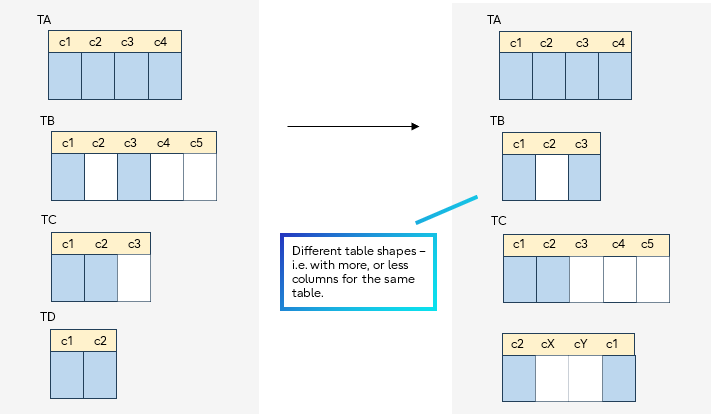
Visual examples of Subscriber tables that differ from the Publisher tables
OK, now let’s work our way through all of the CREATE PUBLICATION syntax parts…
All tables
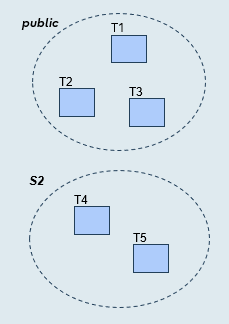
Syntax
CREATE PUBLICATION pub_for_all_tables
FOR ALL TABLES
The publication includes:
- All tables (present and future) from all schemas
- All data from those tables (excluding generated column data)
Catalogs:
- \dRp+ shows "All tables" is true
- pg_publication. puballtables flag member is set true
 Future Tables means that any newly created table will automatically become part of the Publication -- CREATE PUBLICATION command does not have to be executed again, although for any existing subscription an ALTER SUBSCRIPTION … REFRESH PUBLICATION is needed for the subscription to become aware of the new tables.
Use for: Development environments, complete database replication.
Watch out: Includes all tables, even some you may not have intended to replicate.
Benefit: New tables auto-replicate.
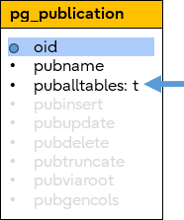
System catalogs
Examples:
test_pub=# \dRp+
                                 Publication pub_for_all_tables
  Owner   | All tables | Inserts | Updates | Deletes | Truncates | Generated columns | Via root
----------+------------+---------+---------+---------+-----------+-------------------+----------
 postgres | t          | t       | t       | t       | t         | none              | f
(1 row)

test_pub=# SELECT * FROM pg_publication;
-[ RECORD 1 ]+-------------------
oid          | 16401
pubname      | pub_for_all_tables
pubowner     | 10
puballtables | t
pubinsert    | t
pubupdate    | t
pubdelete    | t
pubtruncate  | t
pubviaroot   | f
pubgencols   | n

test_pub=# SELECT * FROM pg_publication_tables;
      pubname       | schemaname | tablename |   attnames    | rowfilter
--------------------+------------+-----------+---------------+-----------
 pub_for_all_tables | public     | t1        | {c1,c2,c3,c4} |
 pub_for_all_tables | public     | t2        | {c1,c2,c3,c4} |
 pub_for_all_tables | public     | t3        | {c1,c2,c3,c4} |
 pub_for_all_tables | s2         | t4        | {c1,c2,c3,c4} |
 pub_for_all_tables | s2         | t5        | {c1,c2,c3,c4} |
(5 rows)
Specific schemas
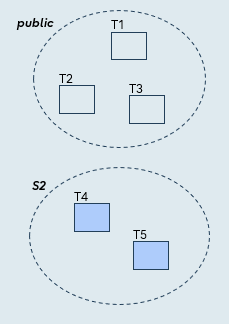
Syntax
CREATE PUBLICATION pub_for_schema
FOR TABLES IN SCHEMA s2;
The publication includes:
- All tables (present and future) from the nominated schema
- All data from those tables (excluding generated column data)
Catalogs:
- \dRp+ shows "Tables from schemas"
- pg_publication_namespace catalog identifies the published schema
Use for: Organizational boundaries.
Benefit: New tables auto-replicate.
System catalogs
Examples:
test_pub=# \dRp+
                                   Publication pub_for_schema
  Owner   | All tables | Inserts | Updates | Deletes | Truncates | Generated columns | Via root
----------+------------+---------+---------+---------+-----------+-------------------+----------
 postgres | f          | t       | t       | t       | t         | none              | f
Tables from schemas:
    "s2"

test_pub=# SELECT * FROM pg_publication;
-[ RECORD 1 ]+---------------
oid          | 16402
pubname      | pub_for_schema
pubowner     | 10
puballtables | f
pubinsert    | t
pubupdate    | t
pubdelete    | t
pubtruncate  | t
pubviaroot   | f
pubgencols   | n

test_pub=# SELECT * FROM pg_publication_tables;
    pubname     | schemaname | tablename |   attnames    | rowfilter
----------------+------------+-----------+---------------+-----------
 pub_for_schema | s2         | t4        | {c1,c2,c3,c4} |
 pub_for_schema | s2         | t5        | {c1,c2,c3,c4} |
(2 rows)
Specific tables
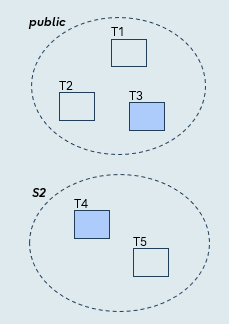
Syntax
CREATE PUBLICATION pub_for_table
FOR TABLE t3, s2.t4;
The publication includes:
- Only the specified tables
- All data from those tables (excluding generated column data)
Catalogs:
- \dRp+ shows "Tables" of the publication
- pg_publication_rel catalog itemizes the tables of the publication
- pg_publication_rel,prrelid member gives the table oid in pg_class
- pg_class. relnamespace member gives the schema oid in pg_namespace
Use for: Bandwidth optimization, reporting databases, selective replication of high-value tables.
System catalogs
Examples:
test_pub=# \dRp+
                                   Publication pub_for_table
  Owner   | All tables | Inserts | Updates | Deletes | Truncates | Generated columns | Via root
----------+------------+---------+---------+---------+-----------+-------------------+----------
 postgres | f          | t       | t       | t       | t         | none              | f
Tables:
    "public.t3"
    "s2.t4"

test_pub=# SELECT * FROM pg_publication;
-[ RECORD 1 ]+---------------
oid          | 16404
pubname      | pub_for_table
pubowner     | 10
puballtables | f
pubinsert    | t
pubupdate    | t
pubdelete    | t
pubtruncate  | t
pubviaroot   | f
pubgencols   | n


test_pub=# SELECT * FROM pg_publication_rel;
  oid  | prpubid | prrelid | prqual | prattrs
-------+---------+---------+--------+---------
 16405 |   16404 |   16391 |        |
 16406 |   16404 |   16395 |        |
(2 rows)


test_pub=# SELECT oid, relname, relnamespace FROM pg_class WHERE oid IN (16391, 16395);
  oid  | relname | relnamespace
-------+---------+--------------
 16391 | t3      |         2200
 16395 | t4      |        16394
(2 rows)

test_pub=# SELECT oid, nspname FROM pg_namespace WHERE oid IN (2200, 16394);
  oid  | nspname
-------+---------
  2200 | public
 16394 | s2
(2 rows)

test_pub=# SELECT * FROM pg_publication_tables;
    pubname    | schemaname | tablename |   attnames    | rowfilter
---------------+------------+-----------+---------------+-----------
 pub_for_table | public     | t3        | {c1,c2,c3,c4} |
 pub_for_table | s2         | t4        | {c1,c2,c3,c4} |
(2 rows)
Column lists
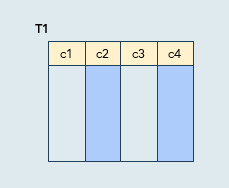
Syntax
CREATE PUBLICATION pub_collist
FOR TABLE t1(c2, c4);
The publication includes:
- Only the specified tables
- Only data from the specified columns
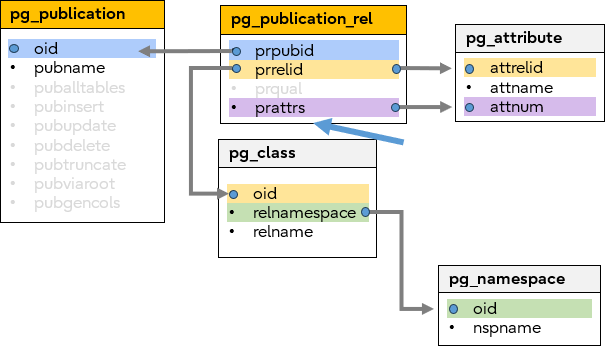
Catalogs:
- \dRp+ shows "Tables" (and columns) of the publication
- pg_publication_rel catalog itemizes the tables of the publication
- pg_publication_rel.prrelid member gives the table oid in pg_class
- pg_publication_rel.prattrs member gives attribute numbers in pg_attribute
- pg_class.relnamespace member gives the schema oid in pg_namespace
Use for: Exclude sensitive data, large BLOBs, or columns missing on subscriber.
Watch out: Must include replica identity columns.
Benefit: Can reduce bandwidth
System catalogs
Examples:
test_pub=# \dRp+
                                    Publication pub_collist
  Owner   | All tables | Inserts | Updates | Deletes | Truncates | Generated columns | Via root
----------+------------+---------+---------+---------+-----------+-------------------+----------
 postgres | f          | t       | t       | t       | t         | none              | f
Tables:
    "public.t1" (c2, c4)

test_pub=# SELECT * FROM pg_publication;
-[ RECORD 1 ]+------------
oid          | 16407
pubname      | pub_collist
pubowner     | 10
puballtables | f
pubinsert    | t
pubupdate    | t
pubdelete    | t
pubtruncate  | t
pubviaroot   | f
pubgencols   | n

test_pub=# SELECT * FROM pg_publication_rel;
  oid  | prpubid | prrelid | prqual | prattrs
-------+---------+---------+--------+---------
 16408 |   16407 |   16385 |        | 2 4
(1 row)

test_pub=# SELECT oid, relname, relnamespace FROM pg_class WHERE oid IN (16385);
  oid  | relname | relnamespace
-------+---------+--------------
 16385 | t1      |         2200
(1 row)

test_pub=# SELECT oid, nspname FROM pg_namespace WHERE oid IN (2200);
 oid  | nspname
------+---------
 2200 | public
(1 row)

test_pub=# SELECT attrelid, attname, attnum FROM pg_attribute WHERE attrelid IN (16385) AND attnum IN (2,4);
 attrelid | attname | attnum
----------+---------+--------
    16385 | c2      |      2
    16385 | c4      |      4
(2 rows)

test_pub=# SELECT * FROM pg_publication_tables;
   pubname   | schemaname | tablename | attnames | rowfilter
-------------+------------+-----------+----------+-----------
 pub_collist | public     | t1        | {c2,c4}  |
(1 row)
Row filtering
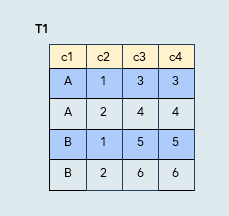
Syntax
CREATE PUBLICATION pub_rowfilter
FOR TABLE t1 WHERE (c2 = 1);
The publication includes:
- Only the specified tables
- Only data from rows matching the specified condition
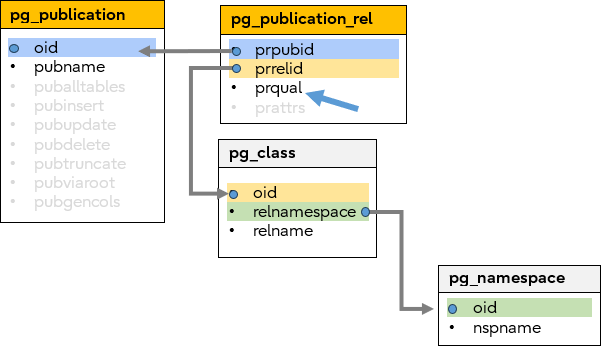
Catalogs:
- \dRp+ shows "Tables" (and row filter expressions) of the publication
- pg_publication_rel catalog itemizes the tables of the publication
- pg_publication_rel.prrelid member gives the table oid in pg_class
- pg_publication_rel.prqual member gives the (internal form) row filter expression
- pgclass.relnamespace member gives the schema oid in pg_namespace
Use for: Geographic filtering, time-based (hot data only), multi-tenant isolation, status filtering.
Watch out: Filters must be immutable; can reduce bandwidth but costs some publisher CPU.
System catalogs
Examples:
test_pub=# \dRp+
                                   Publication pub_rowfilter
  Owner   | All tables | Inserts | Updates | Deletes | Truncates | Generated columns | Via root
----------+------------+---------+---------+---------+-----------+-------------------+----------
 postgres | f          | t       | t       | t       | t         | none              | f
Tables:
    "public.t1" WHERE (c2 = 1)

test_pub=# SELECT * FROM pg_publication;
-[ RECORD 1 ]+--------------
oid          | 16409
pubname      | pub_rowfilter
pubowner     | 10
puballtables | f
pubinsert    | t
pubupdate    | t
pubdelete    | t
pubtruncate  | t
pubviaroot   | f
pubgencols   | n

test_pub=# SELECT * FROM pg_publication_rel;
-[ RECORD 1 ]-------------------------------------------- -----------------------------------------------------------------------------------------------------------------------------------------------------------------------------------------------------------------------------------------------------------------------------------------------------------------------------------------------------------------
oid     | 16410
prpubid | 16409
prrelid | 16385
prqual#| {OPEXPR :opno 96 :opfuncid 65 :opresulttype 16 :opretset false :opcollid 0 :inputcollid 0 :args ({VAR :varno 1 :varattno 2 :vartype 23 :vartypmod -1 :varcollid 0 :varnullingrels (b) :varlevelsup 0 :varnosyn 1 :varattnosyn 2 :location -1} {CONST :consttype 23 :consttypmod -1 :constcollid 0 :constlen 4 :constbyval true :constisnull false :location -1 :constvalue 4 [ 1 0 0 0 0 0 0 0 ]}) :location -1}
prattrs |

test_pub=# SELECT oid, relname, relnamespace FROM pg_class WHERE oid IN (16385);
  oid  | relname | relnamespace
-------+---------+--------------
 16385 | t1      |         2200
(1 row)

test_pub=# SELECT oid, nspname FROM pg_namespace WHERE oid IN (2200);
 oid  | nspname
------+---------
 2200 | public
(1 row)

test_pub=# SELECT * FROM pg_publication_tables;
    pubname    | schemaname | tablename |   attnames    | rowfilter
---------------+------------+-----------+---------------+-----------
 pub_rowfilter | public     | t1        | {c1,c2,c3,c4} | (c2 = 1)
(1 row)
# The prqual member stores the WHERE clause in internal PostgreSQL node tree format. You'll typically use \dRp+ or pg_publication_tables for a human-readable version.
Combinations – e.g., Column lists with Row filtering
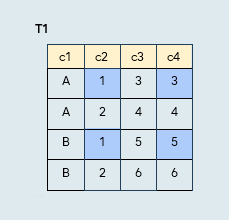
Syntax
CREATE PUBLICATION pub_combo
t1(c2, c4) WHERE (c2 = 1);
The publication includes:
- Only the specified tables
- Only data from the specified columns, from rows matching the specified condition
Catalogs:
- \dRp+ shows "Tables" (and columns and row filter expressions) of the publication
- pg_publication_rel catalog itemizes the tables of the publication
- pg_publication_rel.prrelid member gives the table oid in pg_class
- pg_publication_rel.prattrs member gives attribute numbers in pg_attribute
- pg_publication_rel.prqual member gives the (internal form) row filter expression
- pgclass.relnamespace member gives the schema oid in pg_namespace
There is nothing special about the System Catalog representation when there is a combination of CREATE PUBLICATION clauses; It is simply a merger of the different information at the same time.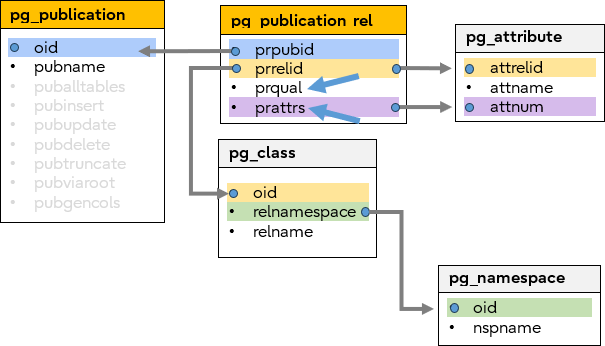
System catalogs
Generated columns
In case you are unfamiliar with generated columns…
# CREATE TABLE tg1(c1 int, c2 int,
                 gc1 int GENERATED ALWAYS AS (c1 + 50) STORED,
                 gc2 int GENERATED ALWAYS AS (c2 * 100) STORED);#

# INSERT INTO tg1 VALUES (1,1),(2,2),(3,3);

# SELECT * FROM tg1;
 c1 | c2 | gc1 | gc2
----+----+-----+-----
  1 |  1 | 51  | 100
  2 |  2 | 52  | 200
  3 |  3 | 53  | 300
(3 rows)
Example of a table with generated columns
# Defining a table with generated columns
- Default replication? By default, generated columns are NOT replicated. In the typical case where the subscriber and publisher tables are the same, there is no need for replication because subscriber-side generated column values will generate themselves.
- So why publish them at all? Because it can be used when the publisher table has generated columns, but the subscriber table does not. Recall from the earlier (table "shape") section that the publisher/subscriber tables are often identical, but they don’t have to be.
- What is allowed?
- Publisher (generated col)
 Subscriber (generated col)
  not allowed
 - Publisher (generated col) Subscriber (regular col)
 allowed since PG18
- Publisher (generated col)
Syntax
CREATE PUBLICATION pub_gencols
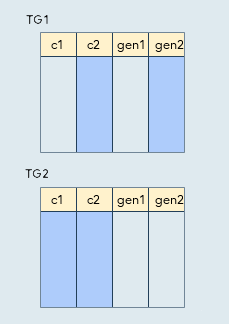
FOR TABLE tg1(c2, gen2), tg2 WITH (publish_generated_columns = none);
This example has specified tables, but the publish_generated_columns option also works for "FOR ALL TABLES" and FOR TABLES IN SCHEMA"
The publication includes:
- If there is a column list (e.g. TG1) then publish all the specified columns regardless of the publish_generated_columns In this example, "TG1.gen2" will be published even though the option is false.
- If there is no column list (e.g. TG2), publication of the generated column data depends on the publish_generated_columns In this example TG2 does not publish generated columns because the option is none. If the option was stored, then all columns (c1, c2, gen1, gen2) of TG2 would have been published.
Catalogs:
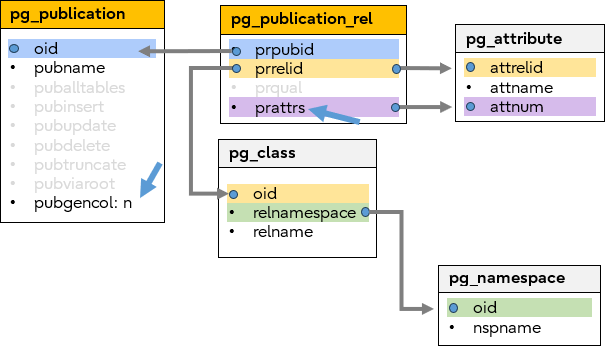
- \dRp+ shows "Tables" (and columns) of the publication, along with the option value
- pg_publication.pubgencols member gives the option value
- pg_publication_rel catalog itemizes the tables of the publication
- pg_publication_rel.prrelid member gives the table oids in pg_class
- pg_publication_rel.prattrs member gives attribute numbers in pg_attribute
- pg_class.relnamespace member gives the schema oid in pg_namespace
Use when: Subscriber has regular columns but publisher has generated columns.
Don't use when: Both sides have generated columns (subscriber will regenerate own values).
System catalogs
Examples:
test_pub=# \dRp+
                                    Publication pub_gencols
  Owner   | All tables | Inserts | Updates | Deletes | Truncates | Generated columns | Via root
----------+------------+---------+---------+---------+-----------+-------------------+----------
 postgres | f          | t       | t       | t       | t         | none              | f
Tables:
    "public.tg1" (c2, gen2)
    "public.tg2"

test_pub=# SELECT * FROM pg_publication;
-[ RECORD 1 ]+------------
oid          | 16431
pubname      | pub_gencols
pubowner     | 10
puballtables | f
pubinsert    | t
pubupdate    | t
pubdelete    | t
pubtruncate  | t
pubviaroot   | f
pubgencols   | n

test_pub=# SELECT * FROM pg_publication_rel;
  oid  | prpubid | prrelid | prqual | prattrs
-------+---------+---------+--------+---------
 16432 |   16431 |   16415 |        | 2 4
 16433 |   16431 |   16423 |        |
(2 rows)

test_pub=# SELECT oid, relname, relnamespace FROM pg_class WHERE oid IN (16415, 16423);
  oid  | relname | relnamespace
-------+---------+--------------
 16415 | tg1     |         2200
 16423 | tg2     |         2200
(2 rows)

test_pub=# SELECT oid, nspname FROM pg_namespace WHERE oid IN (2200);
 oid  | nspname
------+---------
 2200 | public
(1 row)

test_pub=# SELECT attrelid, attname, attnum FROM pg_attribute WHERE attrelid IN (16415) AND attnum IN (2,4);
 attrelid | attname | attnum
----------+---------+--------
    16415 | c2      |      2
    16415 | gen2    |      4
(2 rows)


test_pub=# SELECT * FROM pg_publication_tables;
   pubname   | schemaname | tablename | attnames  | rowfilter
-------------+------------+-----------+-----------+-----------
 pub_gencols | public     | tg1       | {c2,gen2} |
 pub_gencols | public     | tg2       | {c1,c2}   |
(2 rows)
Nothing (An "empty" Publication)
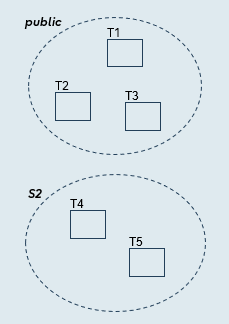
Syntax
CREATE PUBLICATION pub_nothing;
The publication includes:
- Nothing
Catalogs:
- \dRp+ shows default option values of the publication
Use for: Incremental setup, dynamic table management, testing. Add tables later via ALTER PUBLICATION.
According to the CREATE PUBLICATION documentation, this "is useful if tables or schemas are to be added later".
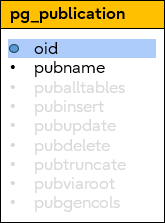
System catalogs
Examples:
test_pub=# \dRp+
                                    Publication pub_nothing
  Owner   | All tables | Inserts | Updates | Deletes | Truncates | Generated columns | Via root
----------+------------+---------+---------+---------+-----------+-------------------+----------
 postgres | f          | t       | t       | t       | t         | none              | f #
(1 row)

test_pub=# SELECT * FROM pg_publication;
-[ RECORD 1 ]+------------
oid          | 16434
pubname      | pub_nothing
pubowner     | 10
puballtables | f
pubinsert    | t
pubupdate    | t
pubdelete    | t
pubtruncate  | t
pubviaroot   | f
pubgencols   | n

test_pub=# SELECT * FROM pg_publication_rel;
 oid | prpubid | prrelid | prqual | prattrs
-----+---------+---------+--------+---------
(0 rows)

test_pub=# SELECT * FROM pg_publication_tables;
 pubname | schemaname | tablename | attnames | rowfilter
---------+------------+-----------+----------+-----------
(0 rows)
# All default values
Tailoring by DML operations
Publish or do not publish according to the DML operation.
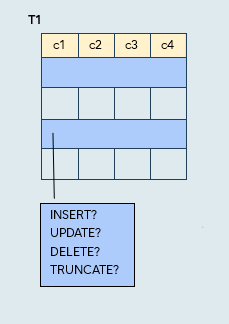
Syntax (some examples):
CREATE PUBLICATION pub_dml_insertonly
FOR TABLE t1 WITH (publish='insert');
CREATE PUBLICATION pub_dml_insertupdate
FOR TABLE t1 WITH (publish='insert,update');
CREATE PUBLICATION pub_dml_noinsert
FOR TABLE t1 WITH (publish='update,delete,truncate');
CREATE PUBLICATION pub_dml_notruncate
FOR TABLE t1 WITH (publish='insert,update,delete');
CREATE PUBLICATION pub_dml_default
FOR TABLE t1;
CREATE PUBLICATION pub_dml_none
FOR TABLE t1 WITH (publish='');
The publication includes:
- All schema, table, column data according to the CREATE PUBLICATION syntax
- Data for DML operations (INSERT, UPDATE, DELETE, TRUNCATE) is replicated only if the respective publish option is set
- Default: Everything
Catalogs and views:
- \dRp+ shows flags for the publish option values in effect
- pg_publication members give the option values
- pg_publication_rel catalog itemizes the tables of the publication
- pg_publication_rel.prrelid member gives the table oids in pg_class
- pg_class.relnamespace member gives the schema oid in pg_namespace
Use for: Audit logs (INSERT only), data warehouses (no TRUNCATE), compliance retention (no DELETE).
Gotcha: Subscription initial copy_data ignores this setting.
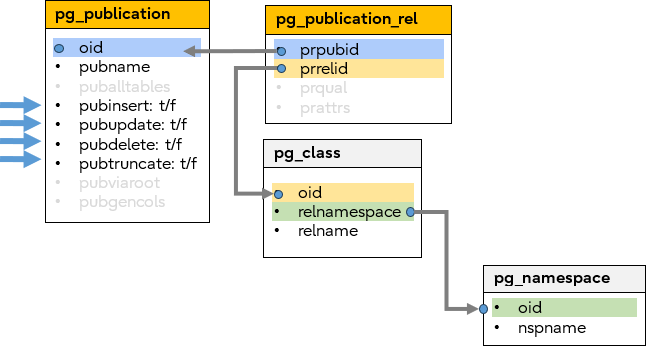
System catalogs
Examples:
test_pub=# \dRp+
                                  Publication pub_dml_default
  Owner   | All tables | Inserts | Updates | Deletes | Truncates | Generated columns | Via root
----------+------------+---------+---------+---------+-----------+-------------------+----------
 postgres | f          | t       | t       | t       | t         | none              | f
Tables:
    "public.t1"

                                 Publication pub_dml_insertonly
  Owner   | All tables | Inserts | Updates | Deletes | Truncates | Generated columns | Via root
----------+------------+---------+---------+---------+-----------+-------------------+----------
 postgres | f          | t       | f       | f       | f         | none              | f
Tables:
    "public.t1"

                                Publication pub_dml_insertupdate
  Owner   | All tables | Inserts | Updates | Deletes | Truncates | Generated columns | Via root
----------+------------+---------+---------+---------+-----------+-------------------+----------
 postgres | f          | t       | t       | f       | f         | none              | f
Tables:
    "public.t1"

                                  Publication pub_dml_noinsert
  Owner   | All tables | Inserts | Updates | Deletes | Truncates | Generated columns | Via root
----------+------------+---------+---------+---------+-----------+-------------------+----------
 postgres | f          | f       | t       | t       | t         | none              | f
Tables:
    "public.t1"

                                    Publication pub_dml_none
  Owner   | All tables | Inserts | Updates | Deletes | Truncates | Generated columns | Via root
----------+------------+---------+---------+---------+-----------+-------------------+----------
 postgres | f          | f       | f       | f       | f         | none              | f
Tables:
    "public.t1"

                                 Publication pub_dml_notruncate
  Owner   | All tables | Inserts | Updates | Deletes | Truncates | Generated columns | Via root
----------+------------+---------+---------+---------+-----------+-------------------+----------
 postgres | f          | t       | t       | t       | f         | none              | f
Tables:
    "public.t1"


test_pub=# SELECT * FROM pg_publication_rel;
  oid  | prpubid | prrelid | prqual | prattrs
-------+---------+---------+--------+---------
 16436 |   16435 |   16385 |        |
 16438 |   16437 |   16385 |        |
 16440 |   16439 |   16385 |        |
 16442 |   16441 |   16385 |        |
 16444 |   16443 |   16385 |        |
 16446 |   16445 |   16385 |        |
(6 rows)


test_pub=# SELECT oid, relname, relnamespace FROM pg_class WHERE oid IN (16385);
  oid  | relname | relnamespace
-------+---------+--------------
 16385 | t1      |         2200
(1 row)

test_pub=# SELECT oid, nspname FROM pg_namespace WHERE oid IN (2200);
 oid  | nspname
------+---------
 2200 | public
(1 row)

test_pub=# SELECT * FROM pg_publication_tables;
       pubname        | schemaname | tablename |   attnames    | rowfilter
----------------------+------------+-----------+---------------+-----------
 pub_dml_insertonly   | public     | t1        | {c1,c2,c3,c4} |
 pub_dml_insertupdate | public     | t1        | {c1,c2,c3,c4} |
 pub_dml_noinsert     | public     | t1        | {c1,c2,c3,c4} |
 pub_dml_notruncate   | public     | t1        | {c1,c2,c3,c4} |
 pub_dml_default      | public     | t1        | {c1,c2,c3,c4} |
 pub_dml_none         | public     | t1        | {c1,c2,c3,c4} |
(6 rows)
A simple DML filtering example
An example allowing only INSERT operations to be replicated:
| Publisher | Subscriber |
CREATE PUBLICATION pub FOR TABLE t1 |
|
CREATE SUBSCRIPTION sub |
|
INSERT INTO t1 VALUES (1,2,3,4);
|
Note – the INSERT is replicated because publish = 'insert' |
DELETE FROM t1 WHERE (c1 = 1); |
Note – the DELETE is NOT replicated |
SELECT * FROM t1; |
SELECT * FROM t1; |
Publication parameters for partition tables
 Partition table replication is governed by the publish_via_partition_root boolean parameter. This parameter is a bit different because it does not determine WHAT data is published; it describes HOW the data is published.
The following examples demonstrate how using this parameter changes the replication behaviour.
When the parameter is false
CREATE PUBLICATION mypub … WITH (publish_via_partition_root=false);
When the parameter is false, partitions are replicated to subscriber tables of the same name. In this example the subscriber-side has same partition tables as the publisher side. We could also have just had 3 regular tables at the subscriber-side and not have a T_root table at all.
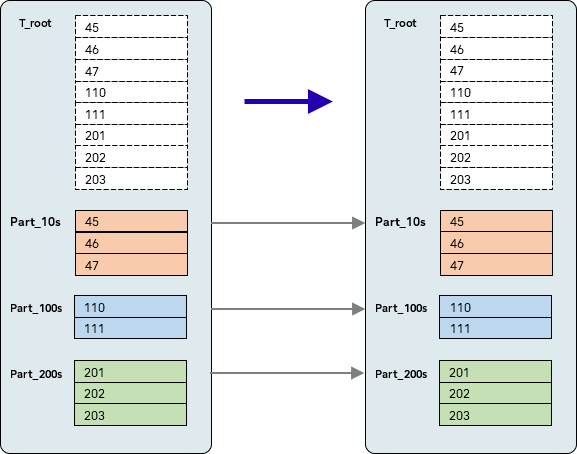
Example: publish_via_partition_root=false
When the parameter is true
CREATE PUBLICATION mypub … WITH (publish_via_partition_root=true);
When parameter is true, all the partition data is replicated to a single table with the same name as the partition root of the publisher. It means that the subscriber-side root table must be present, but that is the only requirement – e.g. in this first example, the subscriber root table is just a regular table with no partitions at all.
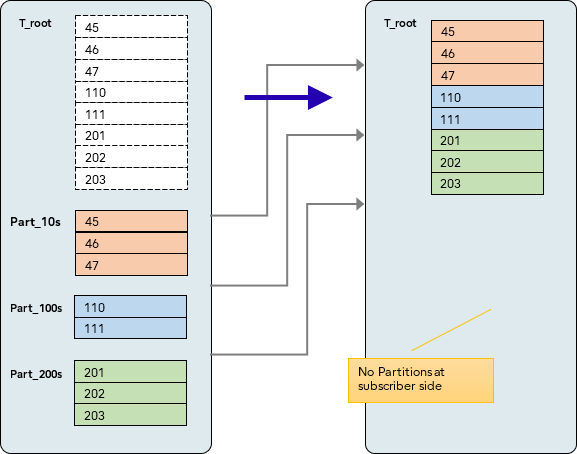
Example 1: publish_via_partition_root=true
CREATE PUBLICATION mypub … WITH (publish_via_partition_root=true)
In the second example below the parameter is true still, but now the subscriber root table is not a regular table – it too is a partitioned table. Notice that because replication is through the T_root, the subscriber-side partitions here are different to those on the publisher.
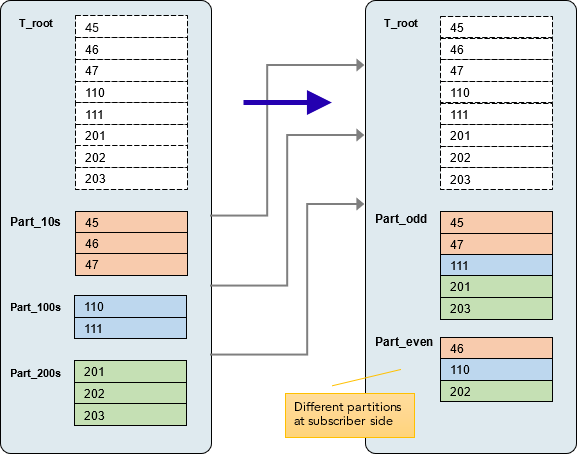
Example 2: publish_via_partition_root=true
Publication command keywords for descendant tables
CREATE PUBLICATION mypub FOR TABLE ONLY employee;
The ONLY keyword indicates that only the Parent table is published, but not any descendant/Child tables.
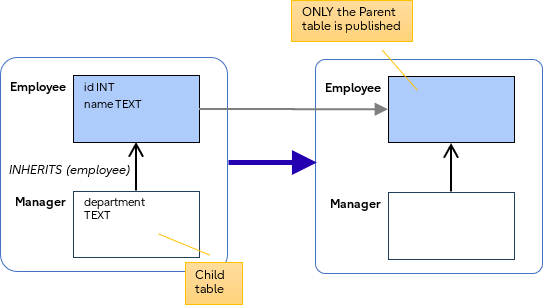
Example: replicating ONLY a parent table
In the following example, the optional '*' indicates that the parent is published as well as all descendant tables.
CREATE PUBLICATION mypub FOR TABLE employee *;
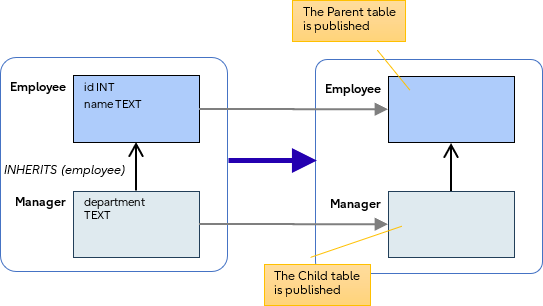
Example: replicating the parent and descendant tables
Combinations
Where they are compatible, the various CREATE PUBLICATION clauses can be combined in any order.
The following matrix gives an idea of what is possible:
| FOR ALL TABLES | TABLES IN SCHEMA s | TABLE t | TABLE t (column list) | WHERE (row filter) | WITH (publish_gen cols) | WITH (publish DML ops) | |
| FOR ALL TABLES |  |
|
|
|
|
 |
|
| TABLES IN SCHEMA s | |
|
|
|
|
|
|
| TABLE t | |
|
|
|
|
|
|
| TABLE t (column list) | |
|
|
|
|
|
|
| WHERE (row filter) | |
|
|
|
|
|
|
| WITH (publish generated cols) | |
|
|
|
|
|
|
| WITH (publish DML ops) | |
|
|
|
|
|
|
Note: Row filters and column lists can only be applied to specific tables, not to FOR ALL TABLES or TABLES IN SCHEMA.
Combining multiple clauses can result in powerful (albeit complicated) publications.
Syntax flexibility
- TABLES IN SCHEMA and TABLES can be combined in any order:
CREATE PUBLICATION pub FOR TABLES IN SCHEMA s2, TABLE t1;
CREATE PUBLICATION pub FOR TABLE t1, TABLES IN SCHEMA s2;
- Specifying the same SCHEMA or same TABLE multiple times is permitted.
CREATE PUBLICATION pub FOR TABLES IN SCHEMA s2, s2, s2;
CREATE PUBLICATION pub FOR TABLE t1, t1, t1;
But, specifying different column lists for the same table is not permitted:
CREATE PUBLICATION pub FOR TABLE t1, t1(c1), t1(c2);

ERROR: conflicting or redundant column lists for table "t1" - If the TABLE is a member of a SCHEMA, then it is "absorbed" by the schema clause:
CREATE PUBLICATION pub FOR TABLES IN SCHEMA s2, TABLE s2.t4;
- There are "short" and "long" ways to express exactly the same combinations:
CREATE PUBLICATION pub FOR TABLE t1, t2;
CREATE PUBLICATION pub FOR TABLE t1, TABLE t2;
CREATE PUBLICATION pub FOR TABLES IN SCHEMA public, s2;
CREATE PUBLICATION pub FOR TABLES IN SCHEMA public, TABLES IN SCHEMA s2;
- To specify row filters for multiple tables, do so per table:
CREATE PUBLICATION pub FOR TABLE t1 WHERE (c1 > 2), t2 WHERE (c3 = 6);
- The WITH clause allows multiple options to be specified at the same time:
CREATE PUBLICATION pub FOR TABLE t1 WITH (publish = 'insert', publish_generated_columns=stored);
Quick reference
Choose your publication type based on your needs:
| Requirement | Command |
| Need everything? |
CREATE PUBLICATION … FOR ALL TABLES |
| Organize by schema? |
CREATE PUBLICATION … FOR TABLES IN SCHEMA |
| Know exact tables? |
CREATE PUBLICATION … FOR TABLE t1, t2, t3 |
| Exclude sensitive columns? ⇒ Add column list |
CREATE PUBLICATION … FOR TABLE t1(col1, col2) |
| Filter by geography/tenant/time? ⇒ Add WHERE clause |
CREATE PUBLICATION … FOR TABLE t1 WHERE (condition) |
| Control which operations replicate? |
CREATE PUBLICATION … WITH (publish='...') |
| Handle partitions differently? |
CREATE PUBLICATION … WITH (publish_via_partition_root=true) |
| Setting up incrementally? ⇒ Start empty, then ALTER |
CREATE PUBLICATION …; ALTER PUBLICATION … |
Quick reference table
Conclusion
 This concludes our in-depth exploration of the CREATE PUBLICATION command syntax. By now, you should recognize that this command can vary from straightforward to highly complex.
Additionally, as briefly noted, there are nuanced interactions between publications and subscriptions, where decisions made during CREATE PUBLICATION can significantly impact the outcome.
For more complex publications, it is advisable to experiment with test data to ensure the behaviour aligns with your expectations.
For the future

The CREATE PUBLICATION command continues to evolve.
The following are currently under development and may become part of PG19.
- SEQUENCES
- CREATE PUBLICATION … FOR ALL SEQUENCES
- CREATE PUBLICATION … FOR SEQUENCES IN SCHEMA s1
- CREATE PUBLICATION … FOR SEQUENCE seq1,seq2,seq3
- EXCEPT (table list)
- CREATE PUBLICATION … FOR ALL TABLES EXCEPT (t1,t2,t3)
- CREATE PUBLICATION … FOR TABLES IN SCHEMA s1 EXCEPT (t1,t2,t3)
- EXCEPT (column list)
- CREATE PUBLICATION … FOR TABLE t1 EXCEPT (c1,c2,c3)
Further reading
This blog was primarily all about the CREATE PUBLICATION command and all its variations. Naturally, there are lots of topics that have overlap with this area of functionality
Here are some related topics for further reading:
- CREATE SUBSCRIPTION
Of course, there is the other side of the coin to CREATE PUBLICATION.
There are also some special considerations for how Subscriptions work together with Publications:- e.g. Subscription with initial copy_data=true may ignore Publication Row Filtering
- e.g. The Publication ‘publish’ option is for DML only; it has no effect for Subscription initial data synchronization
- e.g. When a Subscription subscribes multiple Publications the row filters all get merged
- e.g. When a Subscription subscribes the same table from multiple Publications columns list must be identical
- ALTER PUBLICATION
We saw already that there is a use-case for creating an empty Publication up-front and then using ALTER PUBLICATION to add members to it. After altering the Publication, the Subscriber may need to do REFRESH PUBLICATION to get the changes. - ALTER SUBSCRIPTION … REFRESH PUBLICATION
Might be needed if the publication changes, or when using FOR ALL TABLES future tables and tables have been added after the Subscription is already created. - DDL Replication
Currently there is no implementation for PostgreSQL, but there have been various proposals for this functionality. - REPLICA IDENTITY
A table’s REPLICA IDENTITY defines what columns are necessary to uniquely identify a row of table data. If a table without a replica identity is added to a publication that replicates UPDATE or DELETE operations, then subsequent UPDATE or DELETE operations will cause an error on the publisher. You might encounter Replica Identity errors when publishing column lists if the necessary columns are not published.
Where to find more information

- PGDU 2025 presentations
- PostgreSQL documentation page for CREATE PUBLICATION
- PostgreSQL documentation page for PUBLICATION Column Lists
- PostgreSQL documentation page for PUBLICATION Row Filters
- PostgreSQL documentation for rules about REPLICA IDENTITY and about tailoring for DML operations
- PostgreSQL documentation for how to specify a REPLICA IDENTITY for a table
- Github development enhancement FOR ALL SEQUENCES
- psql-hackers mailing list for EXCEPT enhancements