



PostgreSQL 19 introduces FOR ALL TABLES EXCEPT (TABLE …) for logical replication publications.
It removes the need for workarounds, records exclusions cleanly in existing system catalogs, integrates with psql describe commands, and has well-defined semantics for partitions and table inheritance.
PostgreSQL 19 adds FOR ALL TABLES EXCEPT, giving logical replication publications a cleaner way to exclude specific tables while preserving clear behavior for catalogs, partitions, and inheritance.
Background
 The CREATE PUBLICATION … FOR ALL TABLES; syntax has been available since PostgreSQL 13. However, it is an all-or-nothing choice.
If a database contains 100 tables but only 98 should be published, PostgreSQL provided only awkward workarounds.
Two common workarounds were available:
- Separate schemas
Put tables not to be published in a different schema.
CREATE PUBLICATION … FOR TABLES IN SCHEMA sch_publish;
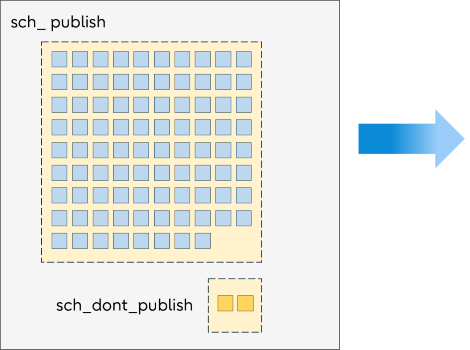 This approach requires ongoing schema discipline and is often impractical for existing databases.
 - Explicit table lists
Name the tables to be published (omitting those you don’t want published)
CREATE PUBLICATION … FOR TABLE tab1, tab2, tab3, … , tab97, tab98;
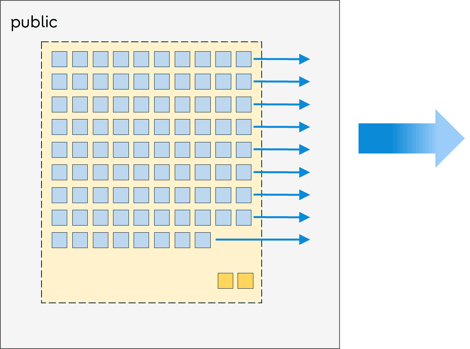 This approach has an important limitation: tables created after the publication is defined are not published automatically.
Meet the new EXCEPT clause
PostgreSQL 19 introduces a new EXCEPT clause:
CREATE PUBLICATION … FOR ALL TABLES EXCEPT (TABLE tab99, tab100);
In this article, let’s discover more about this new EXCEPT clause, how it is represented internally, and how to use it.
 Information in this article was accurate as of May 2026 (after PostgreSQL 19 feature freeze), but some details may change before release.
New syntax
There are syntax changes for CREATE PUBLICATION and for ALTER PUBLICATION.
CREATE PUBLICATION syntax
CREATE PUBLICATION - Syntax from PostgreSQL Documentation (some parts are omitted)

CREATE PUBLICATION name
  [ FOR { publication_object [, ... ] | publication_all_object [, ... ] } ]
  [ WITH ( publication_parameter [= value] [, ... ] ) ]

and publication_all_object is one of:
  ALL TABLES [ EXCEPT ( except_table_object [, ... ] ) ]
  ALL SEQUENCES

and except_table_object is:
  TABLE table_object [, ... ]

and table_object is:
  [ ONLY ] table_name [ * ]
ALTER PUBLICATION syntax
ALTER PUBLICATION - Syntax from PostgreSQL Documentation (some parts are omitted)

ALTER PUBLICATION name
  SET { publication_object [, ...] | publication_all_object [, ... ] }

and publication_all_object is one of:
ALL TABLES [ EXCEPT ( except_table_object [, ... ] ) ]
  ALL SEQUENCES

and except_table_object is:
  TABLE table_object [, ... ]

and table_object is:
  [ ONLY ] table_name [ * ]
System catalogs used by publications
No new catalogs were introduced.
Internal representation of publications
 There are 3 main catalogs that tie everything together for publications:
- pg_publication
- pg_publication_namespace
- pg_publication_rel
These are linked together as shown in the following diagram. Every kind of publication can be represented by these catalogs, but note that not all catalogs are required for all CREATE PUBLICATION commands – e.g. the pg_publication_namespace is only used to describe a FOR TABLES IN SCHEMA publication.
System Catalogs are linked together using the oid members as highlighted by the colour-coding below.
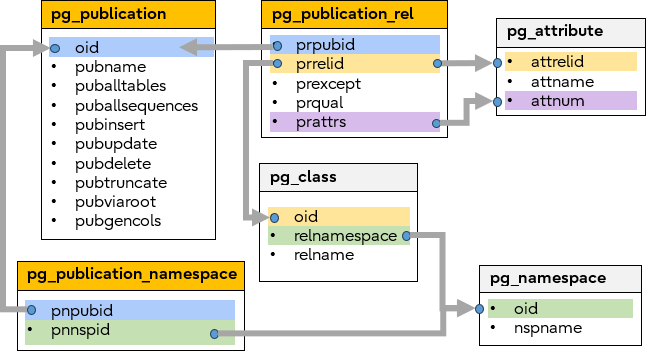
System catalogs
Internal representation of EXCEPT (TABLE …)
The FOR ALL TABLES EXCEPT (TABLE …) syntax is represented using a subset of system catalogs as follows:
- pg_publication
- Because it is FOR ALL TABLES the boolean member puballtables = true
- pg_publication_rel
- EXCEPT tables (if any) are flagged by boolean member prexcept = true
- EXCEPT tables have no Row-filter or Column-list so prqual and prattrs are always NULL
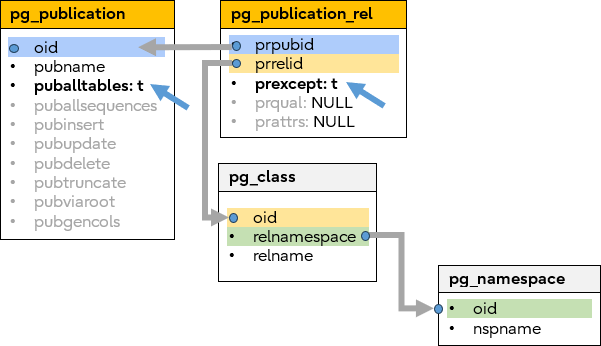
System catalogs
Note that the pg_publication_rel catalog is also used to record the specified tables of the CREATE PUBLICATION … FOR TABLE syntax, however FOR ALL TABLES and FOR TABLE clauses cannot coexist.
To summarize:
| Publication type | pg_publication | pg_publication_rel | ||
| puballtables | prexcept | prqual | prattrs | |
| FOR TABLE | false | false | NULL or Row-Filter |
NULL or Column-List |
| FOR ALL TABLES EXCEPT (TABLE ...) | true | true | NULL | NULL |
| FOR ALL TABLES | true | Catalog will be empty | ||
psql describe commands
PostgreSQL 19 extends the \dRp+ and \d describe commands to show the excluded table information.
For example,
-- create some test tables
CREATE TABLE t1(a int);
CREATE TABLE t2(a int);
CREATE TABLE t3(a int);

-- pub1 publishes all tables except t1 and t2
-- pub2 publishes tables t2 and t3
CREATE PUBLICATION pub1 FOR ALL TABLES EXCEPT (TABLE t1, t2);
CREATE PUBLICATION pub2 FOR TABLE t2, t3;

-- describe the publications
\dRp+ pub1
                                                       Publication pub1
  Owner   | All tables | All sequences | Inserts | Updates | Deletes | Truncates | Generated columns | Via root | Description
----------+------------+---------------+---------+---------+---------+-----------+-------------------+----------+-------------
 postgres | t          | f             | t       | t       | t       | t         | none              | f        |
Except tables:
    "public.t1" 1
    "public.t2"

\dRp+ pub2
                                                       Publication pub2
  Owner   | All tables | All sequences | Inserts | Updates | Deletes | Truncates | Generated columns | Via root | Description
----------+------------+---------------+---------+---------+---------+-----------+-------------------+----------+-------------
 postgres | f          | f             | t       | t       | t       | t         | none              | f        |
Tables:
    "public.t2"
    "public.t3"

 -- describe the tables
\d t1
                 Table "public.t1"
 Column |  Type   | Collation | Nullable | Default
--------+---------+-----------+----------+---------
 a      | integer |           |          |
Excluded from publications: 2
    "pub1"

\d t2
                 Table "public.t2"
 Column |  Type   | Collation | Nullable | Default
--------+---------+-----------+----------+---------
 a      | integer |           |          |
Included in publications:
    "pub2"
Excluded from publications: 3
    "pub1"

\d t3
Table "public.t3"
                 Table "public.t3"
 Column |  Type   | Collation | Nullable | Default
--------+---------+-----------+----------+---------
 a      | integer |           |          |
Included in publications:
    "pub1"
    "pub2"
1EXCEPT tables for publication pub1 2Table t1 is excluded from publication pub1 3Table t2 is excluded from publication pub1
Altering which tables are excluded
The ALTER PUBLICATION … SET ALL TABLES command replaces the currently excluded tables. It does not merge with existing table exclusions.For example,
-- create some test tables
CREATE TABLE t1(a int);
CREATE TABLE t2(a int);
CREATE TABLE t3(a int);

-- publish all tables except t1 and t2
CREATE PUBLICATION pub1 FOR ALL TABLES EXCEPT (TABLE t1, t2);
\dRp+ pub1
                                                       Publication pub1
  Owner   | All tables | All sequences | Inserts | Updates | Deletes | Truncates | Generated columns | Via root | Description
----------+------------+---------------+---------+---------+---------+-----------+-------------------+----------+-------------
 postgres | t          | f             | t       | t       | t       | t         | none              | f        |
Except tables:
    "public.t1"
    "public.t2"

-- later, we decide that t2 can be published, but t3 cannot be
ALTER PUBLICATION pub1 SET ALL TABLES EXCEPT (TABLE t1, t3);
\dRp+ pub1
                                                       Publication pub1
  Owner   | All tables | All sequences | Inserts | Updates | Deletes | Truncates | Generated columns | Via root | Description
----------+------------+---------------+---------+---------+---------+-----------+-------------------+----------+-------------
 postgres | t          | f             | t       | t       | t       | t         | none              | f        |
Except tables:
    "public.t1"
    "public.t3"

 -- clear all table exclusions, so everything is published
ALTER PUBLICATION pub1 SET ALL TABLES;
\dRp+ pub1
                                                       Publication pub1
  Owner   | All tables | All sequences | Inserts | Updates | Deletes | Truncates | Generated columns | Via root | Description
----------+------------+---------------+---------+---------+---------+-----------+-------------------+----------+-------------
 postgres | t          | f             | t       | t       | t       | t         | none              | f        |
(1 row)


-- now, exclude just table t2 (note, previously there were no excluded tables)
ALTER PUBLICATION pub1 SET ALL TABLES EXCEPT (TABLE t2);
\dRp+ pub1
                                                       Publication pub1
  Owner   | All tables | All sequences | Inserts | Updates | Deletes | Truncates | Generated columns | Via root | Description
----------+------------+---------------+---------+---------+---------+-----------+-------------------+----------+-------------
 postgres | t          | f             | t       | t       | t       | t         | none              | f        |
Except tables:
    "public.t2"
Syntax flexibility
The new EXCEPT (TABLE …) accepts the same flexible syntax rules as the FOR TABLE when specifying the table-list.
Specifying the same TABLE multiple times is permitted (but has no practical effect):
CREATE PUBLICATION pub FOR ALL TABLES EXCEPT (TABLE t1, t1, t1);
ALTER  PUBLICATION pub SET ALL TABLES EXCEPT (TABLE t1, t1, t1);
There are short and long ways to express exactly the excluded table list:
 -- these are all equivalent
CREATE PUBLICATION pub FOR ALL TABLES EXCEPT (TABLE t1, TABLE t2, TABLE t3);
CREATE PUBLICATION pub FOR ALL TABLES EXCEPT (TABLE t1, t2, TABLE t3);
CREATE PUBLICATION pub FOR ALL TABLES EXCEPT (TABLE t1, TABLE t2, t3);
CREATE PUBLICATION pub FOR ALL TABLES EXCEPT (TABLE t1, t2, t3);

 -- these are all equivalent
ALTER PUBLICATION pub SET ALL TABLES EXCEPT (TABLE t1, TABLE t2, TABLE t3);
ALTER PUBLICATION pub SET ALL TABLES EXCEPT (TABLE t1, t2, TABLE t3);
ALTER PUBLICATION pub SET ALL TABLES EXCEPT (TABLE t1, TABLE t2, t3);
ALTER PUBLICATION pub SET ALL TABLES EXCEPT (TABLE t1, t2, t3);
Excluding partitions
Allowing exclusions of individual Partitions has potential to become extremely complex and introduce ambiguities.
PostgreSQL therefore implements the simple rule:
Individual partitions cannot be excluded.Only the partitioned root table may appear in the EXCEPT. Excluding the partitioned root table also means all partitions in the tree beneath it are also excluded.
For example, let’s assume a partitioned table tree structure like this which is partitioned by a single column:
- root
- part1 range (0… 50)
- part1_p1 range (0… 25)
- part1_p2 range (25… 50)
- part2 range (50… 100)
- part2_p1 range (50… 75)
- part2_p2 range (75… 100)
- part1 range (0… 50)
| Publisher | Subscriber |
-- Create the partition table tree CREATE TABLE root(a int) PARTITION BY RANGE (a); CREATE TABLE part1 PARTITION OF root FOR VALUES FROM (0) TO (50) PARTITION BY RANGE (a); CREATE TABLE part1_p1 PARTITION OF part1 FOR VALUES FROM (0) TO (25); CREATE TABLE part1_p2 PARTITION OF part1 FOR VALUES FROM (25) TO (50); CREATE TABLE part2 PARTITION OF root FOR VALUES FROM (50) TO (100) PARTITION BY RANGE (a); CREATE TABLE part2_p1 PARTITION OF part2 FOR VALUES FROM (50) TO (75); CREATE TABLE part2_p2 PARTITION OF part2 FOR VALUES FROM (75) TO (100); |
-- Create normal tables to match the publisher-side Partition tree CREATE TABLE root(a int); CREATE TABLE part1(a int); CREATE TABLE part1_p1(a int); CREATE TABLE part1_p2(a int); CREATE TABLE part2(a int); CREATE TABLE part2_p1(a int); CREATE TABLE part2_p2(a int); |
-- Partitions are not supported by EXCEPT CREATE PUBLICATION pub1 FOR ALL TABLES EXCEPT (TABLE part2_p1); ERROR: cannot specify relation "part2_p1" in the publication EXCEPT clause DETAIL: This operation is not supported for individual partitions. CREATE PUBLICATION pub1 FOR ALL TABLES EXCEPT (TABLE part1); ERROR: cannot specify relation "part1" in the publication EXCEPT clause DETAIL: This operation is not supported for individual partitions. |
— |
-- The partitioned root table is supported by EXCEPT CREATE PUBLICATION pub1 FOR ALL TABLES EXCEPT (TABLE root); |
— |
| — |
CREATE SUBSCRIPTION sub1 CONNECTION 'dbname=test_pub' PUBLICATION pub1; |
-- None of this will be published because excluding the -- root means the whole Partition tree is excluded. INSERT INTO root VALUES (20), (40), (60), (80); |
— |
SELECT * FROM part1_p1, part1_p2, part2_p1, part2_p2; a | a | a | a ----+----+----+---- 20 | 40 | 60 | 80 (1 row) |
SELECT * FROM part1_p1, part1_p2, part2_p1, part2_p2; a | a | a | a ---+---+---+--- (0 rows) |
-- Using \d confirms the partitioned root table is excluded.
\d root
          Partitioned table "public.root"
 Column |  Type   | Collation | Nullable | Default
--------+---------+-----------+----------+---------
 a      | integer |           |          |
Partition key: RANGE (a)
Excluded from publications:
"pub1"
Number of partitions: 2 (Use \d+ to list them.)
|
— |
-- Using \d also confirms all partitions are excluded. \d part* Partitioned table "public.part1" Column | Type | Collation | Nullable | Default --------+---------+-----------+----------+--------- a | integer | | | Partition of: root FOR VALUES FROM (0) TO (50) Partition key: RANGE (a) Excluded from publications: "pub1" Number of partitions: 2 (Use \d+ to list them.) Table "public.part1_p1" Column | Type | Collation | Nullable | Default --------+---------+-----------+----------+--------- a | integer | | | Partition of: part1 FOR VALUES FROM (0) TO (25) Excluded from publications: "pub1" Table "public.part1_p2" Column | Type | Collation | Nullable | Default --------+---------+-----------+----------+--------- a | integer | | | Partition of: part1 FOR VALUES FROM (25) TO (50) Excluded from publications: "pub1" Partitioned table "public.part2" Partitioned table "public.part2" Column | Type | Collation | Nullable | Default --------+---------+-----------+----------+--------- a | integer | | | Partition of: root FOR VALUES FROM (50) TO (100) Partition key: RANGE (a) Excluded from publications: "pub1" Number of partitions: 2 (Use \d+ to list them.) Table "public.part2_p1" Table "public.part2_p1" Column | Type | Collation | Nullable | Default --------+---------+-----------+----------+--------- a | integer | | | Partition of: part2 FOR VALUES FROM (50) TO (75) Excluded from publications: "pub1" Table "public.part2_p2" Table "public.part2_p2" Column | Type | Collation | Nullable | Default --------+---------+-----------+----------+--------- a | integer | | | Partition of: part2 FOR VALUES FROM (75) TO (100) Excluded from publications: "pub1" |
— |
Because partitions are not supported by EXCEPT, it follows that you cannot ALTER a currently excluded normal table to become a partition.Descendant tables
When using Parent/Child table inheritance (i.e. descendant tables) you can specify which of the tables will be included in the publication by using ONLY and * .
Similarly, you can specify which of those tables will be excluded from the publication.
| EXCEPT clause | Parent table excluded? | Child tables excluded? |
| EXCEPT (TABLE parent) | Yes | Yes |
| EXCEPT (TABLE parent *) | ||
| EXCEPT (TABLE ONLY parent) | Yes | No |
Publish every table
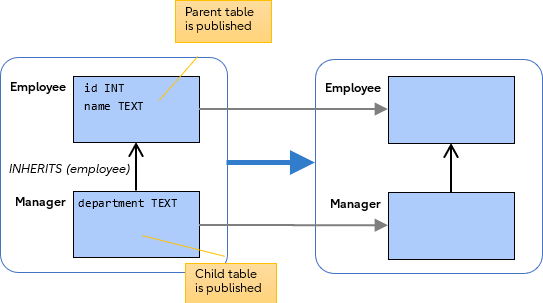
A normal FOR ALL TABLES publishes every table.
Consider the following Employee/Manager tables:
 -- create parent/child tables
CREATE TABLE employee(id int, name text);
CREATE TABLE manager(department text) INHERITS(employee);

-- publish everything
CREATE PUBLICATION mypub FOR ALL TABLES;
Exclude the parent table plus the descendant tables (default)
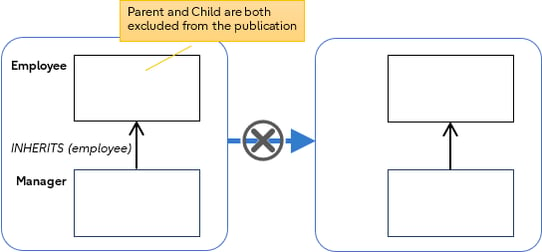
If ONLY is not used, then the default behaviour is that the Parent table plus all descendant Child tables are excluded.
You can also indicate this explicitly using the optional * qualifier.
CREATE PUBLICATION mypub FOR ALL TABLES EXCEPT (TABLE employee *);
Exclude only the parent table
Using the ONLY keyword indicates that only the named table is excluded. Descendants are unaffected.
CREATE PUBLICATION mypub FOR ALL TABLES EXCEPT (TABLE ONLY employee);
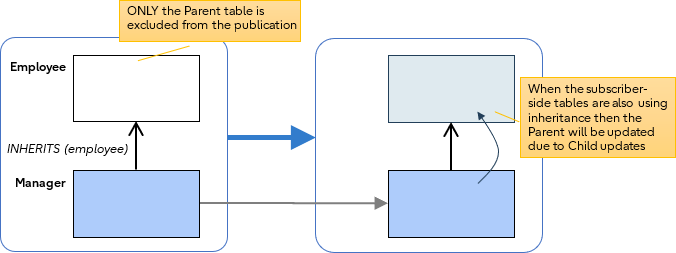 Excluding ONLY the parent is just preventing the parent table from being published – i.e. any direct INSERTS to the employee table will not get published. However, INSERTS to the manager (child) table are still published. This means if the schema is same at the subscriber-side (using parent/child inheritance) then you will still see changes reflected in the inherited employee table due to the manager updates.
For example:
| Publisher | Subscriber |
CREATE TABLE employee(id int, name text); CREATE TABLE manager(department text) INHERITS(employee); |
CREATE TABLE employee(id int, name text); CREATE TABLE manager(department text) INHERITS(employee); |
-- Exclude ONLY the employee table
CREATE PUBLICATION pub1 FOR ALL TABLES EXCEPT (TABLE ONLY employee);
|
|
CREATE SUBSCRIPTION sub1 CONNECTION 'dbname=test_pub' PUBLICATION pub1; |
|
-- These will not be published because employee is excluded INSERT INTO employee VALUES (1, 'Ajin'); INSERT INTO employee VALUES (2, 'Peter'); |
|
-- This will be published because manager was not excluded INSERT INTO manager VALUES (3, 'Zeus', 'Postgres OSS Team'); |
|
SELECT * FROM employee; id | name ----+------- 1 | Ajin 2 | Peter 3 | Zeus (3 rows) |
-- This has data because of the manager descendant SELECT * FROM employee; id | name ----+------ 3 | Zeus (1 row) |
SELECT * FROM manager; id | name | department ----+------+--------------- 3 | Zeus | Postgres OSS Team (1 row) |
SELECT * FROM manager; id | name | department ----+------+--------------- 3 | Zeus | Postgres OSS Team (1 row) |
Exclude only a descendant table
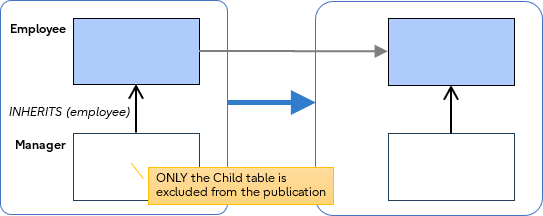
Excluding ONLY descendant tables is no different to just excluding a regular table.
CREATE PUBLICATION mypub FOR ALL TABLES EXCEPT (TABLE ONLY manager);
Conclusion
 PostgreSQL has introduced new publication syntax FOR ALL TABLES EXCEPT (TABLE …)
Internally, the excluded tables are recorded in the pg_publication_rel System Catalog (member prexcept = true).
The basic syntax and behaviour of excluding a normal table is self-explanatory, but partition and inheritance handling are slightly trickier:
- Partitions
- Individual Partition tables cannot be excluded
- Exclude the partitioned root table, means all partitions in the tree are also excluded
- Descendant tables
- The ONLY keyword and * qualifier can be used, with the usual meanings.
For the future
The new EXCEPT (TABLE …) clause is just the starting point. The following table shows how exclusion syntax is expected to expand.
Some variants are already in early development for PostgreSQL 20.
Syntax and version targets for future items reflect current discussion and may change before release.| CREATE PUBLICATION pub1 |
FOR ALL TABLES | ; | PG13 |
| EXCEPT (TABLE t1,t2); | PG19 | ||
| EXCEPT (TABLE t1,t2, TABLES IN SCHEMA s1,s2); | --- | ||
| FOR ALL SEQUENCES | ; | PG19 | |
| EXCEPT (SEQUENCE seq1, seq2); | PG20.dev | ||
| FOR TABLE | t1; | PG13 | |
| t1 (c1, c2) | PG15 | ||
| t1 EXCEPT (c99, c100); | --- | ||
| FOR TABLES IN SCHEMA | s1; | PG15 | |
| s1 EXCEPT (TABLE t1,t2); | PG20.dev |
Become involved! Participate in online discussions and post reviews on the psql-hackers mailing list.
Where to find more information
- Blog Tailoring CREATE PUBLICATION for Logical Replication – A complete syntax guide
- PostgreSQL documentation: CREATE PUBLICATION
- GitHub source commits
- 04-MAR-2026. Allow table exclusions in publications via EXCEPT TABLE
- 20-MAR-2026. Add support for EXCEPT TABLE in ALTER PUBLICATION
- 31-MAR-2026. Change syntax of EXCEPT TABLE clause in publication commands
- 01-APR-2026. Fix miscellaneous issues in EXCEPT publication clause
- psql-hackers mailing list: Skipping schema changes in publication
- Future development discussions