




Why access control matters for sensitive customer data
 Recent events continue to highlight the importance of carefully controlling access to customer information. Recently an Australia Utility company announced that it was investigating a potential security incident involving unauthorized access to some customer data. According to the company's statement, the incident may have involved unauthorized access to customer information, demonstrating that even large organizations can face significant data security risks.
This serves as a reminder that organizations should apply the principle of least privilege, ensuring users can access only the information required to perform their roles. By limiting access to customer data, businesses can reduce the potential impact of security incidents and better protect individuals' privacy.
The following production-style DBA scenario illustrates the challenge:
In a financial services company, an operations team requires limited access to sensitive customer records in Fujitsu Enterprise Postgres. While creating a Data Masking policy, the DBA discovers that the email column uses the unsupported text data type and the document column uses bytea, which is also outside the documented masking matrix. This article examines the challenge from both a short-term containment and long-term remediation perspective, demonstrating how immediate access controls can reduce exposure, while a maintainable Data Masking and role-based access model is established.

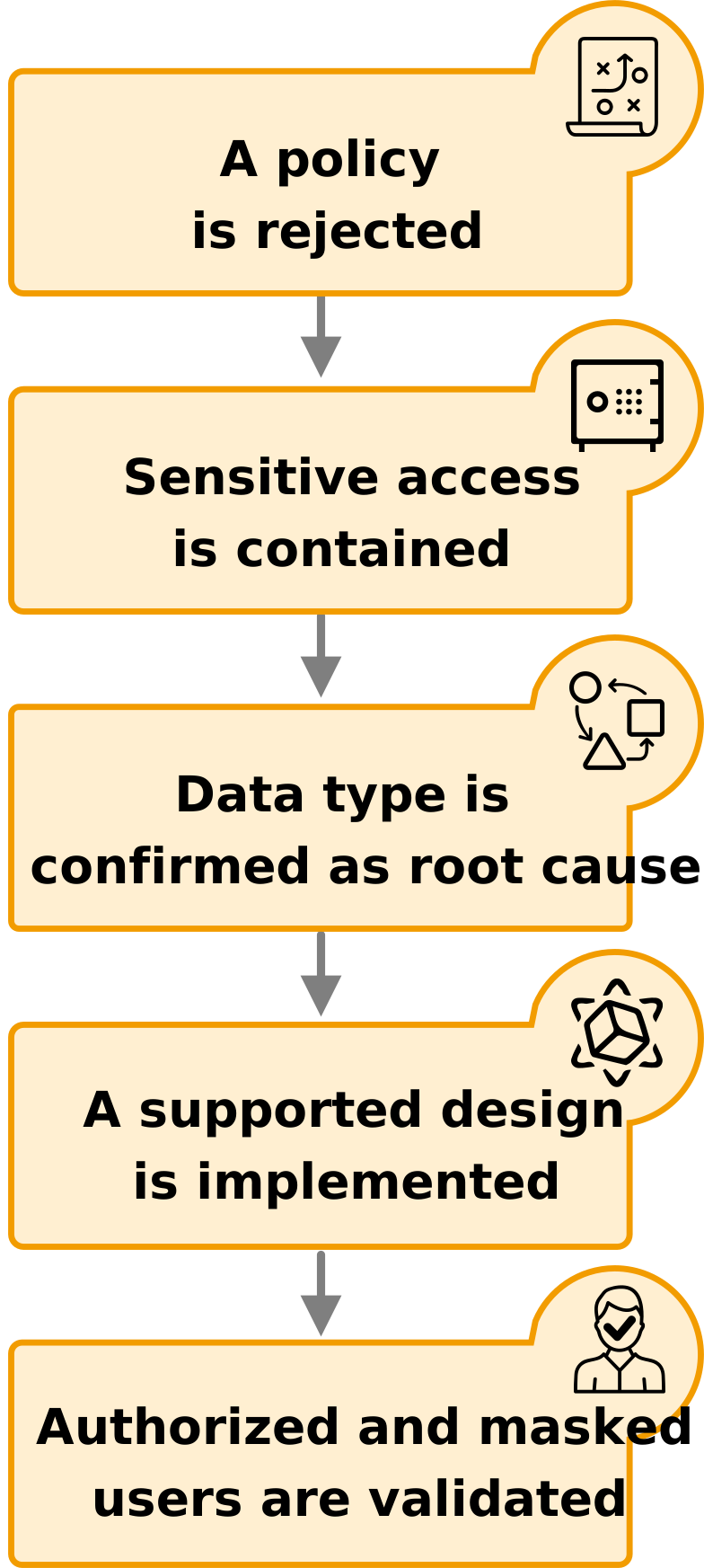
A production-style DBA workflow
How Data Masking makes the decision
Data Masking changes values as they are returned from a query while leaving the stored source values unchanged. A policy identifies the table, the Boolean condition and the target columns. When the condition evaluates to true, Fujitsu Enterprise Postgres returns the masked representation; when it evaluates to false, the original value is returned.
Only one masking policy can be created for a table, but several supported columns can be added to that policy. This makes the policy condition especially important: it becomes the shared decision point for every masking target in the table.
How the default-deny role policy decides what a user sees
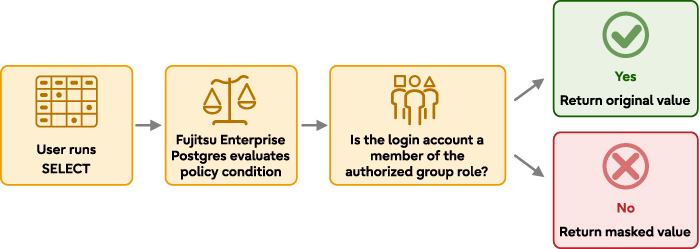
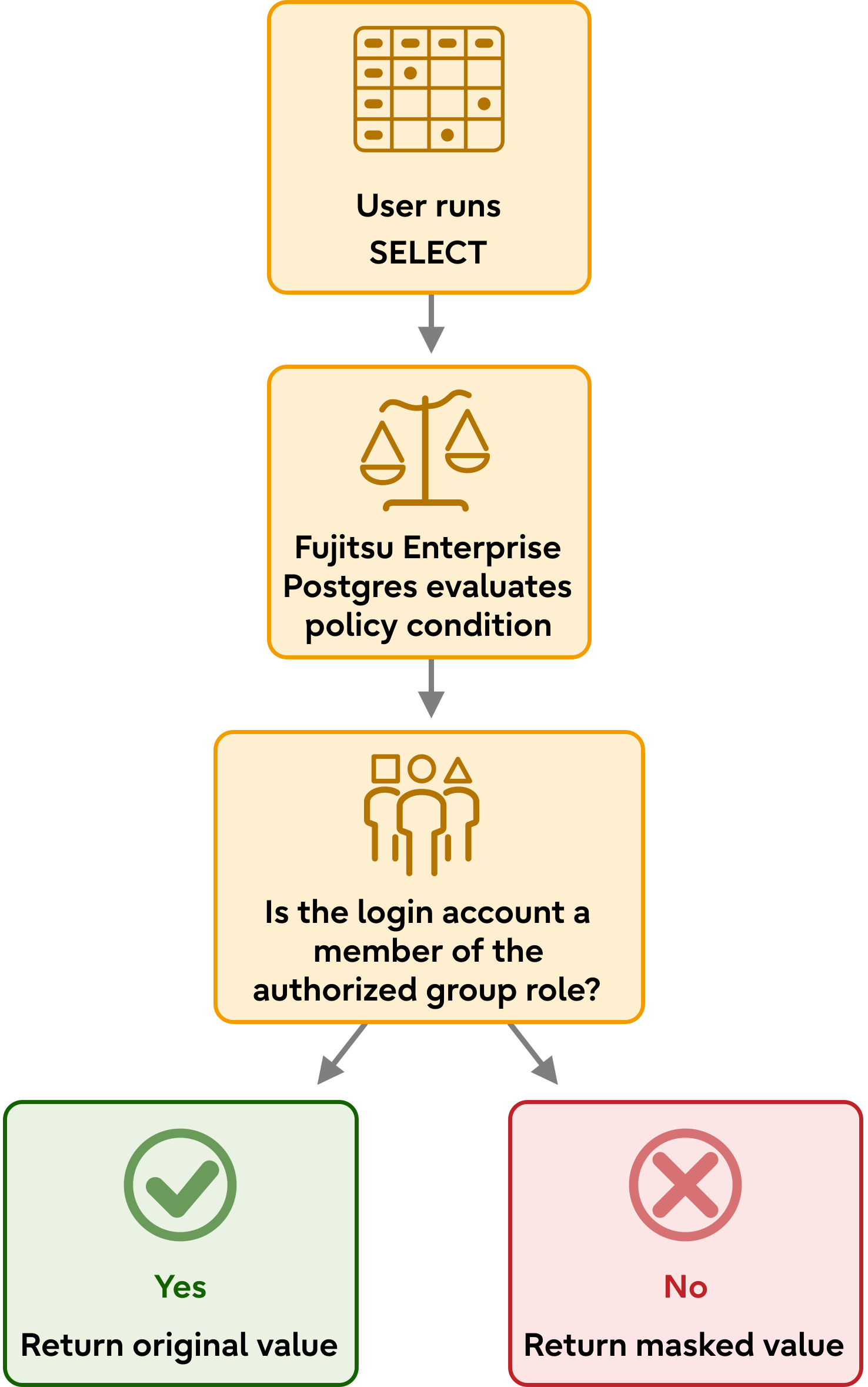
The walkthrough uses a default-deny model: users receive masked values unless their login belongs to the authorized group role
The masking methods at a glance
Before applying a masking policy, it helps to understand how each masking method changes the values returned to different users.
| Method | What it does | Example input | Example result |
| Full | Replaces the entire value with the configured masking value | 5000.00 | 0 |
| Partial | Preserves selected characters while masking others | 012-3456-7890 | 012-****-**** |
| Regexp | Transforms matching parts of a value using a regular expression | name@example.com | xxx@example.com |
Understanding masking requirements
 The email column was defined using the text data type, a common choice because email addresses vary in length. However, when data masking was applied, the column's data type became significant, because only specific data types are supported as masking targets.
Create the demonstration schema and table
To reproduce the scenario, create a dedicated schema and a customer table that contains a mixture of supported and unsupported masking targets. In this example, the email column uses the text data type and the id_document column uses bytea, allowing the masking limitations to be demonstrated in a controlled environment while preserving a realistic customer data model.
postgres=# CREATE SCHEMA data_masking_demo;

CREATE TABLE data_masking_demo.customer_sensitive
(
    customer_id BIGINT PRIMARY KEY,
    full_name   TEXT,
CREATE SCHEMA
postgres=#
postgres=# CREATE TABLE data_masking_demo.customer_sensitive
postgres-# (
postgres(#     customer_id BIGINT PRIMARY KEY,
postgres(#     full_name   TEXT,
postgres(#     email       TEXT,              -- Target used to reproduce the limitation
postgres(#     phone       VARCHAR(13),
postgres(#     salary      NUMERIC(12,2),
postgres(#     created_at  TIMESTAMP,
postgres(#     id_document BYTEA
postgres(# );
CREATE TABLE
Insert representative data
Insert a small set of representative customer records. The sample data includes personally identifiable information, salary data and binary document content stored as bytea. These values provide realistic masking candidates and allow the behavior of both supported and unsupported data types to be observed.
postgres=# INSERT INTO data_masking_demo.customer_sensitive
postgres-#     (customer_id, full_name, email, phone, salary, created_at, id_document)
postgres-# VALUES
postgres-#     (1, 'Diksha Sharma', 'diksha.sharma@example.com',
postgres(#      '012-3456-7890', 5000.00, '2026-07-20 10:15:30',
postgres(#      decode('89504E470D0A1A0A', 'hex')),
postgres-#     (2, 'John Smith', 'john.smith@example.com',
postgres(#      '012-3456-7891', 8000.00, '2026-07-20 11:20:45',
postgres(#      decode('25504446', 'hex'));
INSERT 0 2
Attempt to mask the email address
The next step is to create a confidential policy that applies REGEXP masking to the email column. Because the column is defined as text, which is not included in the documented masking matrix for this masking method, the policy creation is expected to fail. This confirms that the issue is related to data-type support rather than permissions, syntax or the policy definition itself.
2026-07-24 14:56:28.341 AEST [1995572] STATEMENT:  SELECT pgx_create_confidential_policy(
    schema_name        := 'data_masking_demo',
    table_name         := 'customer_sensitive',
    policy_name        := 'customer_masking_policy',
    expression         := '1=1',
    enable             := true,
    column_name        := 'email',
    function_type      := 'REGEXP',
    regexp_pattern     := '(.*)@(.*)',
    regexp_replacement := 'xxx\2',
    regexp_flags       := 'g'
);

ERROR:  The specified argument is invalid.
The turning point: The problem was the data type, not the pattern
 The regular expression was not the root cause of the failure. The masking matrix for Fujitsu Enterprise Postgres lists bounded character types such as varchar(n), character varying(n), char(n) and character(n) as supported targets for regular expression masking. The text and bytea data types are not included in the documented matrix. This distinction is important. A column may contain character data and still fall outside the documented masking matrix. Likewise, a binary column can contain sensitive information but require a different protection strategy because bytea is not a supported masking target. Understanding this distinction helped separate the immediate symptom from the actual cause and guided the selection of an appropriate long-term solution.

For the list of data types supported by each data masking method, refer to the Fujitsu Enterprise Postgres Operation Guide > Chapter 8 - Data Masking > 8.3 - Data types for masking.
| Column type | Masking position | Practical response |
| varchar(n), char(n) | Inside documented matrix | Use FULL, PARTIAL or REGEXP as supported. |
| numeric, date, timestamp | Inside documented matrix | Use the masking types documented for that category. |
| text, bytea | Outside documented matrix | Use privileges, a protected view, a separate table or another approved design. |
The diagram below illustrates the journey from policy failure to a supported design. Initially, the masking policy is rejected because the email column uses the TEXT data type. A temporary protected view reduces exposure while the root cause is investigated. The email column is then converted to varchar(320), allowing the masking policy to be applied successfully and integrated with role-based access controls.
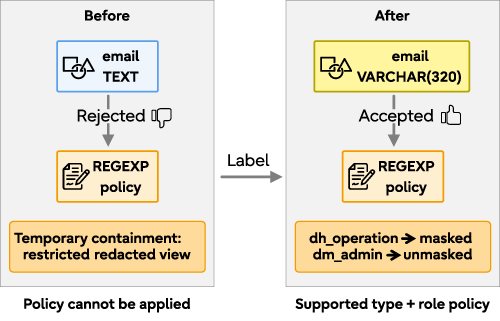
Resolving the situation
Addressing the issue involved two stages. First, access to the original values needed to be restricted while the production design was reviewed. Second, a long-term protection model had to be selected and implemented. This walkthrough demonstrates one practical approach rather than every possible solution.
Short-term response: Contain access while design is reviewed
 Before changing a production column, administrators should review factors such as existing data, indexes, constraints, application dependencies, replication requirements and operational processes. Until that assessment is complete, access to the original values should be limited wherever possible.
In this example, a temporary containment strategy is used. Direct access to the table is removed and a security-barrier view provides a redacted representation of the sensitive data. This approach reduces immediate exposure without requiring changes to the underlying table definition.
1 Create the support role
postgres=# CREATE ROLE dm_operation LOGIN;
CREATE ROLE
2 Review production environment considerations
As a security best practice, sensitive database objects should be stored in dedicated schemas and protected through role-based permissions. Rather than relying on broad access granted through the PUBLIC role, permissions should be assigned explicitly to application and support roles. This approach provides more granular control over who can view or modify sensitive data and supports the principle of least privilege.
The following statements remove default access and establish a controlled permission model for the demonstration environment:
postgres=# REVOKE ALL ON SCHEMA data_masking_demo FROM PUBLIC;
REVOKE
postgres=# REVOKE ALL ON TABLE data_masking_demo.customer_sensitive FROM PUBLIC;
REVOKE
postgres=# REVOKE ALL ON TABLE data_masking_demo.customer_sensitive FROM dm_operation;
REVOKE
3 Create a temporary redacted view
The next step is to provide the support role with a restricted view of the data while preventing direct access to sensitive information. In this example, a security-barrier view exposes only redacted values for the columns required by the operations team. This approach reduces immediate exposure without modifying the underlying table structure.
postgres=# CREATE VIEW data_masking_demo.customer_sensitive_masked
postgres-# WITH (security_barrier = true)
postgres-# AS
postgres-# SELECT
postgres-#     customer_id,
postgres-#     '[REDACTED]'::text AS full_name,
postgres-#     regexp_replace(email, '(^.).*(@.*$)', '\1***\2') AS email,
postgres-#     regexp_replace(
postgres(#         phone,
postgres(#         '^(.{3})-.{4}-.{4}$',
postgres(#         '\1-****-****'
postgres(#     ) AS phone,
postgres-#     0::numeric(12,2) AS salary,
postgres-#     date_trunc('day', created_at)::timestamp AS created_at
postgres-# FROM data_masking_demo.customer_sensitive;
CREATE VIEW
Note: The id_document column contains binary document data stored as bytea. Since the operations role does not require access to document contents and bytea is outside the documented masking matrix, the column is excluded from the view. When there is no business need to expose sensitive data, omission is often the safest short-term containment strategy.
4 Grant access only to the protected view
The dm_operation role is granted access only to the redacted view, not the original table. This ensures that users see the protected representation of the data while access to the underlying sensitive values remains restricted.
postgres=# GRANT USAGE
postgres-# ON SCHEMA data_masking_demo
postgres-# TO dm_operation;
GRANT
postgres=# GRANT SELECT
postgres-# ON data_masking_demo.customer_sensitive_masked
postgres-# TO dm_operation;
GRANT
5 Test the containment
The results show that the containment measure is effective. The dm_operation role can access the redacted view but cannot query the underlying table, ensuring that only protected values are exposed. While this reduces immediate risk, it does not resolve the underlying masking limitation. The unsupported text and bytea columns still require a long-term remediation strategy.
postgres=# SELECT session_user, current_user;
 session_user | current_user
--------------+--------------
 dm_operation | dm_operation
(1 row)

postgres=# SELECT *
postgres-# FROM data_masking_demo.customer_sensitive_masked
postgres-# ORDER BY customer_id;
 customer_id | full_name  |      email      |     phone     | salary |     created_at
-------------+------------+-----------------+---------------+--------+---------------------
           1 | [REDACTED] | xxx@example.com | 012-****-**** |   0.00 | 2026-07-20 00:00:00
           2 | [REDACTED] | xxx@example.com | 012-****-**** |   0.00 | 2026-07-20 00:00:00
(2 rows)

postgres=# SELECT *
postgres-# FROM data_masking_demo.customer_sensitive;
ERROR:  permission denied for table customer_sensitive
Other containment choices
The temporary redacted view is not the only valid response. Depending on application requirements and the organization's security model, other containment measures may include:
- Restricting access through table-level and role-based permissions
- Using column-level privileges to prevent access to unsupported sensitive columns
- Moving sensitive fields into separately protected tables with tighter access controls
- Providing controlled application interfaces that expose only the information required for operational tasks
Confirm the root cause
After access is contained, repeat the original pgx_create_confidential_policy call against the unchanged text column. The policy should still be rejected. This separates the temporary access workaround from the underlying data-type limitation and confirms that a longer-term design decision is still required.
Long-term resolution
 Once the immediate exposure has been contained, the organization must decide whether to retain the existing text column and rely on privilege-based controls as the permanent design, or align the column with the documented masking matrix so that Fujitsu Enterprise Postgres Data Masking can be applied directly.
For this example, the email column is migrated from text to varchar(320). This approach preserves the logical purpose of the column while making it eligible for documented regular expression masking.
An alternative approach would be to retain the existing text column and continue protecting the data through a combination of role-based permissions and a redacted view. The most appropriate solution depends on the organization's security requirements, operational constraints, and application design.
1. Validate the existing data before changing the data type
postgres=# SELECT max(length(email)) AS maximum_email_length
postgres-# FROM data_masking_demo.customer_sensitive;
 maximum_email_length
----------------------
                   25
(1 row)

postgres=# SELECT customer_id, length(email) AS email_length
postgres-# FROM data_masking_demo.customer_sensitive
postgres-# WHERE length(email) > 320;
 customer_id | email_length
-------------+--------------
(0 rows)
Before converting the email column, review the existing data to ensure that all values fit within the proposed limit.
2. Change the column to a supported data type
The next step is to convert the email column from text to varchar(320) so that it can be protected using a documented masking policy. Because the temporary redacted view depends on the column, it must be removed before the schema change can proceed.
postgres=# ALTER TABLE data_masking_demo.customer_sensitive
postgres-#     ALTER COLUMN email TYPE varchar(320)
postgres-#     USING email::varchar(320);
ERROR:  cannot alter type of a column used by a view or rule
DETAIL: rule _RETURN on view data_masking_demo.customer_sensitive_masked depends on column "email"
After the conversion is complete, the masking policy can be implemented and validated. The temporary view can then be retired, as masking is now applied directly to the underlying table.
postgres=# DROP VIEW data_masking_demo.customer_sensitive_masked;
DROP VIEW
postgres=# ALTER TABLE data_masking_demo.customer_sensitive
postgres-#     ALTER COLUMN email TYPE varchar(320)
postgres-#     USING email::varchar(320);
ALTER TABLE
3. Verify the definition
After the data type conversion, verify that the table definition reflects the expected change. The following query checks the column names, data types and any defined maximum lengths for the table.
postgres=# SELECT
postgres-#     column_name,
postgres-#     data_type,
postgres-#     character_maximum_length
postgres-# FROM information_schema.columns
postgres-# WHERE table_schema = 'data_masking_demo'
postgres-#   AND table_name = 'customer_sensitive'
postgres-# ORDER BY ordinal_position;
 column_name |          data_type          | character_maximum_length
-------------+-----------------------------+--------------------------
 customer_id | bigint                      |
 full_name   | text                        |
 email       | character varying           |                      320
 phone       | character varying           |                       13
 salary      | numeric                     |
 created_at  | timestamp without time zone |
 id_document | bytea                       |
(7 rows)
Build a maintainable role policy
Rather than embedding individual usernames directly in the masking policy, a role-based design is easier to manage and scale. Users who require access to unmasked data can be placed in a dedicated role, while all other users receive masked values by default. This approach simplifies ongoing administration and avoids the need to modify the policy whenever personnel change.
1. Create a role for users who require unmasked access
Create a group role to represent users authorized to view unmasked data, and grant membership to the appropriate accounts.
postgres=# CREATE ROLE dm_authorized NOLOGIN;
CREATE ROLE
postgres=# CREATE ROLE dm_admin LOGIN;
CREATE ROLE
postgres=# GRANT dm_authorized TO dm_admin;
GRANT ROLE
The masking policy can then check whether the connected user belongs to the authorized role and apply masking accordingly.
postgres=> SELECT
postgres->     session_user,
postgres->     pg_has_role(session_user, 'dm_authorized', 'MEMBER') AS is_authorized,
postgres->     NOT pg_has_role(session_user, 'dm_authorized', 'MEMBER') AS should_mask;
 session_user | is_authorized | should_mask
--------------+---------------+-------------
 dm_admin     | t             | f
(1 row)

Policy behavior:
Authorized member → should_mask = false → Sees unmasked data
Not an authorized member → should_mask = true → Sees masked data
Using session_user ensures that the masking decision is based on the account that established the connection, providing a consistent and maintainable role-based access model. In production environments, validate the behavior against any nested role structures, connection pooling configurations and SET ROLE usage patterns.
2. Create the table-level policy and mask email
With the role structure in place, the next step is to create a masking policy for the table. The policy evaluates the connected user's role membership and determines whether masking should be applied. In this example, the email column is protected using regular expression masking to hide the local part of the email address while preserving the domain.
postgres=# SELECT pgx_create_confidential_policy(
postgres(#     schema_name        := 'data_masking_demo',
postgres(#     table_name         := 'customer_sensitive',
postgres(#     policy_name        := 'customer_masking_policy',
postgres(#     expression         :=
postgres(#         'NOT pg_has_role(session_user, ''dm_authorized'', ''MEMBER'')',
postgres(#     enable             := true,
postgres(#     policy_description :=
postgres(#         'Masks supported customer fields unless the login is a member of dm_authorized',
postgres(#     column_name        := 'email',
postgres(#     function_type      := 'REGEXP',
postgres(#     regexp_pattern     := '(.*)@(.*)',
postgres(#     regexp_replacement := 'xxx\2',
postgres(#     regexp_flags       := 'g',
postgres(#     column_description :=
postgres(#         'Masks the email local part and preserves the domain'
postgres(# );
 pgx_create_confidential_policy
--------------------------------
 t
(1 row)
Users who are members of dm_authorized see the original email address, while all other users receive a masked value such as xxx@example.com.
Note: Only one masking policy can be created for a table. Additional supported columns must be added to the existing policy rather than creating separate policies. The remaining supported columns are added in the following steps.
3 Protecting multiple types of sensitive data with a single policy
A confidential policy is not limited to a single sensitive column. Once the policy has been created on a table, additional columns can be added with masking functions that match the sensitivity and business requirements of each data type. In this example, the policy is extended to protect phone numbers, salary information, and timestamps using a combination of partial and full masking techniques.
3.1 Add partial masking for phone numbers
The phone number is added to the existing table policy using the PARTIAL masking function. This configuration preserves the first three digits while masking the remainder of the value, allowing users to identify a record without exposing the full phone number.
postgres=# SELECT pgx_alter_confidential_policy(
postgres(#     schema_name         := 'data_masking_demo',
postgres(#     table_name          := 'customer_sensitive',
postgres(#     policy_name         := 'customer_masking_policy',
postgres(#     action              := 'ADD COLUMN',
postgres(#     column_name         := 'phone',
postgres(#     function_type       := 'PARTIAL',
postgres(#     function_parameters :=
postgres(#         'VVV-VVVV-VVVV, VVV-VVVV-VVVV, *, 4, 11',
postgres(#     column_description  :=
postgres(#         'Preserves the first three digits and masks the remainder'
postgres(# );
 pgx_alter_confidential_policy
--------------------------------
 t
(1 row)
3.2 Add full masking for salary
Salary values are highly sensitive and generally have no business requirement to remain partially visible to unauthorized users. In this case, the FULL masking function completely obscures the data, ensuring that users who do not have the appropriate privileges cannot view any portion of the salary amount.
postgres=# SELECT pgx_alter_confidential_policy(
postgres(#     schema_name        := 'data_masking_demo',
postgres(#     table_name         := 'customer_sensitive',
postgres(#     policy_name        := 'customer_masking_policy',
postgres(#     action             := 'ADD_COLUMN',
postgres(#     column_name        := 'salary',
postgres(#     function_type      := 'FULL',
postgres(#     column_description := 'Fully masks salary'
postgres(# );
 pgx_alter_confidential_policy
--------------------------------
 t
(1 row)
3.3 Mask the precise time while retaining the date
Not all timestamp data needs to be hidden entirely. In many reporting and auditing scenarios, the date remains useful while the exact time may be considered sensitive. This PARTIAL masking configuration preserves the year, month, and day while replacing the time component with 00:00:00. The result provides business context without revealing precise user activity times.
postgres=# SELECT pgx_alter_confidential_policy(
postgres(#     schema_name         := 'data_masking_demo',
postgres(#     table_name          := 'customer_sensitive',
postgres(#     policy_name         := 'customer_masking_policy',
postgres(#     action              := 'ADD_COLUMN',
postgres(#     column_name         := 'created_at',
postgres(#     function_type       := 'PARTIAL',
postgres(#     function_parameters := 'MDYh0m0s0',
postgres(#     column_description  :=
postgres(#         'Preserves the date and returns 00:00:00 as the time'
postgres(# );
 pgx_alter_confidential_policy
--------------------------------
 t
(1 row)
4. Protect columns outside the masking matrix
Although the masking policy now protects the supported columns, it does not automatically secure unsupported data types such as full_name (text) or id_document (bytea).
The following permissions limit the dm_operation role to only the columns covered by the masking strategy, while dm_admin retains access to the entire table. This helps prevent accidental exposure of data that is outside the masking matrix.
postgres=# REVOKE ALL
postgres-# ON data_masking_demo.customer_sensitive
postgres-# FROM dm_operation,
postgres-#      dm_admin;
REVOKE
postgres=# GRANT USAGE
postgres-# ON SCHEMA data_masking_demo
postgres-# TO dm_operation, dm_admin;
GRANT
postgres=# GRANT SELECT
postgres-#     (customer_id, email, phone, salary, created_at)
postgres-# ON data_masking_demo.customer_sensitive
postgres-# TO dm_operation;
GRANT
postgres=# GRANT SELECT
postgres-# ON data_masking_demo.customer_sensitive
postgres-# TO dm_admin;
GRANT
5. Validate what each user sees
A masking policy should always be tested from the perspective of the users who will access the data. This confirms that authorized users see the original values while other users see only the masked representations.
5.1 Check the policy definition
Before testing user access, confirm that the policy and its associated column definitions have been created correctly.
postgres=# SELECT
postgres-#     schema_name,
postgres-#     table_name,
postgres-#     policy_name,
postgres-#     expression,
postgres-#     enable,
postgres-#     policy_description
postgres-# FROM pgx_confidential_policies
postgres-# WHERE schema_name = 'data_masking_demo'
postgres-#   AND table_name = 'customer_sensitive';
 schema_name       | table_name         | policy_name             | expression                                                  | enable | policy_description
-------------------+--------------------+-------------------------+-------------------------------------------------------------+--------+-------------------------------------------------------------------------------
 data_masking_demo | customer_sensitive | customer_masking_policy | NOT pg_has_role(session_user, 'dm_authorized', 'MEMBER')    | t      | Masks supported customer fields unless the login is a member of dm_authorized
(1 row)
postgres=# SELECT
postgres-#     column_name,
postgres-#     function_type,
postgres-#     function_parameters,
postgres-#     regexp_pattern,
postgres-#     regexp_replacement,
postgres-#     regexp_flags
postgres-# FROM pgx_confidential_columns
postgres-# WHERE schema_name = 'data_masking_demo'
postgres-#   AND table_name = 'customer_sensitive'
postgres-# ORDER BY column_name;
 column_name | function_type |       function_parameters              | regexp_pattern | regexp_replacement | regexp_flags
-------------+---------------+----------------------------------------+----------------+--------------------+--------------
 created_at  | PARTIAL       | MDYh0m0s0                              |                |                    |
 email       | REGEXP        |                                        | (.*)@(.*)      | xxx\2              | g
 phone       | PARTIAL       | VVV-VVVV-VVVV, VVV-VVVV-VVVV, *, 4, 11 |                |                    |
 salary      | FULL          |                                        |                |                    |
(4 rows)
These queries allow administrators to verify that the policy is enabled and that each protected column has been configured with the intended masking function.
5.2 Test the operation user experience
Connect using the dm_operation account and query the protected table. This verifies that sensitive information is protected while still allowing the support team to perform their operational responsibilities.
postgres=> SELECT
postgres->     customer_id,
postgres->     email,
postgres->     phone,
postgres->     salary,
postgres->     created_at
postgres-> FROM data_masking_demo.customer_sensitive
postgres-> ORDER BY customer_id;
 customer_id |        email        |      phone      | salary |     created_at
-------------+---------------------+-----------------+--------+---------------------
           1 | xxx@example.com     | 012-****-****   |      0 | 2026-07-20 00:00:00
           2 | xxx@example.com     | 012-****-****   |      0 | 2026-07-20 00:00:00
(2 rows)
5.3 Test the authorized administrator experience
Connect in a separate session as dm_admin and query the protected table. As dm_admin is a member of the dm_authorized role, the masking expression evaluates to false and the policy does not apply masking. The administrator therefore sees the original values stored in the table, including the full email address, phone number, salary and timestamp.
This confirms that the role-based policy is working as intended: authorized users receive unmasked data, while users who are not members of the authorized role receive masked values.
postgres=> SELECT
postgres->     customer_id,
postgres->     email,
postgres->     phone,
postgres->     salary,
postgres->     created_at
postgres-> FROM data_masking_demo.customer_sensitive
postgres-> ORDER BY customer_id;
 customer_id |          email            |     phone     | salary  |     created_at
-------------+---------------------------+---------------+---------+---------------------
           1 | diksha.sharma@example.com | 012-3456-7890 | 5000.00 | 2026-07-20 10:15:30
           2 | john.smith@example.com    | 012-3456-7891 | 8000.00 | 2026-07-20 11:20:45
(2 rows)
Summary
 Unsupported data types do not mean sensitive data cannot be protected. They simply require a different control strategy. In this blog post, we showed how a temporary containment approach reduced immediate exposure while the root cause was investigated and remediated. The chosen long-term solution aligned the email column with the documented masking matrix, enabling Fujitsu Enterprise Data Masking to be applied directly. At the same time, a role-based access model and least-privilege permissions continued to protect data that remained outside the masking matrix, such as text and bytea columns.
The key lesson is that effective data protection is not achieved by masking alone. It requires a combination of appropriate data types, well-defined access controls, and a clear understanding of the capabilities and limitations of the platform. By validating sensitive columns against the documented masking matrix during design and applying the right protection mechanism for each data type, organizations can build practical, maintainable, and production-ready security controls that evolve with their applications and operational requirements.




 PostgreSQL Insider

