


 Discover how DBOS and Fujitsu Enterprise Postgres combine durable execution, automatic recovery, and robust data encryption to power resilient, secure AI agents and applications, demonstrated through a practical Python deployment.

Resilient workflows, secured by PostgreSQL
 DBOS is an open-source durable workflow library that allows developers to build fault-tolerant applications and AI agents using ordinary Python, TypeScript, Go, Rust, or Java code. Rather than requiring a separate workflow orchestration platform, DBOS stores workflow state, checkpoints, execution history, and queue information directly in a PostgreSQL-compatible database, making PostgreSQL the backbone of the entire durable orchestration system.
It also has a commercial observability and management console for DBOS applications, named DBOS Conductor (this is optional, but recommended). DBOS Conductor may be used as a service, hosted by DBOS, or you can self host it anywhere you’d like (e.g., VMs, Kubernetes/OpenShift, cloud VMs etc.) if you purchase a license.
DBOS is a very simple way to make systems resilient to failure. Simply include the open source DBOS library in your code, and then add lightweight annotations (decorators) to your application code to indicate where workflows start and end and the steps they include. As the workflow executes, DBOS records progress in PostgreSQL. If a process crashes, a VM reboots, a container is restarted, or a network call fails midway through execution, DBOS can automatically resume from the last successful checkpoint instead of starting over. This provides durable execution, exactly-once semantics, recovery from failures, durable queues, scheduling, notifications, and workflow management without introducing a heavyweight orchestration server.
One of the use cases for DBOS is AI agents and AI-powered applications. AI systems frequently depend on unreliable and non-deterministic external services such as LLM APIs, web services, vector databases, document processing pipelines, and third-party SaaS integrations. When one of these components fails, times out, or returns inconsistent results, traditional applications often require significant custom error-handling and state-management logic. DBOS provides durable workflows that can survive these interruptions, resume automatically, track state in PostgreSQL, and ensure that work is not lost or accidentally executed multiple times.
From a benefits perspective, DBOS offers several advantages:
- Reliability and fault tolerance
Workflows automatically recover from crashes, restarts, and transient failures. - Leverages PostgreSQL instead of new infrastructure
No separate workflow engine, message broker, or orchestration cluster is required. - Exactly-once execution semantics
Prevents duplicate processing and reduces complexity around retries and idempotency. - Durable queues and scheduling
Background jobs, scheduled tasks, event processing, and long-running workflows are all persisted in PostgreSQL. - Strong fit for AI agents and distributed systems
Simplifies handling external API failures, retries, agent orchestration, and long-running AI workflows. - Operational simplicity
Developers add annotations to existing code rather than adopting an entirely new programming model or operating a separate orchestration platform.
 Being PostgreSQL compatible, Fujitsu Enterprise Postgres works seamlessly with DBOS, whilst additionally offering Fujitsu Enterprise Postgres-specific security and reliability features. For example, DBOS deployments (especially sovereign and on-premise deployments for security-conscious organizations) would benefit from Fujitsu Enterprise Postgres' Transparent Data Encryption, as the DBOS database is storing serialized workflow inputs, outputs, errors, messages, events, streams, and authentication context, which all may potentially hold sensitive or confidential information.
This post describes how to set up an example Python DBOS app (included with DBOS) with Fujitsu Enterprise Postgres as the database, to demonstrate how DBOS and Fujitsu Enterprise Postgres can be integrated and work together. The DBOS Starter App presents a web page with tabs that illustrate the core features of DBOS, using an interactive UI (workflows, schedules, queues, communication, conductor).
Setting up your environment
 For a simplified setup, we will install DBOS and Fujitsu Enterprise Postgres on the same Linux machine/VM. Installation on other systems would be similar, but you should ensure that the Operating System and version are supported by both products.
Fujitsu Enterprise Postgres installs in a global location for all users to use (Fujitsu Enterprise Postgres 18 server installs to /opt/fsepv18server64 by default). The installation includes all the executables, libraries and resources used for creating and operating Fujitsu Enterprise Postgres database clusters. It occupies about 1.2GB of filesystem disk space.
To keep the application setup simple, we will create a Fujitsu Enterprise Postgres database cluster, and install the necessary DBOS libraries, all under the one directory of a chosen existing user account. Let’s refer to this directory as $PROJECT_DIR. For example, it might be: /home/xxxx/dbos_fep (where xxxx is an existing user).
PROJECT_DIR=/home/xxxx/dbos_fep
mkdir $PROJECT_DIR
The resultant project directory occupies about 200MB of filesystem disk space.
Installing Fujitsu Enterprise Postgres
 Detailed Fujitsu Enterprise Postgres installation instructions won’t be provided here; however, the basic steps are (as root):
- Install the core Fujitsu Enterprise Postgres pre-requisite packages
- Mount the Fujitsu Enterprise Postgres 18SP2 ISO
- Run the Fujitsu Enterprise Postgres install.sh script and select option 1, Fujitsu Enterprise Postgres Advanced Edition (64bit) 18 SP2
- Select default options to complete the installation
- Unmount the ISO
Fujitsu Enterprise Postgres 18 SP2 Installation and Setup Guide for Server
Fujitsu Enterprise Postgres manuals
Setting up Fujitsu Enterprise Postgres for DBOS
 For simplicity, the Fujitsu Enterprise Postgres database cluster can be manually started/stopped. However, in a proper production environment, Fujitsu Enterprise Postgres server would typically be set up to run as a service, under a dedicated user (e.g. postgres).
In a separate terminal window, in the chosen $PROJECT_DIR directory, create a Fujitsu Enterprise Postgres cluster to use with DBOS, and start it, as follows:
PROJECT_DIR=/home/xxxx/dbos_fep
cd $PROJECT_DIR
export PATH=/opt/fsepv18server64/bin:$PATH
pg_ctl -D ./dbos_db initdb
pg_ctl -D ./dbos_db -l db.log start
By default, Fujitsu Enterprise Postgres uses port 27500 for database connection. If required, a different port may be set in the configuration file dbos_db/postgresql.conf.
The use of Fujitsu Enterprise Postgres’ Transparent Data Encryption is optional, but by having the database data encrypted, it protects the data from being accessed, even if the database files or disk are stolen.
Follow the additional steps below to configure Transparent Data Encryption for our Fujitsu Enterprise Postgres database cluster.
For simplicity here, we will just store the encryption key locally (protected by a passphrase and file permissions), but for better security, Fujitsu Enterprise Postgres does support storing the key in a remote key management server, for example, accessed via the Key Management Interoperability Protocol (KMIP).
To use Transparent Data Encryption for the DBOS database, we define a default tablespace that is encrypted. This will be used by DBOS when it connects to the database and creates its tables etc.
Append the following lines to dbos_db/postgresql.conf (note that environment variables references are not supported in this configuration file):
keystore_location = '/home/xxxx/dbos_fep/ks'
tablespace_encryption_algorithm = 'AES256'
default_tablespace = 'tsencrypt'
Create directories for the keystore_location and tablespace and set permissions to only allow access by the current user:
mkdir $PROJECT_DIR/ks $PROJECT_DIR/ts
chmod 700 $PROJECT_DIR/ks $PROJECT_DIR/ts
Restart the Fujitsu Enterprise Postgres database cluster to allow above configuration to take effect:
pg_ctl -D ./dbos_db -l db.log restart
Set the Transparent Data Encryption Master Encryption Key, protected by a specified passphrase:
psql -d postgres -c "SELECT pgx_set_master_key('<passphrase>');"
The <passphrase> is the passphrase that will be used to open the keystore. The master encryption key is protected by this passphrase, so avoid specifying a short simple string that is easy to guess. The master encryption key is created from random bit strings, encrypted with the specified passphrase and stored in the file keystore.ks in the keystore_location.
Use the following command to setup the keystore to open automatically:
pgx_keystore --enable-auto-open $PROJECT_DIR/ks/keystore.ks
Restart, to reflect the keystore settings and open the keystore on startup.
pg_ctl -D ./dbos_db -l db.log restart
Create the encrypted tablespace, that will be used as the default tablespace.
psql -d postgres -c "create tablespace tsencrypt location '/home/xxxx/dbos_fep/ts' "
Installing DBOS
The DBOS library (Python version) can be installed into a Python virtual-environment and configured to run the sample "dbos-app-starter" application, in the following way. Here we essentially follow the DBOS Quickstart steps documented here: Get Started with DBOS | DBOS Docs
cd $PROJECT_DIR
python3.12 -m venv dbos-app-starter/.venv
cd dbos-app-starter
source .venv/bin/activate
pip install dbos 'fastapi[standard]'
dbos init --template dbos-app-starter
At the time of writing, the latest version of DBOS is 2.31.0. As an alternative to installing a pre-packaged DBOS, it is also possible to build DBOS from source (https://github.com/dbos-inc/dbos-transact-py) and then install the resultant wheel file.
To determine what version of DBOS has been installed, use the following command:
dbos version
In order to use DBOS Conductor, you need to sign-up for a DBOS Cloud account (https://console.dbos.dev) and then:
- Login
- Register the application "dbos-app-starter"
- Create an API key
These steps can simply be done in the DBOS web console or alternatively, via the DBOS CLI (by installing the "dbosctl" command and following the steps in the DBOS Quickstart).
Once you have created an API key, it needs to be set as follows (continuing in the same Python virtual-environment) prior to running the application:
export DBOS_CONDUCTOR_KEY=<your-api-key>
Configuring DBOS to use Fujitsu Enterprise Postgres
In order for DBOS to connect to Fujitsu Enterprise Postgres and create a database, a database URL must be specified in the DBOS_SYSTEM_DATABASE_URL environment variable, as shown below (continuing in the same Python virtual-environment).
"xxxx" needs to be replaced with the username of the user account being used.
 Since we have a simplified setup, in which only a local database connection is being used, the password will not be validated, as it defaults to a "trust" connection. However, password validation can be configured if required, by connecting to the database, setting the desired password for the user and then modifying the dbos_db/pg_hba.conf configuration file to use "scram-sha-256" for local connections - followed by a database restart..
export DBOS_SYSTEM_DATABASE_URL="postgresql://xxxx:mypwd@localhost:27500/dbos"
DBOS Starter App Web GUI
Start the DBOS Starter App using the following (continuing in the same Python virtual-environment):
python3 main.py
You should see some DBOS initialization messages, ending with the following line:
INFO: Uvicorn running on http://0.0.0.0:8000 (Press CTRL+C to quit)
The DBOS Starter App Web GUI should now be accessible in a local web browser at URL: localhost:8000.
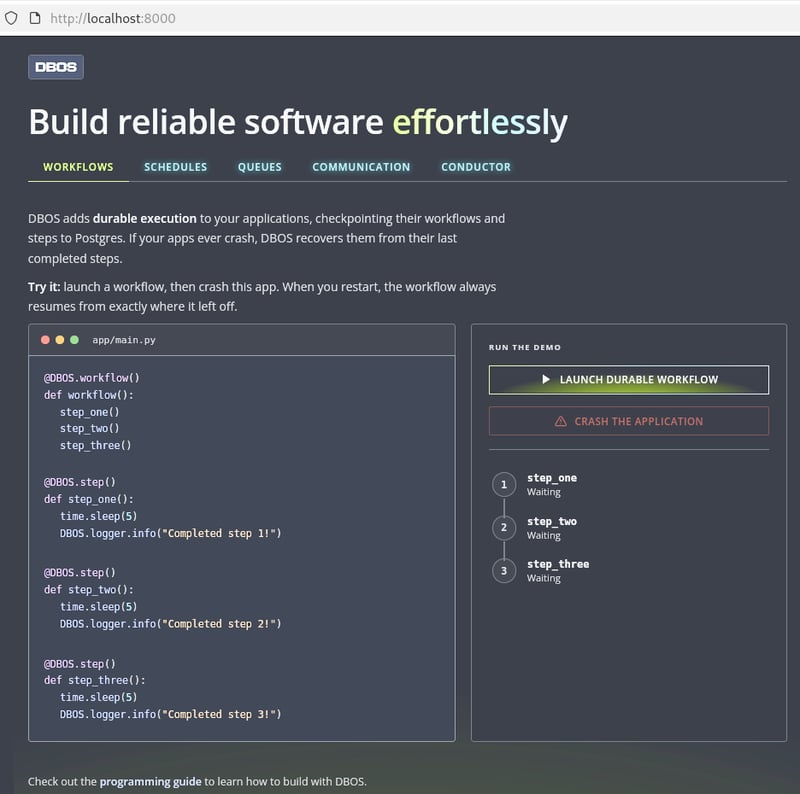
DBOS and Fujitsu Enterprise Postgres verification
Once the DBOS Starter App GUI is running and accessible, the core DBOS functionality can be demonstrated and verified by following the instructions for each interactive UI on the application tabs: workflows, schedules, queues, and communication. The workflows, schedules and queues can also be viewed in the DBOS console (https://dbos.console.dev). There should be no errors reported in the DBOS log output.
Exercising and verifying the DBOS functionality also verifies that the Fujitsu Enterprise Postgres database is working correctly, as it is an integral part of the system. There should be no errors reported in the database log.
The following database queries may be used to verify that the tables created by DBOS are encrypted using Fujitsu Enterprise Postgres’ Transparent Data Encryption. This is done by confirming that the DBOS tables reside in the tsencrypt tablespace, protected by AES-256 encryption.
$ psql -d dbos -c "SELECT spcname, spcencalgo FROM pg_tablespace ts, pgx_tablespaces tsx WHERE ts.oid = tsx.spctablespace"
 spcname    | spcencalgo
------------+------------
 pg_default | none
 pg_global  | none
 tsencrypt  | AES256
(3 rows)
$ psql -d dbos -c "SELECT schemaname, tablename, tablespace FROM pg_tables WHERE schemaname = 'dbos';"
 schemaname | tablename               | tablespace
------------+-------------------------+------------
 dbos       | dbos_migrations         | tsencrypt
 dbos       | workflow_schedules      | tsencrypt
 dbos       | event_dispatch_kv       | tsencrypt
 dbos       | workflow_status         | tsencrypt
 dbos       | workflow_events         | tsencrypt
 dbos       | workflow_events_history | tsencrypt
 dbos       | streams                 | tsencrypt
 dbos       | notifications           | tsencrypt
 dbos       | operation_outputs       | tsencrypt
 dbos       | application_versions    | tsencrypt
 dbos       | queues                  | tsencrypt
(11 rows)
Disclaimer
This blog is provided for informational purposes only.
The information provided herein is based on internal testing conducted within Fujitsu’s environment and does not guarantee operation, compatibility, or support in all environments.
Users are responsible for making their own assessment of the information provided in this blog. Fujitsu shall not be liable for any loss or damage arising from the use of this information.


 PostgreSQL Insider


